DeepSeek Harness 是构建AI代理的插件式系统。从工具和模型到Web UI,所有内容均可作为插件添加或替换。
DeepSeek Harness is a plugin-based system for building AI agents. Everything, from tools and models to the web UI, can be added or replaced as a plugin.
安装
dsh plugin --profile web add github:0lidaxiang/dsh-plugin-greetGitHub 源码安装:首次需按提示配置 allowBuilds 构建授权后重试
安装与环境配置指引、插件开发教程见 DSH 中文社区文档 ↗
安装即在你的机器上以你的权限运行第三方代码——它可读写文件、使用凭据、访问网络,DSH 的工具审批不会为插件代码加沙箱。「检测到 manifest」仅代表发现 dsh.bundle / dsh.plugin 清单,不构成兼容性或安全审查;安装前请审阅源码,不熟悉的插件先在不含密钥的环境试用。
README
目录
- dsh-plugin-greet
- What you will learn
- Tool contract
- Input
- Output
- Greeting examples
- Install from npm
- Try the tool
- Configure the plugin
- Install from GitHub
- Install from a local checkout
- Develop and test
- Troubleshooting
- The model replies but does not call greet
- The tool is not listed
- npm install dsh-plugin-greet worked, but the tool is missing
- My configuration did not take effect
- Project structure
- Security and compatibility
- License
dsh-plugin-greet
English | 简体中文
A beginner-friendly, installable DeepSeek Harness plugin that demonstrates bundle distribution, profile composition, plugin configuration, tool schemas, structured output, validation, testing, and a real model-driven tool call.
This is a community example, not an official DeepSeek AI plugin. DeepSeek Harness is currently in Developer Preview, so future releases may require compatibility updates.
What you will learn
This repository keeps the implementation in one small entry file so that a new plugin author can follow the complete path:
User prompt
  → model chooses the greet tool
  → argument schema checks the shape
  → execute validates and normalizes values
  → the tool returns structured data
  → output.render creates model-facing text
  → the model writes its final response
The example covers:
- exporting a validated plugin
Config - injecting and using the Harness
toolsservice - required and optional tool arguments
- English and Chinese greetings
- friendly and formal styles
- structured canonical output with a text renderer
- actionable validation errors
- unit tests and CI packaging checks
Tool contract
The plugin registers one model-callable tool named greet.
Input
| Field | Required | Values | Default |
|---|---|---|---|
name |
Yes | Non-empty string, at most 80 characters | — |
language |
No | en, zh |
Plugin configuration |
style |
No | friendly, formal |
Plugin configuration |
Leading and trailing whitespace is removed from name. Unknown arguments, empty names, unsupported languages, and unsupported styles are rejected with clear errors.
Output
The canonical result is structured data:
{
  "message": "Hello, Ada!",
  "name": "Ada",
  "language": "en",
  "style": "friendly"
}
output.render converts that value into the model-facing text:
Hello, Ada!
This separation lets other plugins or policies use the structured fields without making the model read raw JSON.
Greeting examples
| Language | Style | Result |
|---|---|---|
| English | Friendly | Hello, Ada! |
| English | Formal | Greetings, Ada. |
| Chinese | Friendly | 你好,小明! |
| Chinese | Formal | 您好,小明。 |
Install from npm
Stop any running DeepSeek Harness instance, then install the package into the web profile:
npx @deepseek-ai/dsh plugin --profile web add dsh-plugin-greet@0.2.0
This command does more than a regular npm install: it installs the package into the selected Harness profile and adds its declared bundle to the profile composition.
Before starting, confirm that the bundle is present in the final configuration:
npx @deepseek-ai/dsh --profile web --dump-config
Then start the Web UI:
npx @deepseek-ai/dsh web
Try the tool
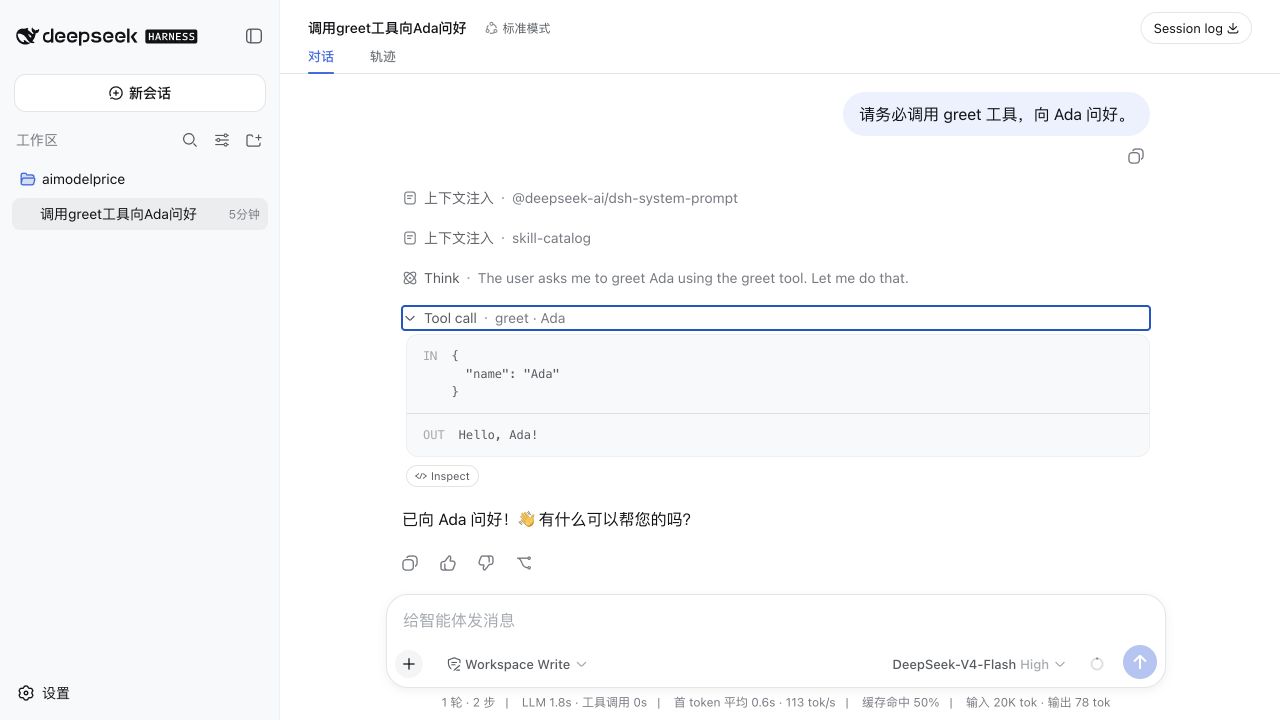
Open http://127.0.0.1:3080 and send:
You must use the greet tool to greet Ada in a friendly English style.
The expected tool call is:
IN  { "name": "Ada", "language": "en", "style": "friendly" }
OUT Hello, Ada!
Try Chinese formal output:
You must use the greet tool to greet 小明 in formal Chinese.
Expected result:
IN  { "name": "小明", "language": "zh", "style": "formal" }
OUT 您好,小明。
The plugin does not listen for keywords such as Hello. It makes the tool available to the model, and the model decides whether to call it. Explicitly naming the greet tool makes the behavior easier to verify.
Configure the plugin
The exported configuration schema supplies these defaults:
greeting: Hello
punctuation: "!"
defaultLanguage: en
defaultStyle: friendly
To override them, restate the plugin row in a later patch layer, such as the profile's cordis.patch.yml:
- insert:
    - id: greet-tool
      name: dsh-plugin-greet
      config:
        greeting: Hi
        punctuation: "!"
        defaultLanguage: en
        defaultStyle: friendly
With that configuration, a call containing only { "name": "Grace" } returns Hi, Grace!.
greeting and punctuation customize friendly English output. Chinese and formal wording use the built-in examples shown above. defaultLanguage and defaultStyle are used only when the model omits those arguments.
Later patch layers replace the entire row configuration rather than deep-merging individual keys, so keep id, name, and the complete desired config together.
Install from GitHub
To install the current development branch:
npx @deepseek-ai/dsh plugin --profile web add \
  github:0lidaxiang/dsh-plugin-greet#master
For stable usage, prefer a published npm version, release tag, or specific commit SHA.
Install from a local checkout
Run this command from the parent directory of the repository:
npx @deepseek-ai/dsh plugin --profile web add ./dsh-plugin-greet
After changing the code, restart DeepSeek Harness and verify the tool through the chat interface.
Develop and test
Install dependencies and run the unit tests:
npm install
npm test
Run the complete local check, including the npm package preview:
npm run check
The test suite verifies configuration defaults, registration metadata, all four greeting modes, structured output rendering, whitespace normalization, invalid values, unknown arguments, and length limits. GitHub Actions runs the same checks on Node.js 20 and 22.
Troubleshooting
The model replies but does not call greet
Say explicitly: You must use the greet tool.... A normal greeting such as Hello does not force a tool call.
The tool is not listed
Stop the running Harness process, reinstall the plugin into the same profile, inspect --dump-config, and then restart the Web UI.
npm install dsh-plugin-greet worked, but the tool is missing
A regular npm install only adds a dependency to the current Node.js project. Use dsh plugin --profile <name> add ... to install and compose the bundle into a Harness profile.
My configuration did not take effect
Make sure your later patch restates the row with the same id (greet-tool), the package name, and the complete config object.
Project structure
dsh-plugin-greet/
├── .github/
│   ├── assets/social-preview.png # GitHub social preview image
│   └── workflows/ci.yml          # Tests and package checks
├── docs/
│   ├── README.zh-CN.md       # Chinese documentation
│   ├── greet-tool-result.png # README screenshot
│   └── readme-hero.webp      # Lightweight README hero
├── tests/greet.test.js       # Node.js unit tests
├── cordis.patch.yml          # Inserts the plugin into a profile
├── index.js                  # Config and greet tool implementation
├── package-lock.json         # Reproducible dependency versions
├── package.json              # Package and dsh.bundle metadata
└── LICENSE
Security and compatibility
DeepSeek Harness plugins run inside the host process. Review third-party plugin source code before installation, and prefer a pinned release tag or commit SHA.
The plugin has no network, filesystem, shell, or credential access. It depends only on the official @deepseek-ai/schemastery package for configuration validation.
The original 0.1.x release line was verified with @deepseek-ai/dsh 0.1.0-rc.6. Run the included tests and a real profile installation when upgrading Harness versions.
License
原始 README: https://github.com/0lidaxiang/dsh-plugin-greet/blob/master/README.md ↗
同类插件
查看全部 →
agent-vision-toolkit
为纯文本模型"看图“设计更好的视觉工具箱和技能,支持多图理解,图片问答,前端UI还原、GUI 自动化等,并可选无缝接入多个主流agent,直接识别粘贴图片| A vision toolkit and skill designed for text-only llms — image Q&A, long-screenshot OCR, frontend UI restoration, and GUI automation, with optional seamless integration for Codex, Claude Code, Pi, Oh My Pi, and OpenCode

api-relay-audit
从 DeepSeek Harness 对 AI API 中转站和 LLM 代理运行本地安全审计,生成 Markdown 报告,覆盖提示词注入、模型替换信号、工具调用改写、错误泄漏、流完整性和按 profile 启用的 Web3 风险。

OpenStory
✨ OpenStory 现已支持 DeepSeek Harness 插件! 现在可以通过 dsh-openstory 将 OpenStory 多智能体推演接入 DeepSeek Harness,让 agent 直接启动模拟、查看角色、下达指令并逐回合推进故事。查看 DSH 插件配置与使用指南。

phi
pi的编码代理 ∞ 提供者、子代理、hashline编辑和权限门

anysearch-dsh
DeepSeek Harness(DSH)的 AnySearch 网络搜索提供方与高级搜索工具。

codex-switch
Codex Switch 是一个 macOS 工具,一键配置 Codex 的自定义 API,同时保留官方 OpenAI 登录。保存后 Codex 的模型选择器里只会出现你选的那个 provider 的模型。也支持 Claude Code 的官方 / 自定义 API 切换。Codex Switch is a lightweight helper for configuring multiple coding-agent API routes. For Codex, it keeps Official OpenAI and a custom API provider configured in parallel, registers the custom model in Codex's mod