DSH-Timeline-Navigator
by 7A7K
一个面向 DeepSeek Harness Web UI 的对话时间线导航插件。它把长对话按回合整理成可点击跳转、可收藏的侧边时间线,不修改 Harness 主程序源码。
A turn-based conversation timeline for DeepSeek Harness with bookmarks, history loading, keyboard controls, and mobile support.
安装
dsh plugin --profile web add github:7A7K/DSH-Timeline-NavigatorGitHub 源码安装:首次需按提示配置 allowBuilds 构建授权后重试
安装与环境配置指引、插件开发教程见 DSH 中文社区文档 ↗
安装即在你的机器上以你的权限运行第三方代码——它可读写文件、使用凭据、访问网络,DSH 的工具审批不会为插件代码加沙箱。「检测到 manifest」仅代表发现 dsh.bundle / dsh.plugin 清单,不构成兼容性或安全审查;安装前请审阅源码,不熟悉的插件先在不含密钥的环境试用。
README
目录


一个面向 DeepSeek Harness Web UI 的对话时间线导航插件。它把长对话按回合整理成可点击跳转、可收藏的侧边时间线,不修改 Harness 主程序源码。
本项目由 7A7K 独立维护,是社区插件,与 DeepSeek 官方无隶属、赞助或背书关系。
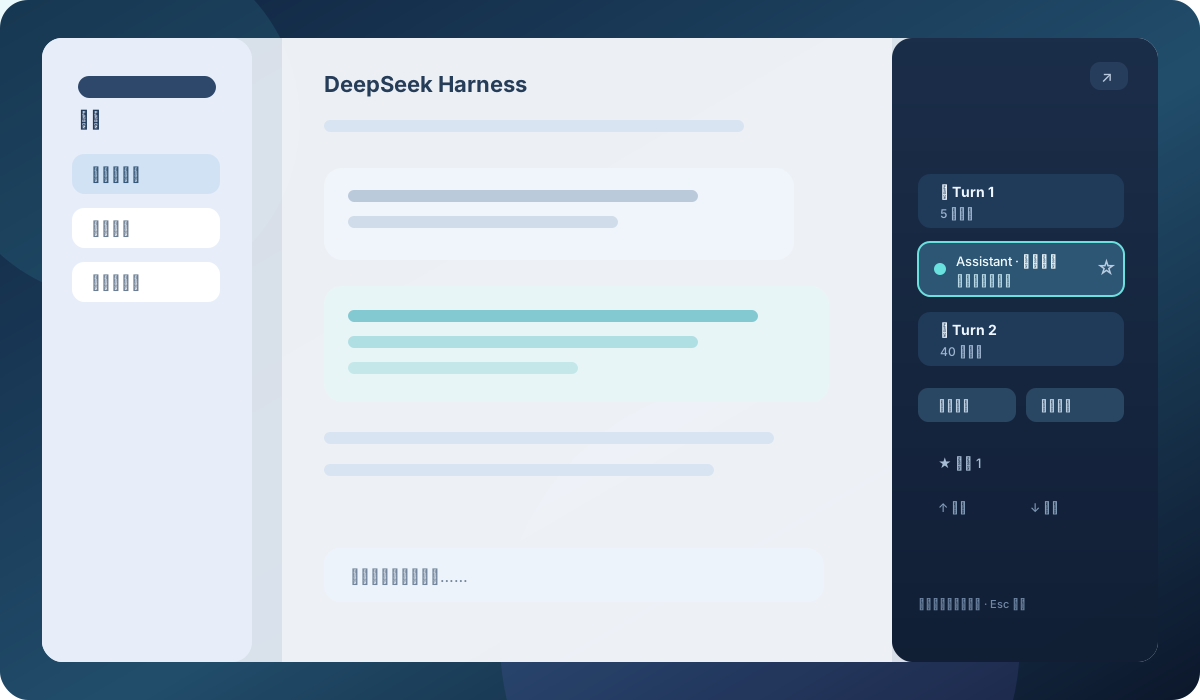
你能用它做什么
- 从聊天右侧可见入口打开时间线,也支持键盘聚焦和移动端触摸。
- 按 Turn 分组浏览消息,自动高亮当前可见消息。
- 跳转到尚未加载的旧消息时,自动加载历史。
- 默认合拢回合,支持“展开全部 / 折叠全部”。
- 点击每条消息右侧星标收藏;移动端长按是备用方式。
- 一键跳到最早/最新消息,按
Escape关闭面板,拖动左边缘调整宽度。 - 面板标题栏和设置页插件卡片都提供
中 / EN按钮;切换后标题、收藏、跳转、展开/折叠和状态提示会同步切换语言,并自动记住选择。 - 记住启用状态、面板宽度、过滤模式、滚动模式和首次提示状态。
- 支持移动端底部面板,并尊重系统的“减少动态效果”设置。
安装:让 Harness 直接下载(推荐)
如果已经安装 DeepSeek Harness,直接在终端执行下面这一条命令,Harness 会从 GitHub 获取并安装插件:
dsh plugin --profile web add github:7A7K/DSH-Timeline-Navigator
首次安装会自动把插件加入 web profile。安装完成后刷新 http://127.0.0.1:3080/;如果页面仍使用旧 bundle,请重启一次 DSH Web 进程。
本项目已经包含可直接加载的 lib/ 构建产物,并声明了 Harness 所需的 dsh.bundle 清单,因此用户不需要先下载仓库、执行 npm install 或手动编写 patch。
备用方式:PowerShell 安装脚本
安装包已经随仓库提供,普通用户不需要 npm install 或发布 npm 包。Windows PowerShell 推荐使用下面的方式:
方式一:下载仓库后安装
git clone https://github.com/7A7K/DSH-Timeline-Navigator.git
Set-Location .\DSH-Timeline-Navigator
.\install.ps1
也可以在 GitHub 点击 Code → Download ZIP,解压后在解压目录运行 .\install.ps1。
方式二:使用备用 PowerShell 安装脚本
.\install.ps1 `
  -Source 'https://github.com/7A7K/DSH-Timeline-Navigator' `
  -Version latest
-Version latest 会读取 GitHub 最新 Release;也可以指定版本 tag。备用脚本会从 GitHub 下载并复制代码到本地,未提供签名或哈希校验;请优先使用上面的 Harness 官方安装命令,或至少固定到明确的版本 tag,不要对不受信任的仓库使用 main。
安装器会把插件复制到 DSH 的插件目录,创建 Web profile 所需的 junction 和 patch 配置。
如果 DSH 不在默认目录 %USERPROFILE%\.dsh,请显式指定:
.\install.ps1 -DshHome 'D:\path\to\.dsh'
卸载
在插件目录运行:
.\uninstall.ps1
默认只移除启用链接和 patch,保留源代码以便回滚。确定不再需要源代码时再加 -RemoveSource。
操作速查
| 操作 | 结果 |
|---|---|
| 悬停或聚焦右侧入口 | 打开时间线 |
| 点击消息 | 跳转并居中消息 |
| 点击消息右侧星标 | 添加/取消收藏 |
| 点击 Turn 标题 | 展开/折叠该回合 |
| 展开全部 / 折叠全部 | 批量改变回合状态 |
| ↑ / ↓ 按钮 | 跳到最早 / 最新消息 |
| 移动端长按消息 | 收藏备用操作 |
Escape |
关闭时间线 |
| 拖动面板左边缘 | 调整面板宽度 |
兼容性与隐私边界
- 目标为 DSH Web client
rc.6及更新的插件合约。 - 依赖 Harness 提供的
ChatSnapshot和data-chat-anchor-key,不抓取原始 session 事件。 - 插件只拥有自己的 overlay 和 settings slots;禁用或卸载不会修改宿主源码。
- CI 会验证宿主 DOM 定位、历史消息加载、插件 manifest、overlay/settings slots,以及模拟 Harness 页面中的真实 UI 交互。
- 自动化 fixture 覆盖 DSH
rc.6合约形状;npm run smoke仍需要一个正在运行且有非空会话的真实 Harness,用于发布前人工验证,不作为普通 CI 的前置条件。 - 详细的支持范围、契约依赖和升级建议见 兼容性说明。
- 安装脚本需要 Windows PowerShell 和一个已经存在的 DSH home;最终用户不需要 Node.js。
本地开发
开发和打包需要 Node.js 18 或更新版本:
npm install
npm run bundle
npm run check
npm run test:ui
源码在 src/,lib/ 是生成产物。修改后先运行 npm run bundle,不要直接编辑 lib/client.js。npm run check 检查版本元数据、生成 bundle 的语法和核心测试;npm run test:ui 在模拟 Harness 页面中运行 Playwright 交互测试。
UI 冒烟测试需要本地 Harness 正在运行并有非空会话:
npm run smoke
English
DeepSeek Harness Timeline Navigator
An accessible conversation timeline for the DeepSeek Harness Web UI. It turns long conversations into a clickable, bookmarkable side panel without modifying Harness source code.
This is a community-maintained plugin by 7A7K. It is not affiliated with, sponsored, or endorsed by DeepSeek.
Features
- Visible right-edge trigger with keyboard-focus and touch support.
- Turn-based grouping with the currently visible message highlighted.
- Automatic history loading when jumping to an older unloaded message.
- Collapsed turn groups by default, plus Expand all / Collapse all.
- Explicit star controls for bookmarks, with touch long-press as a fallback.
- Earliest/latest navigation,
Escapeto close, and draggable panel width. - A
中 / ENlanguage switcher updates panel labels, buttons, messages, and status text together, and remembers the choice. - Persistent enabled state, width, filter mode, scroll mode, and first-use hint state.
- Mobile bottom sheet and
prefers-reduced-motionsupport.
Install from GitHub
The recommended Harness-native installation is:
dsh plugin --profile web add github:7A7K/DSH-Timeline-Navigator
The package declares the required dsh.bundle.patch manifest and includes the built lib/ artifact, so end users do not need to clone the repository or run npm:
git clone https://github.com/7A7K/DSH-Timeline-Navigator.git
Set-Location .\DSH-Timeline-Navigator
.\install.ps1
Reload http://127.0.0.1:3080/ after installation and restart the DSH Web process if an old bundle remains loaded.
Compatibility and development
The plugin targets the DSH Web client rc.6 contract line and newer. It uses the host ChatSnapshot and data-chat-anchor-key contracts, owns only its overlay and settings slots, and does not scrape raw session events. CI checks DOM location, older-message loading, the plugin manifest, both UI slot integrations, and real interactions in a simulated Harness page. See compatibility notes for the support boundary. Developers need Node.js 18+:
npm install
npm run bundle
npm run check
npm run test:ui
npm run test:ui is the deterministic fixture test. npm run smoke remains an optional live Harness UI check and requires a running Harness page with a non-empty conversation.
Links
MIT License.
原始 README: https://github.com/7A7K/DSH-Timeline-Navigator/blob/main/README.md ↗
同类插件
查看全部 →
archify
Agent 技能:生成美观、可校验的架构图、工作流图、时序图、数据流图与生命周期图——自包含 HTML、带动画与清晰导出

dsh-turn-rewind
对话回退:基于持久 Change Ledger 回滚会话与工作区状态。

dsh-plugin-cc
把 DeepSeek Harness 接入 Claude Code:评审、批评、委派与会话导入

dsh-interconnect
跨实例互联:经 interconnect 服务在多个 DSH 实例间转发消息与事件。

dsh-chat-import
把 13 家 coding agent(Claude Code、Codex、ChatGPT、Cursor、Gemini、opencode 等)的完整对话历史导入为可续聊的 DeepSeek Harness 会话,并支持反向导出回 Claude Code。

dsh-crew
DSH 插件:从 Claude Code / Codex 向 DSH agent 派活——原生 subagent 进度、宿主内 worker 会话(分级预设),以及为纯文本宿主补上视觉与图像生成的多模态桥