A zero-token online status indicator for the DeepSeek Harness (dsh) web UI. 为 DeepSeek Harness (dsh) Web 界面提供零 token 消耗的在线状态指示器。
Zero-token online status indicator for the DeepSeek Harness web UI: an always-visible online/offline dot in the conversation header, auto-refreshed every 15 seconds with no LLM calls.
安装
dsh plugin --profile web add github:AikenFra/dsh-aliveGitHub 源码安装:首次需按提示配置 allowBuilds 构建授权后重试
安装与环境配置指引、插件开发教程见 DSH 中文社区文档 ↗
安装即在你的机器上以你的权限运行第三方代码——它可读写文件、使用凭据、访问网络,DSH 的工具审批不会为插件代码加沙箱。「检测到 manifest」仅代表发现 dsh.bundle / dsh.plugin 清单,不构成兼容性或安全审查;安装前请审阅源码,不熟悉的插件先在不含密钥的环境试用。
README
目录




A zero-token online status indicator for the DeepSeek Harness (dsh) web UI. 为 DeepSeek Harness (dsh) Web 界面提供零 token 消耗的在线状态指示器。
在会话窗口右上角常驻显示 ● 在线 / ● 离线 状态点,每 15 秒自动检测一次。完全不调用 LLM,零 token 消耗——只是浏览器对本地服务做一次进程内的 HTTP 心跳。
An always-visible ● Online / ● Offline indicator in the conversation header, auto-refreshed every 15 seconds. It costs zero tokens — the browser simply polls a process-local HTTP endpoint.
功能 / Features
- ✅ 会话头部右上角常驻状态点(绿色 = 在线,红色 = 离线,黄色 = 检测中)
- ✅ 每 15 秒自动检测,无需手动刷新
- ✅ 零 token 消耗:纯进程内 ping,不调用任何 LLM
- ✅ 开箱即用,无需任何配置
- ✅ 服务挂了立刻变红点,恢复后自动变回绿点
截图 / Screenshots
● 在线(绿色)| ● 离线(红色) — 会话窗口右上角常驻显示:
| 在线 / Online | 离线 / Offline |
|---|---|
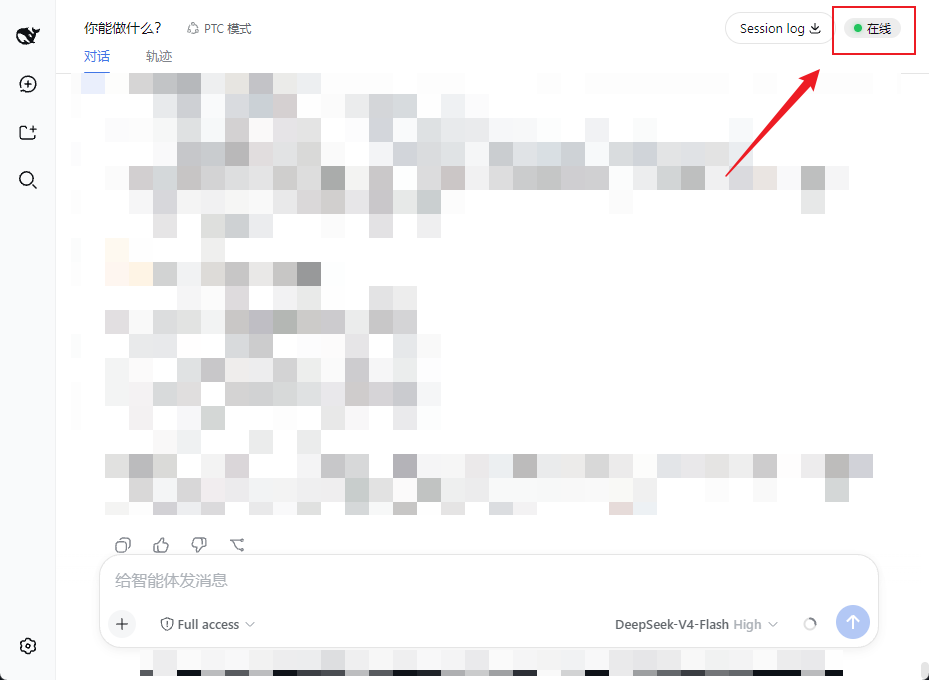 |
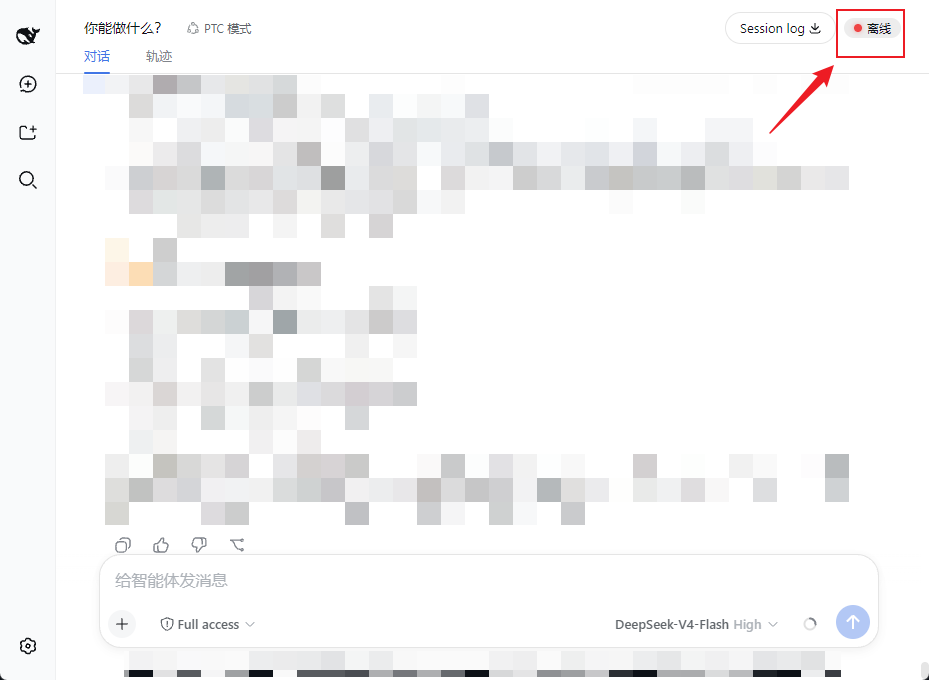 |
工作原理 / How it works
浏览器页面 --(每 15s fetch)--> GET /dsh-alive/ping --> dsh 服务进程(直接应答)
                              | 零 LLM 调用,零 token
- 后端:注册一个进程内 HTTP 端点
GET /dsh-alive/ping,立即返回{"ok":true},不经过任何模型。 - 前端:通过 dsh 的 slot 系统注入一个小组件到
conversation.session.header.utilities,用setInterval每 15 秒轮询一次 ping 端点,根据响应更新状态点。
安装 / Install
需要已安装 DeepSeek Harness(
dsh)。适用于webprofile。
# 装进 web profile(npm 发布后)
dsh plugin --profile web add dsh-alive

# 重启服务
dsh web
重启后打开页面,按 Ctrl+F5 强制刷新,右上角即可看到状态点。
本地/手动安装(未发布时)
把本仓库放到 ~/.dsh/profiles/web/dsh-alive,然后:
- 在
~/.dsh/profiles/web/package.json的dependencies加"dsh-alive": "file:./dsh-alive" - 在
dsh.profile.bundles列表追加"dsh-alive" - 重启
dsh web并硬刷新页面
卸载 / Uninstall
dsh plugin --profile web remove dsh-alive
dsh web
兼容性 / Compatibility
- 测试于
dsh 0.1.0-rc.6(webprofile) - 依赖 dsh 的 slot 系统(
conversation.session.header.utilities)与webServer服务注入,要求 dsh web 客户端框架版本匹配
开发 / Development
dsh-alive/
├── package.json        # 插件清单(dsh.bundle / dsh.client)
├── cordis.patch.yml    # bundle 挂载声明
├── dsh/
│   └── index.js        # 后端:/dsh-alive/ping 进程内端点
└── client/
    └── client.js       # 前端:状态点组件 + 15s 轮询
License
原始 README: https://github.com/AikenFra/dsh-alive/blob/main/README.md ↗
同类插件
查看全部 →
dsh-web-ui-all
DSH Web UI 插件与皮肤合集:任务看板、git 图、右侧面板、远程移动端 UI、桌宠、实时 token 统计与皮肤中心。
dsh-web-ui
DSH Web UI 插件与皮肤合集:任务看板、git 图、右侧面板、远程移动端 UI、桌宠、实时 token 统计与皮肤中心。

dsh-TUI
Claude Code 风格全屏终端 UI:像素鲸鱼顶栏、实时工作状态行、思考流式展开。

DSH-better-sidebar
侧边栏完整工作台:内置文件渲染编辑、终端、Git 与子代理,支持三方插件注册新 Tab。
working-activity
让 agent 的"工作状态行"活过来——实时工具动态与进度、俏皮文案、模型自述、上下文预警。同一套想法,适配两个平台: pi CLI 与 DeepSeek Harness(DSH) 。

deepseek-idesign
可视化设计工作室,支持网站、App 原型、海报、信息卡、报告和杂志的模板创建、元素编辑、选区级 AI 草稿衔接与导出。