dsh-plugin-ya-workspace-sidebar
by HuanLinOTO
DSH Web 工作区侧栏替代,顶部全局最近会话 + Workspace→Session 二级菜单 + 面包屑 | DSH Web workspace sidebar replacement: top global recent sessions + Workspace→Session two-level menu + breadcrumbs
安装
dsh plugin --profile web add github:HuanLinOTO/dsh-plugin-ya-workspace-sidebarGitHub 源码安装:首次需按提示配置 allowBuilds 构建授权后重试
安装与环境配置指引、插件开发教程见 DSH 中文社区文档 ↗
安装即在你的机器上以你的权限运行第三方代码——它可读写文件、使用凭据、访问网络,DSH 的工具审批不会为插件代码加沙箱。「检测到 manifest」仅代表发现 dsh.bundle / dsh.plugin 清单,不构成兼容性或安全审查;安装前请审阅源码,不熟悉的插件先在不含密钥的环境试用。
README
ya-workspace-sidebar

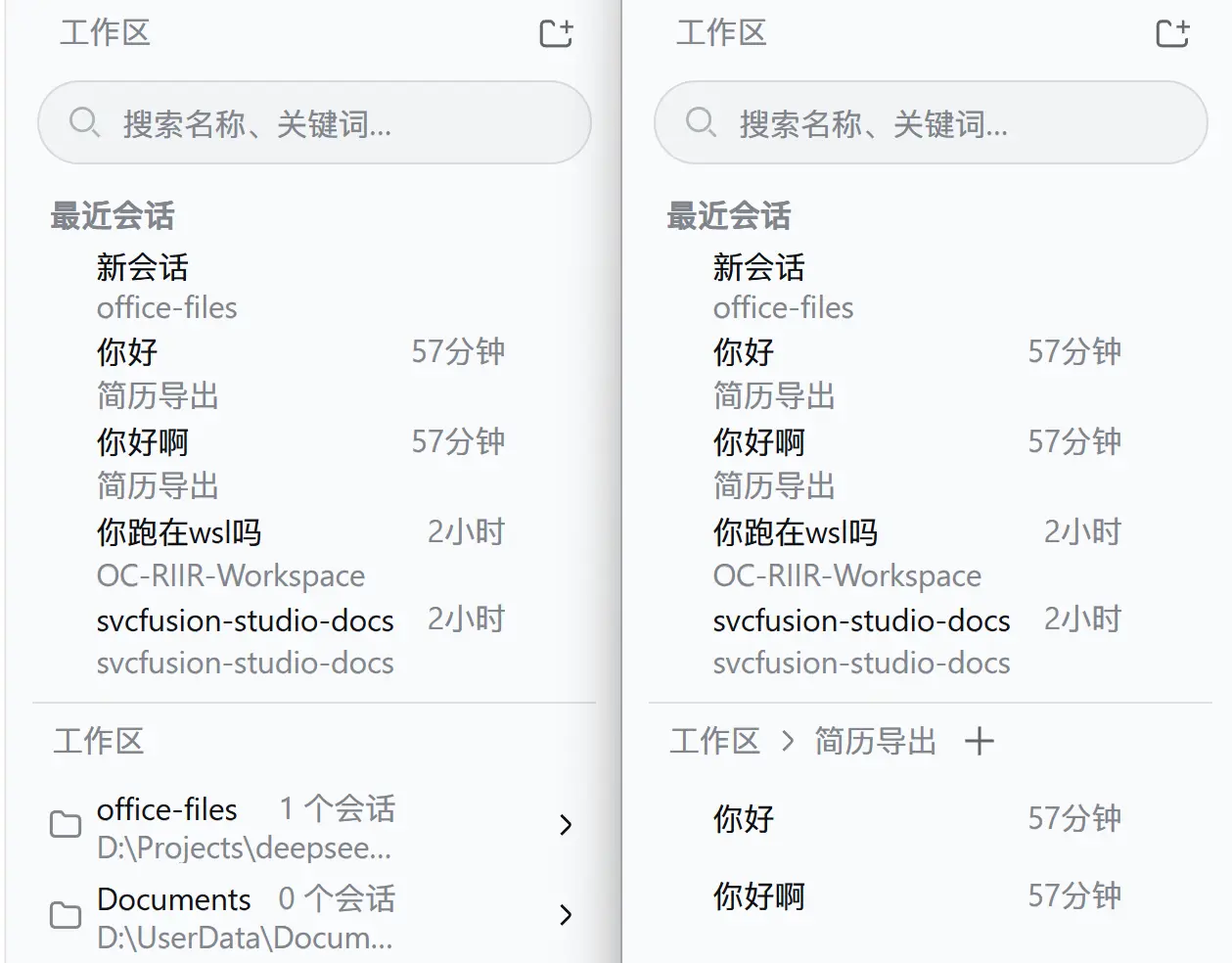
DSH Web 工作区侧栏替代插件。顶部固定展示 5 条全局最近会话,下方使用 Workspace → Session 二级菜单和面包屑导航;选中工作区的会话按本地日历日期分组(今天/昨天/更早),搜索、添加工作区、重命名、删除、Fork 与归档继续使用 DSH 原生 Host 能力。
运行
插件采用 bundle 形式,cordis.patch.yml 会禁用官方 ui-workspace 并插入 @huanlin/dsh-plugin-ya-workspace-sidebar。安装:
# 从 npm 安装(推荐):
dsh plugin --profile web add @huanlin/dsh-plugin-ya-workspace-sidebar

# 本地开发(热更新):
dsh plugin --profile web add "link:D:/Projects/deepseek-harness/ya-workspace-sidebar"
修改源码后重新运行 pnpm run build,再重启 dsh web 并硬刷新浏览器。
开发
pnpm install
pnpm run typecheck
pnpm test
pnpm run build
dsh/ 仅作为类型和行为参考,插件不会修改 DSH checkout。浏览器产物预构建到 lib/client.js,因此仓库发布时必须提交 lib/。
检查
pnpm run typecheck
pnpm test
pnpm run build
构建后确认 lib/index.js、lib/invariant.js、lib/client.js 和 lib/types/ 存在,并确认 lib/client.js 使用 window.__ModuleLoader__.load() 包装。
原始 README: https://github.com/HuanLinOTO/dsh-plugin-ya-workspace-sidebar/blob/master/README.md ↗
同类插件
查看全部 →
archify
Agent 技能:生成美观、可校验的架构图、工作流图、时序图、数据流图与生命周期图——自包含 HTML、带动画与清晰导出

dsh-turn-rewind
对话回退:基于持久 Change Ledger 回滚会话与工作区状态。

dsh-plugin-cc
把 DeepSeek Harness 接入 Claude Code:评审、批评、委派与会话导入

dsh-interconnect
跨实例互联:经 interconnect 服务在多个 DSH 实例间转发消息与事件。

dsh-chat-import
把 13 家 coding agent(Claude Code、Codex、ChatGPT、Cursor、Gemini、opencode 等)的完整对话历史导入为可续聊的 DeepSeek Harness 会话,并支持反向导出回 Claude Code。

dsh-crew
DSH 插件:从 Claude Code / Codex 向 DSH agent 派活——原生 subagent 进度、宿主内 worker 会话(分级预设),以及为纯文本宿主补上视觉与图像生成的多模态桥