DeepSeek Harness Web GUI 文件面板插件:浏览器内浏览并编辑工作区文件(Monaco 编辑器 + vim/emacs 键位)
DeepSeek Harness web GUI file panel plugin: browse and edit workspace files in-browser (Monaco editor + vim/emacs keymaps).
安装
dsh plugin --profile web add github:JiayuuWang/dsh-files-panelGitHub 源码安装:首次需按提示配置 allowBuilds 构建授权后重试
安装与环境配置指引、插件开发教程见 DSH 中文社区文档 ↗
安装即在你的机器上以你的权限运行第三方代码——它可读写文件、使用凭据、访问网络,DSH 的工具审批不会为插件代码加沙箱。「检测到 manifest」仅代表发现 dsh.bundle / dsh.plugin 清单,不构成兼容性或安全审查;安装前请审阅源码,不熟悉的插件先在不含密钥的环境试用。
README
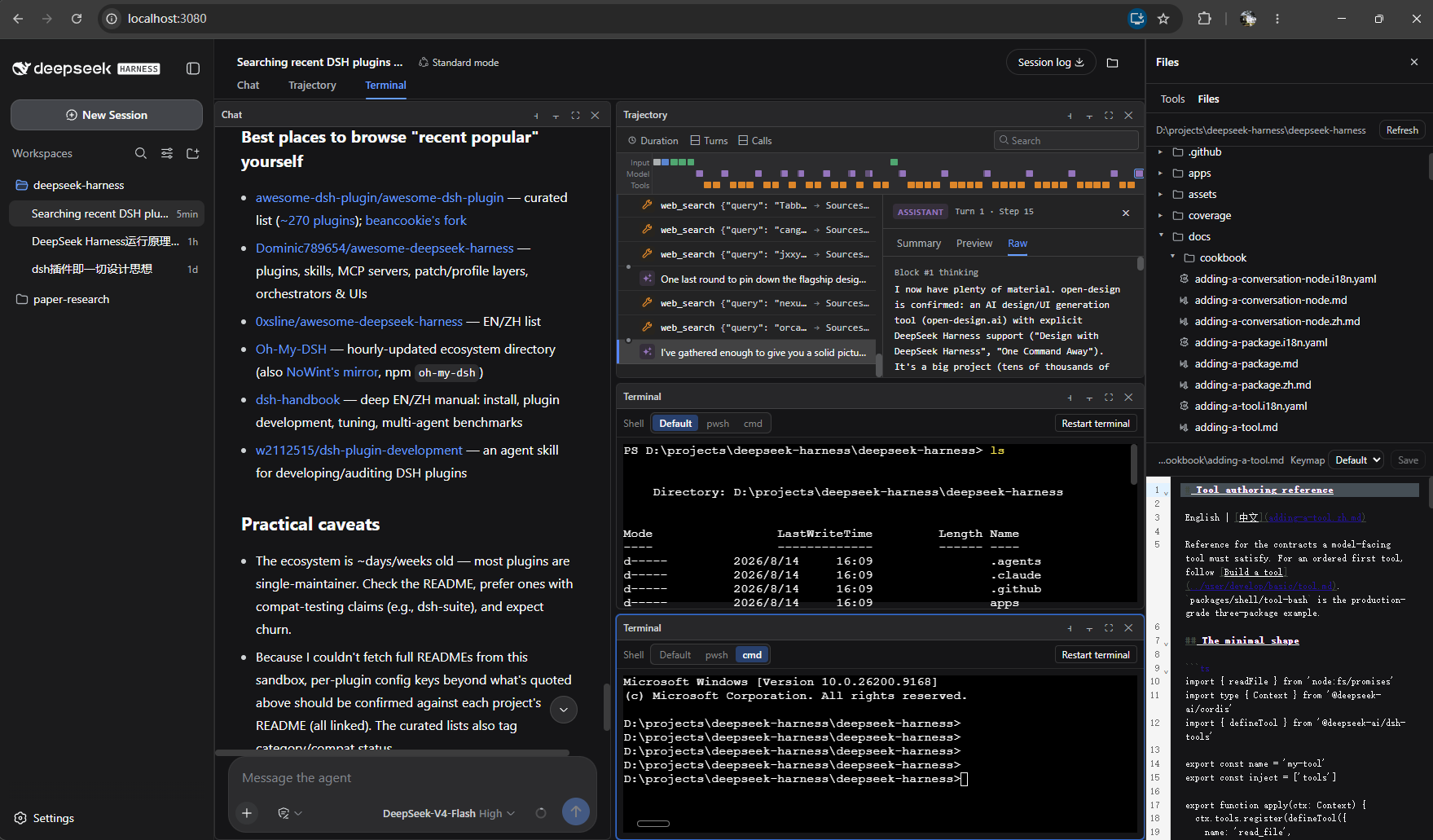
Interactive terminal, workspace file browser, and tmux-style split panes for the DeepSeek Harness web GUI (dsh web).
This plugin extends the DeepSeek Harness browser surface with three features:
| Feature | What you get |
|---|---|
| Terminal | A real interactive terminal tab beside Chat/Trajectory. Per-pane PTYs with a shell picker (Windows: pwsh / cmd; Linux/macOS: bash / zsh / sh). |
| File browser | A workspace file tree with per-type icons and syntax-highlighted editing (save with conflict detection, Vim/Emacs keymaps, drag-resizable tree/editor split). |
| Split panes | tmux-style panes: recursive split right/down, per-pane fullscreen, draggable dividers, sizes that follow the window. Splitting a Chat pane starts a new session side by side, and each chat pane gets its own input box sized with the pane. |
Install
The plugin is a set of packages inside the deepseek-harness monorepo. It modifies core packages, so it is installed by applying the cumulative patch to a clean checkout and building with the app — three ways, from easiest to most manual:
1. npm (recommended) — no need to clone this repo (package: @jiayuw/dsh-files-panel):
npx @jiayuw/dsh-files-panel <deepseek-harness checkout>
The npm package ships the patch and an installer bin: it validates the checkout, applies patch/dsh-files-panel.patch (skipped when already applied), then runs pnpm install and pnpm run build. (--apply-only skips the build for a dry check.)
2. Installer scripts from this checkout:
# Windows PowerShell:  .\install.ps1 <deepseek-harness checkout>
# Linux/macOS/Git Bash: ./install.sh  <deepseek-harness checkout>
3. Manually — in a deepseek-harness checkout at base commit 47f943859b:
git apply path/to/dsh-files-panel.patch
pnpm install
pnpm run build
pnpm dsh --profile web   # do NOT use npx @deepseek-ai/dsh web
Open the printed URL (default http://127.0.0.1:3080) and hard-refresh (Ctrl+F5).
Usage
- Open a session → the Terminal tab opens a live shell; the toolbar lets you pick the shell and restart it.
- The folder icon in the session header opens the workspace file browser.
- Each pane's thin toolbar has ⫞ split right, ⫟ split down, ⛶ fullscreen, ✕ close. Focus a pane, then click the top tab to switch its view (Chat / Trajectory / Terminal). A split chat pane has its own input box; closing a pane re-flows the rest to fill the grid.
Full usage: docs/USAGE.md · docs/USAGE.zh.md(中文)
Repository layout
patch/dsh-files-panel.patch   the single cumulative patch (everything above)
package.json, bin/            npm package (@jiayuw/dsh-files-panel) — the npx installer
install.ps1 / install.sh      one-command installer (apply + pnpm install + build)
src/packages/                 the plugin source, mirroring the monorepo packages/ layout
assets/layout.png             the layout screenshot shown above
src/packages/ mirrors the harness monorepo paths, so each file's location tells you where it belongs:
host/web-terminal,host/web-terminal-local— terminal capability seam + local providerhost/workspace-files,host/workspace-files-fs— workspace file seam + providerhost/apiproxy/src/api/{terminal,files}.*+fetch/*— theterminal.*/files.*wire domainsclient/ui-terminal,client/ui-files— the browser Terminal and file-panel viewsclient/ui-conversation— the split-pane grid, pane store, and cross-session panesclient/ui-slots,client/web-react,client/runtime— framework additions (SessionBoundary,provideInfoOf)client/tsdown.client.ts,bundle/web-app— build + registration
Limitations
- Terminal output is polled (~60 ms), not streamed; fixed size,
TERM=dumb(no color / full-screen programs yet). - A split grid shares each session's chat state across panes of that session.
- The file tree and terminal are human-facing only; their content is not fed to the model.
License
MIT
原始 README: https://github.com/JiayuuWang/dsh-files-panel/blob/main/README.md ↗
同类插件
查看全部 →
dsh-web-ui-all
DSH Web UI 插件与皮肤合集:任务看板、git 图、右侧面板、远程移动端 UI、桌宠、实时 token 统计与皮肤中心。
dsh-web-ui
DSH Web UI 插件与皮肤合集:任务看板、git 图、右侧面板、远程移动端 UI、桌宠、实时 token 统计与皮肤中心。

dsh-TUI
Claude Code 风格全屏终端 UI:像素鲸鱼顶栏、实时工作状态行、思考流式展开。

DSH-better-sidebar
侧边栏完整工作台:内置文件渲染编辑、终端、Git 与子代理,支持三方插件注册新 Tab。
working-activity
让 agent 的"工作状态行"活过来——实时工具动态与进度、俏皮文案、模型自述、上下文预警。同一套想法,适配两个平台: pi CLI 与 DeepSeek Harness(DSH) 。

deepseek-idesign
可视化设计工作室,支持网站、App 原型、海报、信息卡、报告和杂志的模板创建、元素编辑、选区级 AI 草稿衔接与导出。