dsh-client-ui-slingshot
by JingkaiTang
dsh Web GUI 的互动弹弓玩具:击碎界面元素、看它们滚出屏幕再复原;dsh.client 插件,零依赖
Interactive slingshot toy for the dsh web GUI: shatter UI elements, watch them tumble off screen, then recover. dsh.client plugin, zero deps.
安装
dsh plugin --profile web add github:JingkaiTang/dsh-client-ui-slingshotGitHub 源码安装:首次需按提示配置 allowBuilds 构建授权后重试
安装与环境配置指引、插件开发教程见 DSH 中文社区文档 ↗
安装即在你的机器上以你的权限运行第三方代码——它可读写文件、使用凭据、访问网络,DSH 的工具审批不会为插件代码加沙箱。「检测到 manifest」仅代表发现 dsh.bundle / dsh.plugin 清单,不构成兼容性或安全审查;安装前请审阅源码,不熟悉的插件先在不含密钥的环境试用。
README
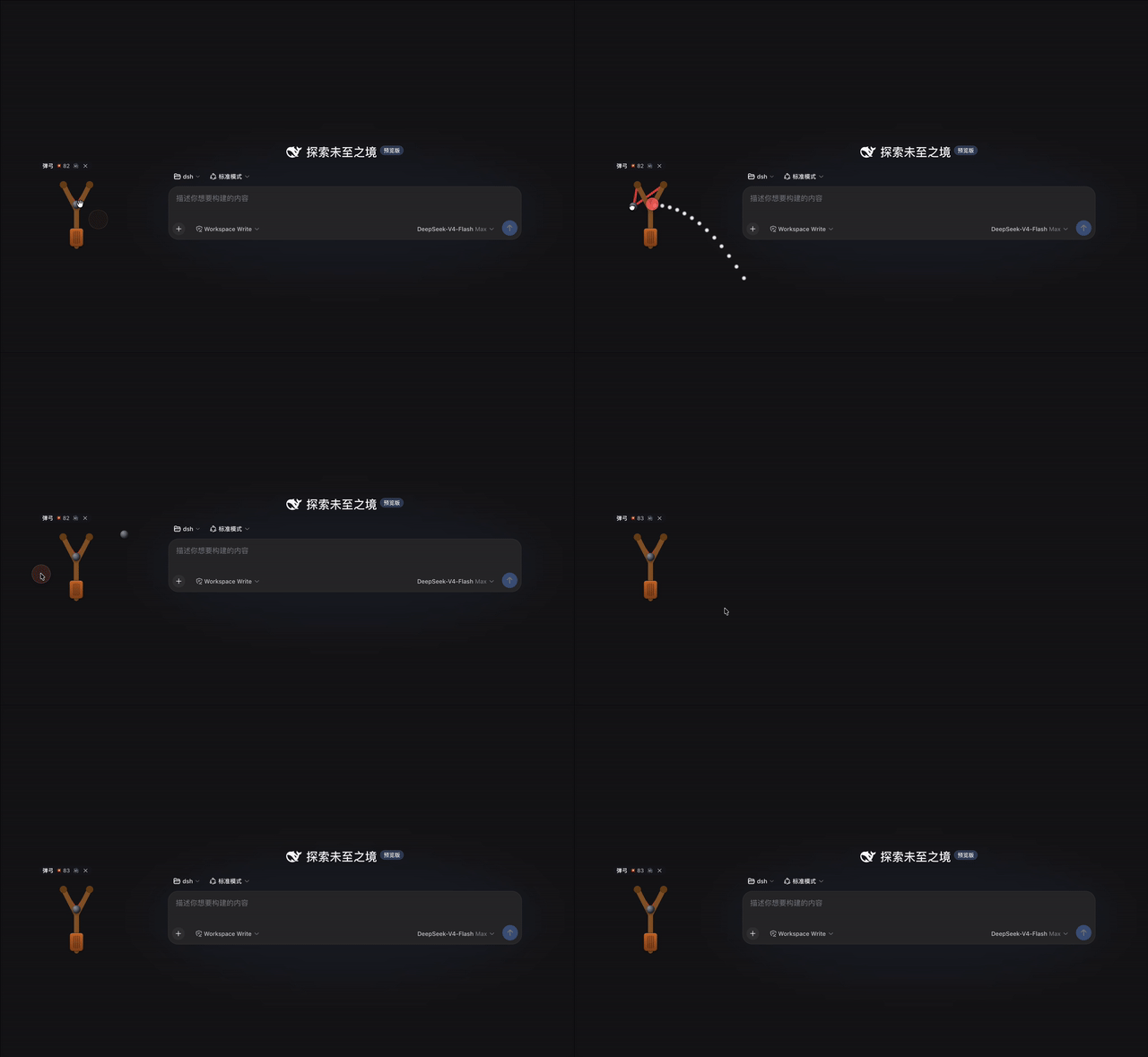
A playful, purely-visual toy for the dsh web GUI. A wooden slingshot lives in the bottom-right corner of the page (drag it anywhere!):
- 拖拽瞄准 — press and hold the leather pouch, drag it backwards (Angry-Birds style). A dotted arc previews where the stone will fly.
- 松手发射 — release to fire the stone.
- 打碎元素 — the stone shatters the first UI element it hits: the element is cloned into shards that burst apart, and the whole wreckage tumbles off the screen under gravity.
- 自动恢复 — once it has fallen out of the viewport, the original element
pops back with a small animation. Nothing in the GUI is ever permanently
damaged —
html/bodyand the toy itself are never targeted, and the layout is preserved the whole time (the original is onlyvisibility:hiddenwhile its clone flies).
Extra features:
- 🪵 手柄拖动 — the slingshot has a leather grip handle at the bottom of
the trunk (orange-brown, with grip ridges and a grab cursor). Press and drag
it to move the slingshot anywhere on the screen (clamped to the viewport) —
no mode toggles. The position is persisted in
localStorageand restored after reload; the collapsed launcher button follows the gun. - 🔊/🔇 sound toggle — WebAudio-synthesized boings, crashes and pops (no
assets), muted and state persisted in
localStorage. - 💥 score counter (persisted).
- Collapsible widget: ✕ hides it into a small launcher button that pulses and shows a "where did it go" tip.
- The client bundle is part of the dsh client HMR chain: edit
lib/client.jsand the running page hot-swaps the plugin without a refresh.
安装(给使用者)
DSH 0811 起不再有官方 repository 插件机制,客户端插件统一挂进 web profile:
把本包放进 profile 的模块解析路径(二选一):
- 直接把
dsh-client-ui-slingshot目录复制/软链到~/.dsh/profiles/node_modules/@t7kai/下,或 - 用 plugin-registry 控制台 git 源安装:
dsh plugin --profile web add "github:<你的账号>/dsh-client-ui-slingshot#main"
- 直接把
在
~/.dsh/profiles/web/cordis.patch.yml注册一行(配置层 HMR 热生效,无需重启):- insert: - id: ui-slingshot name: '@t7kai/dsh-client-ui-slingshot'刷新浏览器页面,右下角出现弹弓 🪀(点击 ✕ 可收起;位置、声音、得分自动记忆)。
发布到 dshfind 插件超市
- 将本仓库推送到 GitHub(公开仓库)。
- 给仓库添加
dsh-plugintopic(仓库页 → About → Topics,或gh repo edit <owner>/<repo> --add-topic dsh-plugin)。 - dshfind.com/zh/plugins 每日自动同步该 topic 下的仓库
(star、贡献者、增长数据),无需提交申请。可选:再打上
deepseek-harness、dsh、cordis等 topic 增加曝光。
Files
| File | Purpose |
|---|---|
package.json |
Package manifest: dsh.client.platform = "web" + dsh.bundle.client = "./lib/client.js" declarations + ./client export (the dsh client-modules contract) |
lib/index.js |
Host-side no-op plugin (the loader row needs a valid host entry; the toy is browser-only) |
lib/client.js |
The whole toy — vanilla DOM, no dependencies, ModuleLoader bundle format |
README.md |
This file |
How it is wired in
- The package lives in the session workspace and is linked into the profile's
module resolution:
~/.dsh/profiles/node_modules/@t7kai/dsh-client-ui-slingshot → <workspace>/dsh-client-ui-slingshot ~/.dsh/profiles/web/cordis.patch.ymlregisters the loader rowui-slingshot(@t7kai/dsh-client-ui-slingshot); the profile patch layer is hot-reloaded by the running server, so the row and its bundle are served without a restart (a one-time page refresh picks the new plugin up).
Removing the toy
Delete the ui-slingshot row from ~/.dsh/profiles/web/cordis.patch.yml and
remove the symlink
~/.dsh/profiles/node_modules/@t7kai/dsh-client-ui-slingshot. A page refresh
unloads it.
原始 README: https://github.com/JingkaiTang/dsh-client-ui-slingshot/blob/main/README.md ↗
同类插件
查看全部 →
dsh-web-ui-all
DSH Web UI 插件与皮肤合集:任务看板、git 图、右侧面板、远程移动端 UI、桌宠、实时 token 统计与皮肤中心。
dsh-web-ui
DSH Web UI 插件与皮肤合集:任务看板、git 图、右侧面板、远程移动端 UI、桌宠、实时 token 统计与皮肤中心。

dsh-TUI
Claude Code 风格全屏终端 UI:像素鲸鱼顶栏、实时工作状态行、思考流式展开。

DSH-better-sidebar
侧边栏完整工作台:内置文件渲染编辑、终端、Git 与子代理,支持三方插件注册新 Tab。
working-activity
让 agent 的"工作状态行"活过来——实时工具动态与进度、俏皮文案、模型自述、上下文预警。同一套想法,适配两个平台: pi CLI 与 DeepSeek Harness(DSH) 。

deepseek-idesign
可视化设计工作室,支持网站、App 原型、海报、信息卡、报告和杂志的模板创建、元素编辑、选区级 AI 草稿衔接与导出。