在DeepSeek Harness会话中提及一个服务器,通过SSH在该服务器上运行命令,背后设有两级审批门,默认关闭。
Mention a server with @ in a DeepSeek Harness session and run commands on it over SSH, behind a two-tier approval gate that fails closed.
安装
dsh plugin --profile web add github:MRZHUH/dsh-remote-serverGitHub 源码安装:首次需按提示配置 allowBuilds 构建授权后重试
安装与环境配置指引、插件开发教程见 DSH 中文社区文档 ↗
安装即在你的机器上以你的权限运行第三方代码——它可读写文件、使用凭据、访问网络,DSH 的工具审批不会为插件代码加沙箱。「检测到 manifest」仅代表发现 dsh.bundle / dsh.plugin 清单,不构成兼容性或安全审查;安装前请审阅源码,不熟悉的插件先在不含密钥的环境试用。
README
目录
Mention a server with @ in a DeepSeek Harness session and run commands on it over SSH.
Register a server once, then ask for what you need in plain language. Commands that only read run immediately; anything that changes state stops and asks you first.
Nothing is installed on the servers. No agent, no daemon, no inbound port. The plugin drives your own
sshclient, so your existing~/.ssh/config— jump hosts, agent forwarding,known_hosts— keeps applying unchanged.
What it looks like
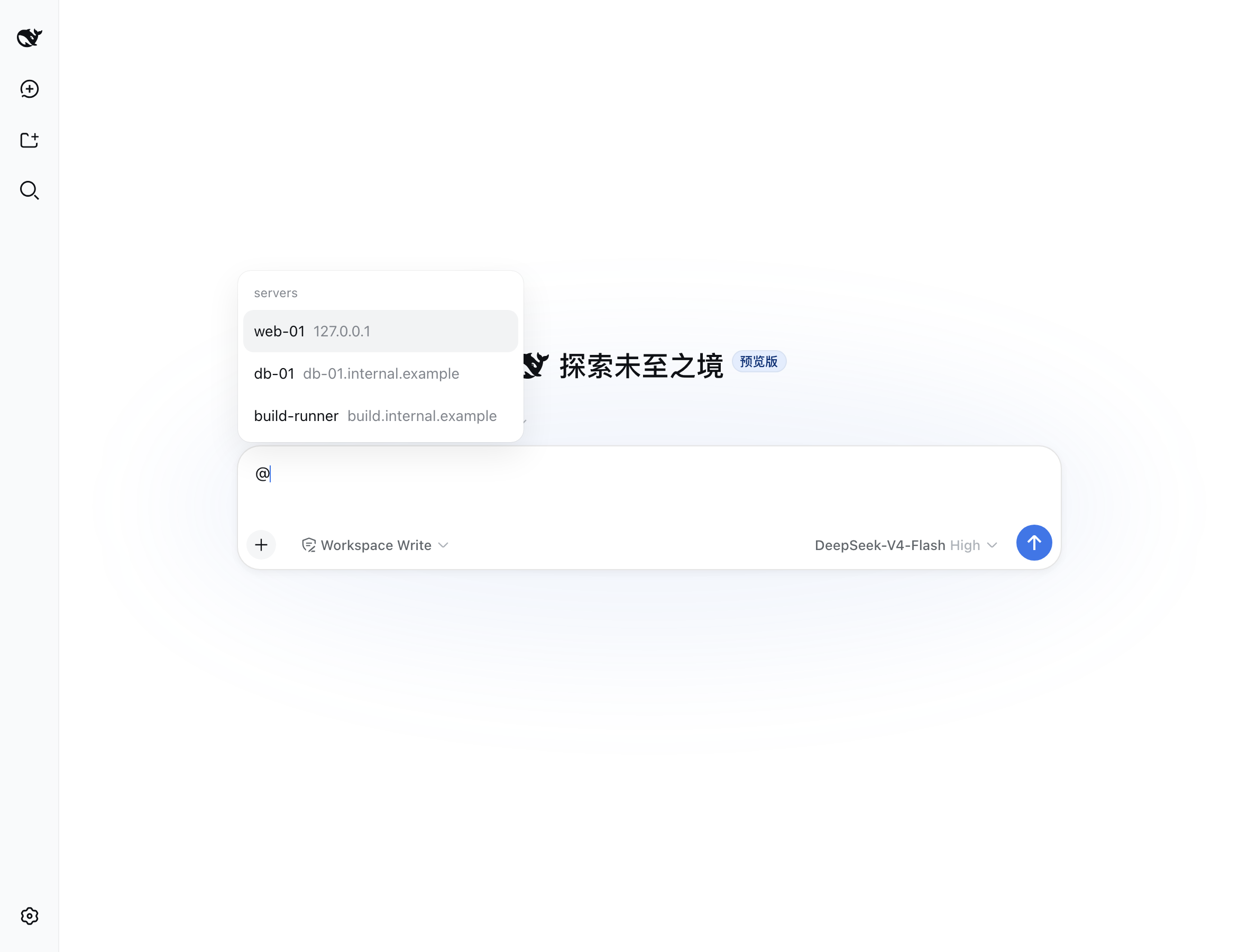
Type @ and pick a server. The reference travels with your message; the model names the target explicitly on every command.
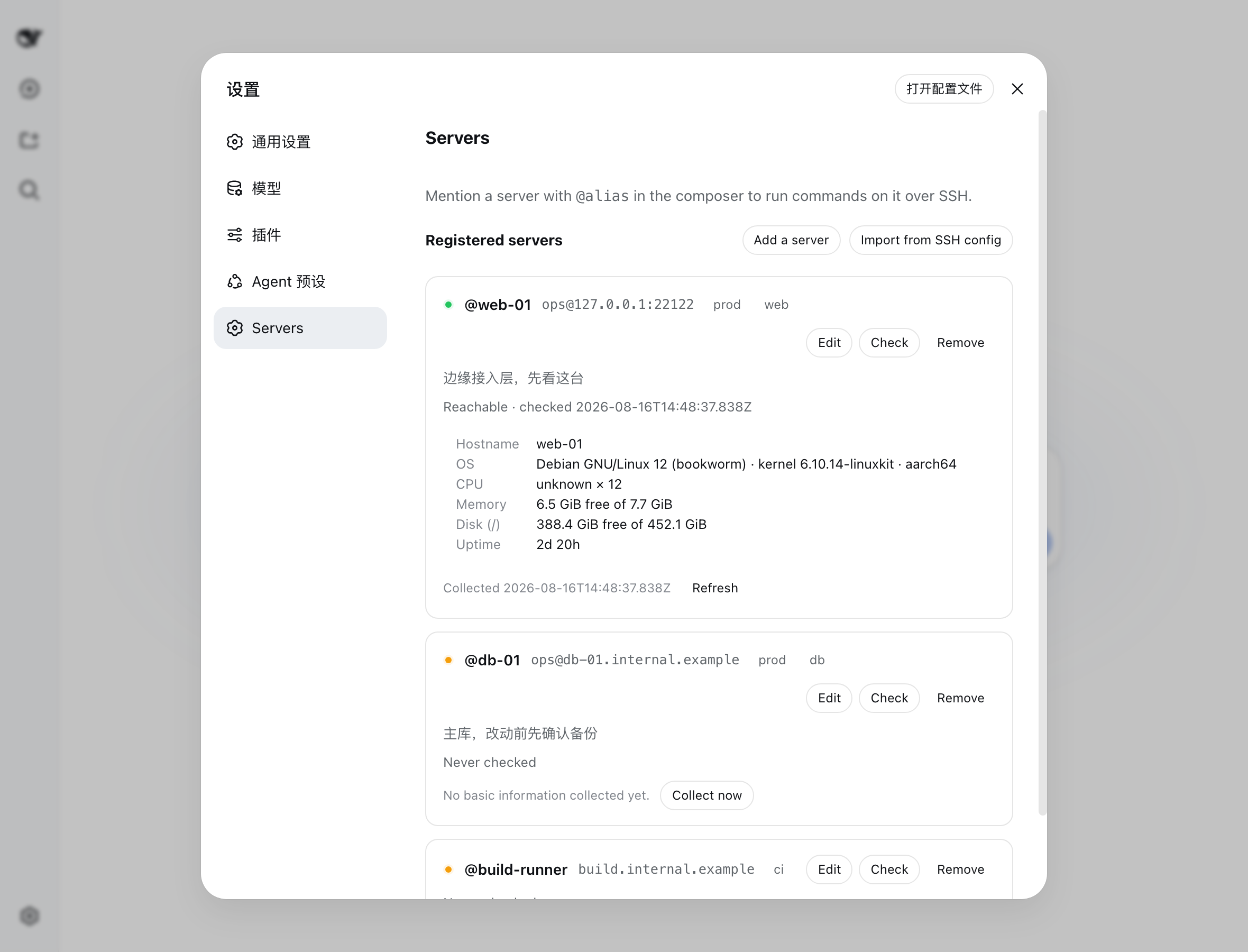
One page for every server. Reachability, a description you write, and the machine's own numbers — hostname, OS, CPU, memory, disk, uptime — collected in a single SSH round trip. A server you have not checked says so rather than showing a fabricated placeholder.
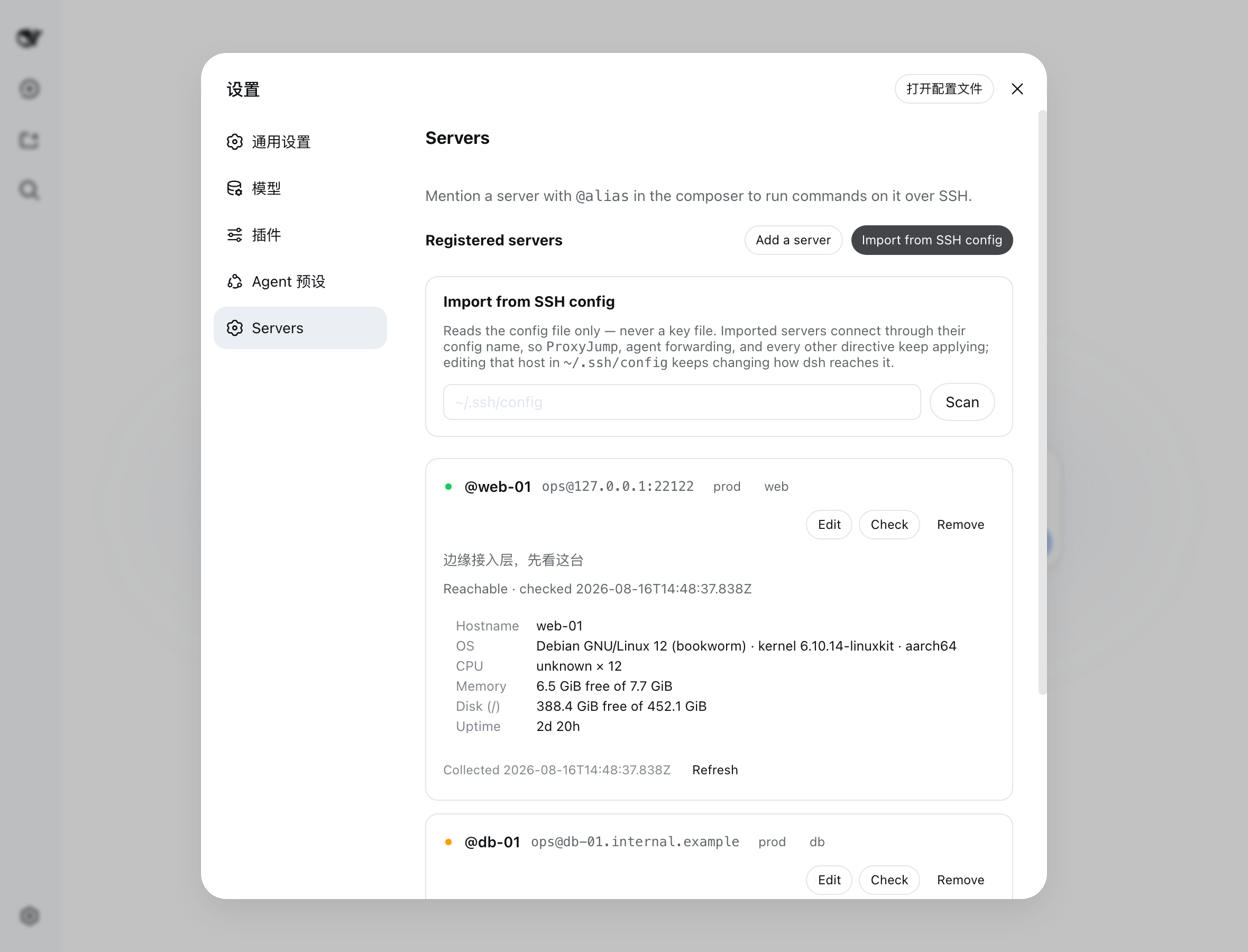
Bring in what you already have. Import reads ~/.ssh/config (or any path you name) and registers the hosts you pick. Re-scanning tells you what is already registered instead of showing a wall of disabled rows.
Install
dsh plugin --profile web add dsh-remote-server
Then start dsh as usual — dsh web, which is the same thing as dsh --profile web.
Nothing to hand-edit, and nothing to allow: the published tarball is already built.
--profile names which composition to install into. A profile is one bootable set of plugins under $DSH_HOME/profiles/, so you can keep a working setup and a clean one side by side; web is the one the quickstart boots.
Need the
dshcommand? The quickstart runs the harness throughnpx @deepseek-ai/dsh webwithout installing anything, sodshmay not be on your PATH. Either install it once withnpm install -g @deepseek-ai/dsh, or prefix each command below withnpx @deepseek-ai/dsh—npx @deepseek-ai/dsh plugin --profile web add dsh-remote-server. Keep the scope: a barenpx dshpulls an unrelated package and fails withcould not determine executable to run.
About the peer-dependency warnings
The install prints a list of "missing peer" warnings for @deepseek-ai/dsh-*, @deepseek-ai/cordis, and react. This is expected, and the plugin works.
pnpm manages only out-of-tree packages in your profile. Those peers are in-box bundles supplied by the dsh installation itself, so they are genuinely absent from the profile's node_modules and genuinely present at run time. Verified: with none of them installed there, the plugin loads, its routes answer, and its browser bundle is served.
They stay declared because the package really does require those seams. Deleting them would quiet the output by removing true information.
Installing from source instead
dsh plugin --profile web add github:MRZHUH/dsh-remote-server
A git install fetches sources, not build output, so pnpm has to run this package's prepare script to compile it. pnpm refuses that until you allow it: the first add fails and prints the key to add to your profile's pnpm-workspace.yaml.
onlyBuiltDependencies:
  - dsh-remote-server
Copy the key from pnpm's own message rather than from here — older pnpm called it allowBuilds, and the message is authoritative for the version actually running. Treat granting it for what it is: permission to execute this package's code on your machine at install time. Pin a commit (github:MRZHUH/dsh-remote-server#<sha>) so a later push cannot silently change what runs.
Treat that for what it is — permission to execute this package's code on your machine at install time. Pin a commit (github:MRZHUH/dsh-remote-server#<sha>) so a later push cannot silently change what runs. Installing from npm needs no such allowance, because the published tarball is already built.
Removing it takes one command, and your registered servers survive it:
dsh plugin --profile web remove dsh-remote-server
Requires an OpenSSH client on the machine running dsh. If ssh is missing, the plugin fails at load with the install command for your platform rather than mounting in a state where nothing can run.
Register a server
Use Settings -> Servers -> Add a server, or write them into the remote-servers settings namespace:
remote-servers:
  servers:
    - alias: web-01
      host: 10.0.0.11
      user: ops
      tags: [prod, web]
      description: edge tier - start here
    - alias: db-01
      host: db-01.internal.example
      port: 2222
      identityFile: ~/.ssh/id_ed25519_db
alias is the name you type after @, so it carries no whitespace. Authentication is key-based only: identityFile is a path the SSH client opens, and the plugin never reads, copies, or stores key material. A password field is refused rather than stored.
If a server rejects your key, the page hands you the exact ssh-copy-id line with your own user, host, and port already filled in.
What the model can do
| Tool | What it does |
|---|---|
remote_exec |
Runs one command on one registered server; returns stdout, stderr, and the exit code. |
remote_server_info |
Reads a server's collected facts, or re-probes the machine. |
How approval works
Every command passes through a fixed sequence. The order is the point:
- Unregistered alias - refused. No connection is attempted.
- High-risk ruleset - a deterministic match forces a human decision. The classifier cannot override it.
alwaysAsk- when set, everything from here on goes to a human.- Read-only allowlist - a plain invocation of a configured prefix runs immediately.
- Model classifier - answers
autoorhumanfor whatever is left. - Human approval - asked through the harness approval channel.
Anything that cannot reach a confident "clear" ends at a human, and a human that cannot be reached ends at a refusal. A classifier that times out, errors, or answers ambiguously is not a pass — the denying branch is the default path through the code, not an error handler.
The nine high-risk categories: recursive deletion, disk and filesystem writes, shutdown and reboot, service stop and restart, user and permission changes, package install and removal, writes into system paths, privilege escalation, and reads of credential or key paths.
Enabling model auto-approval
Auto-approval stays off until you name a model, because the plugin cannot know which provider routes your deployment composed. In your profile's cordis.patch.yml:
- id: remote-server
  config:
    classifier:
      provider: deepseek
      model: deepseek-chat
No API key is involved here — the plugin never sees one. It calls ctx.llm and the harness resolves the credential it already holds. Set both fields or neither; half of them fails at load.
Configuration
| Key | Default | Meaning |
|---|---|---|
connectTimeoutMs |
10000 |
Bound on establishing the connection. |
execTimeoutMs |
120000 |
Bound on one command. |
probeTimeoutMs |
15000 |
Bound on one facts probe. |
outputMaxBytes |
65536 |
Retained bytes per stream; overflow keeps the tail and is reported as truncated. |
strictHostKeyChecking |
accept-new |
Unknown-host-key policy (accept-new or yes). |
alwaysAsk |
false |
Route every command to a human. |
readOnlyAllowlist |
[] |
Command prefixes that skip the classifier. |
classifier |
unset | { provider, model } for auto-approval. |
classifyTimeoutMs |
15000 |
Bound on one classification call. |
Limits worth knowing before you rely on this
The high-risk ruleset is a noise filter, not a security boundary. It matches command text. An obfuscated rm, a base64-decoded payload, and a call into a script that does the damage all walk straight past it. What actually bounds damage is that the default leans toward asking you, and that the SSH user's own permissions on the target still apply. Give that user the least privilege the work needs, and set alwaysAsk: true where no automated clearance is acceptable.
accept-new trusts the first key it sees. A first connection to a host you have never reached records whatever key answers; a later change is refused. That is trust-on-first-use, and a first connection through a hostile network can be intercepted. Set strictHostKeyChecking: yes and pre-populate known_hosts where that matters. ask is not offered: authentication here is non-interactive, so a prompt could only ever fail.
A timeout or cancellation does not kill the remote process. It stops this side from waiting. The remote command may still be running, and results say so rather than claiming a kill. Run long work under nohup or tmux.
Exit code 255 is ambiguous, and the plugin says so. It is what the SSH client reports for its own failures and a legal exit code for your command. When stdout is empty and the stderr text matches no known client failure, the result is reported as ambiguous — carrying the client's own message — rather than asserting a remote exit that was never observed.
Credential redaction is best-effort. Recognized secret formats are replaced before anything reaches the session log, a tool result, or the screen. It reduces exposure; it does not guarantee none. The structural protection is that the plugin never reads key material itself.
Reading an SSH config reads a path you name, as you. The route serving import runs in your local dsh process. The web server binds 127.0.0.1 by default; binding it to a network address exposes that reach along with everything else.
Auditability
Every execution and every refusal appends one remoteServer/exec session event recording the target, the command (redacted), which gate stage decided, the reason, and the outcome. A refused attempt carries no exit code, because nothing ran. Whatever the model was told can be reconstructed from the log alone.
Development
npm install
npm test
npm run typecheck
npm run build
npm test builds first, so the suite always runs against fresh output.
Design documents — specification, plan, research, contracts, and a validation guide — live under specs/ and travel with the code.
License
原始 README: https://github.com/MRZHUH/dsh-remote-server/blob/main/README.md ↗
同类插件
查看全部 →
archify
Agent 技能:生成美观、可校验的架构图、工作流图、时序图、数据流图与生命周期图——自包含 HTML、带动画与清晰导出

dsh-turn-rewind
对话回退:基于持久 Change Ledger 回滚会话与工作区状态。

dsh-plugin-cc
把 DeepSeek Harness 接入 Claude Code:评审、批评、委派与会话导入

dsh-interconnect
跨实例互联:经 interconnect 服务在多个 DSH 实例间转发消息与事件。

dsh-chat-import
把 13 家 coding agent(Claude Code、Codex、ChatGPT、Cursor、Gemini、opencode 等)的完整对话历史导入为可续聊的 DeepSeek Harness 会话,并支持反向导出回 Claude Code。

dsh-crew
DSH 插件:从 Claude Code / Codex 向 DSH agent 派活——原生 subagent 进度、宿主内 worker 会话(分级预设),以及为纯文本宿主补上视觉与图像生成的多模态桥