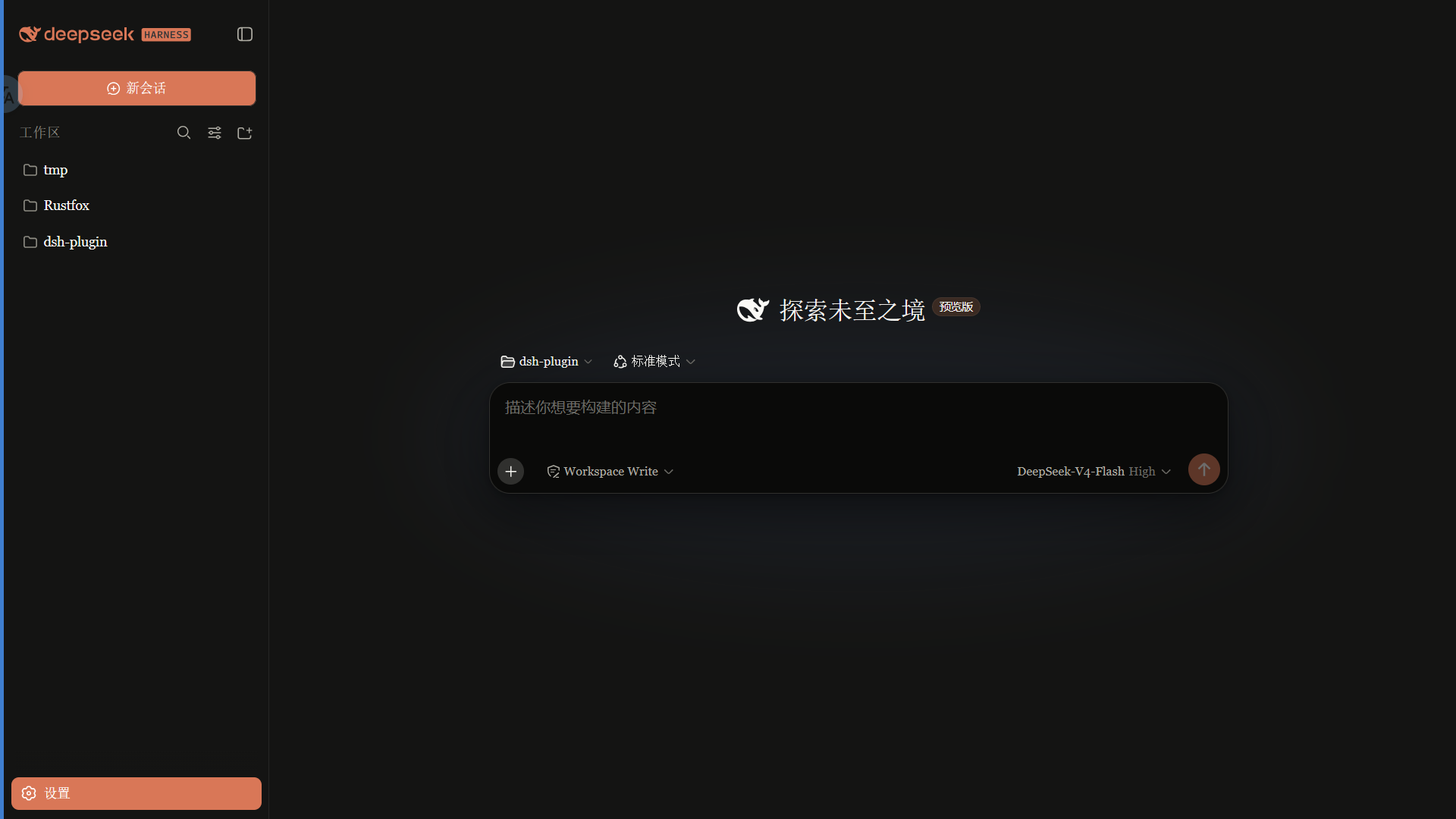
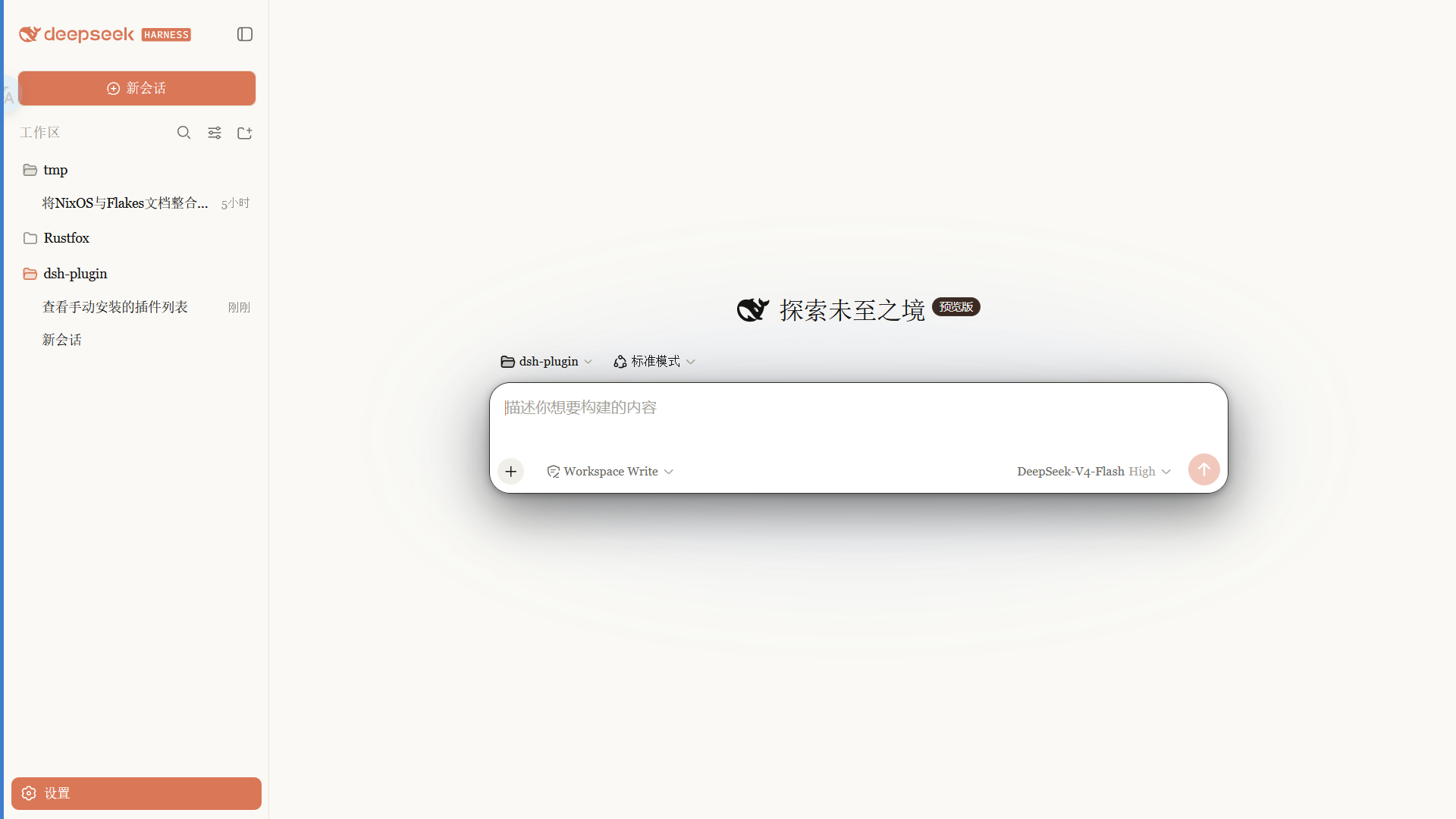
Claude 风格皮肤:暖黑画布、陶橙点缀、衬线 UI,跟随原生亮/暗主题。
Claude-style skin with a warm-black canvas, clay accent, and serif UI that follows the native light and dark themes.
安装
dsh plugin --profile web add github:PAKIKNOWLEDGE/dsh-client-ui-skin-claudeGitHub 源码安装:首次需按提示配置 allowBuilds 构建授权后重试
安装与环境配置指引、插件开发教程见 DSH 中文社区文档 ↗
安装即在你的机器上以你的权限运行第三方代码——它可读写文件、使用凭据、访问网络,DSH 的工具审批不会为插件代码加沙箱。「检测到 manifest」仅代表发现 dsh.bundle / dsh.plugin 清单,不构成兼容性或安全审查;安装前请审阅源码,不熟悉的插件先在不含密钥的环境试用。
README
English | 中文
Claude 风格的 DSH Web 界面皮肤:暖黑画布、陶橙点缀、衬线 UI,跟随原生亮/暗主题。
 ·
· 
特性
- 暖黑(#141413)画布 + Anthropic 陶橙(#d97757)点缀
- 衬线界面字体(Georgia),代码用等宽栈
- 细滚动条、陶橙选中 / 焦点、胶囊徽章
- 亮 / 暗双主题,跟随系统切换
安装
从 npm 安装(推荐,预构建免授权):
dsh plugin --profile web add @pakiknowledge/dsh-client-ui-skin-claude
或从 GitHub 安装:
dsh plugin --profile web add github:PAKIKNOWLEDGE/dsh-client-ui-skin-claude
装完重启 dsh web,刷新页面。
切换
同一时刻只启用一个皮肤。编辑 ~/.dsh/cordis.patch.yml:
# dsh-skin managed 段之外
- insert:
    - id: ui-skin-claude
      name: '@pakiknowledge/dsh-client-ui-skin-claude'
(并把当前启用皮肤的 disabled: true 加上。)配置 watcher 几秒内热加载,刷新页面生效。
卸载
- 删除
~/.dsh/cordis.patch.yml里的ui-skin-claudeinsert 行 dsh plugin --profile web remove @pakiknowledge/dsh-client-ui-skin-claude- 重启
dsh web
许可
MIT
原始 README: https://github.com/PAKIKNOWLEDGE/dsh-client-ui-skin-claude/blob/main/README.md ↗
同类插件
查看全部 →
maid-atelier
DSH Web 鲸鱼娘皮肤系列(深海女仆工坊 maid-atelier)。
dsh-deep-whale
DSH Web 鲸鱼娘皮肤系列(深海女仆工坊 maid-atelier)。

dsh-wallpaper-engine
DSH 网页界面壁纸:把本机 Wallpaper Engine 的 Video/Web 壁纸实时播放到聊天界面后方,Scene 壁纸提取主纹理作为静态帧,支持内容分级/类型过滤、自定义壁纸上传与 iOS 液态玻璃设置窗口。

deepseek-harness-desktop
开源Windows桌面客户端和GUI——DeepSeek Harness——零配置安装器,包含Codex、插件、技能、SSH、移动远程访问和11种皮肤。

dsh-liang-skin
DeepSeek Harness 滑动变阻器皮肤

deepseek-harness
为 DSH Web 设置本地图片与 MP4 视频背景:侧栏「背景」面板、可保存主题(含内置「画窗」)、声音开关、恢复上次背景,以及 /bg、/bg-theme、/bg-clear 命令。