支持跨多个模型、供应商、工作区与时间范围进行统一分析,并可在全部保留历史中自定义起止日期;实时呈现缓存命中率,并可分别查看模型和供应商的分类数据;提供 53 周 GitHub 风格热力图、连续使用和缓存效率趋势,支持查询 DeepSeek 账户余额、管理工作区别名及导出 CSV 数据。中文使用本地时区,英文统一使用 UTC;API 仅限本机访问。
Analyze usage across models, providers, workspaces, and time ranges — including custom start/end dates over the full retained history — with live cache-hit visibility and separate model and provider breakdowns. Includes a 53-week GitHub-style heatmap, usage streaks, cache-efficiency trends, DeepSeek account balance, workspace aliases, and CSV export. Chinese uses local time, English uses UTC; API access is loopback-only.
安装
dsh plugin --profile web add github:ParticleLight/dsh-all-usageGitHub 源码安装:首次需按提示配置 allowBuilds 构建授权后重试
安装与环境配置指引、插件开发教程见 DSH 中文社区文档 ↗
安装即在你的机器上以你的权限运行第三方代码——它可读写文件、使用凭据、访问网络,DSH 的工具审批不会为插件代码加沙箱。「检测到 manifest」仅代表发现 dsh.bundle / dsh.plugin 清单,不构成兼容性或安全审查;安装前请审阅源码,不熟悉的插件先在不含密钥的环境试用。
预览截图
README
目录
中文
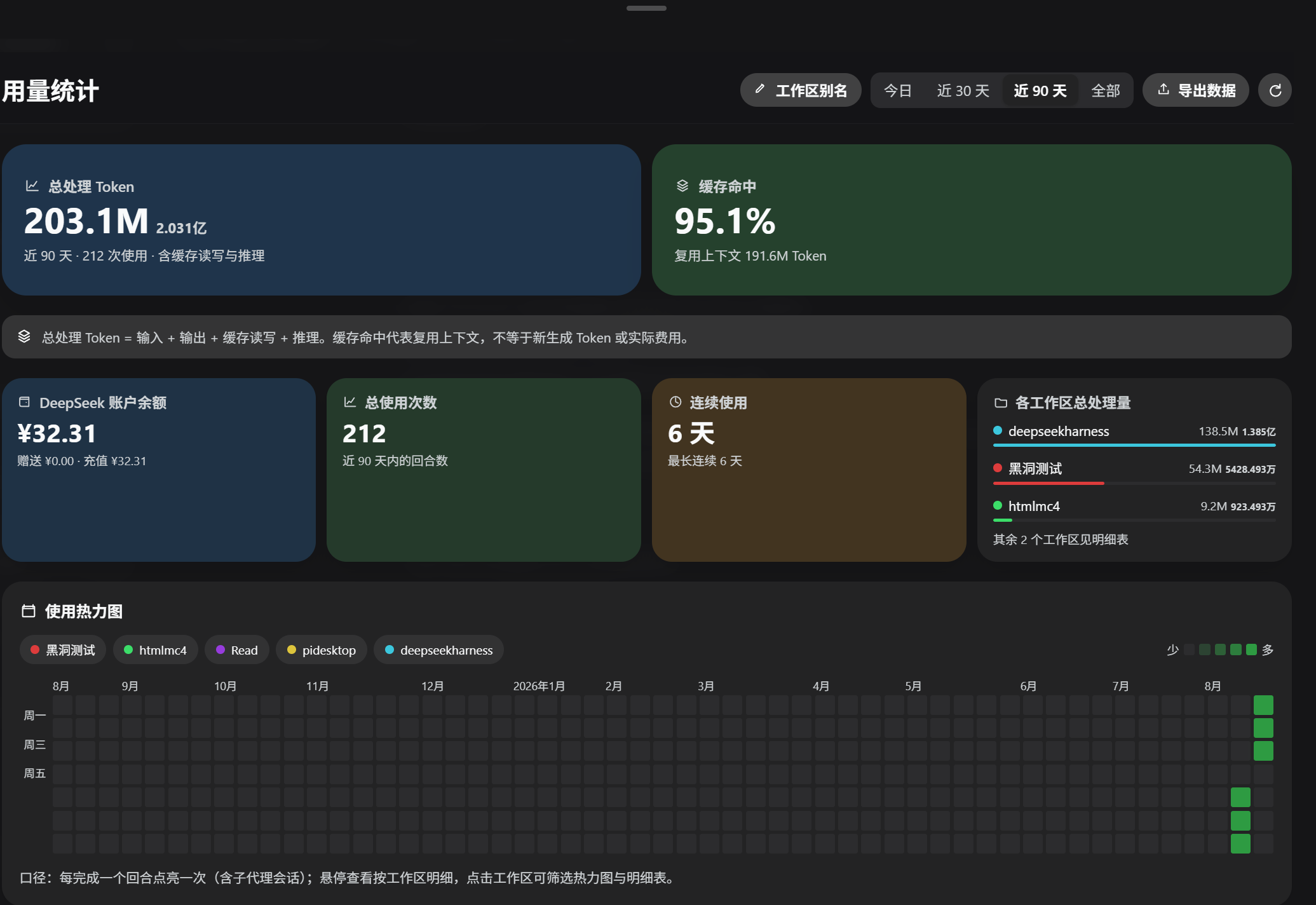
DeepSeek Harness 全量用量看板:按模型、供应商、工作区和时间范围分析 Token、缓存与账户余额。
功能
- 热力图:53 周使用热力图;按工作区筛选并查看每日回合与 Token 明细
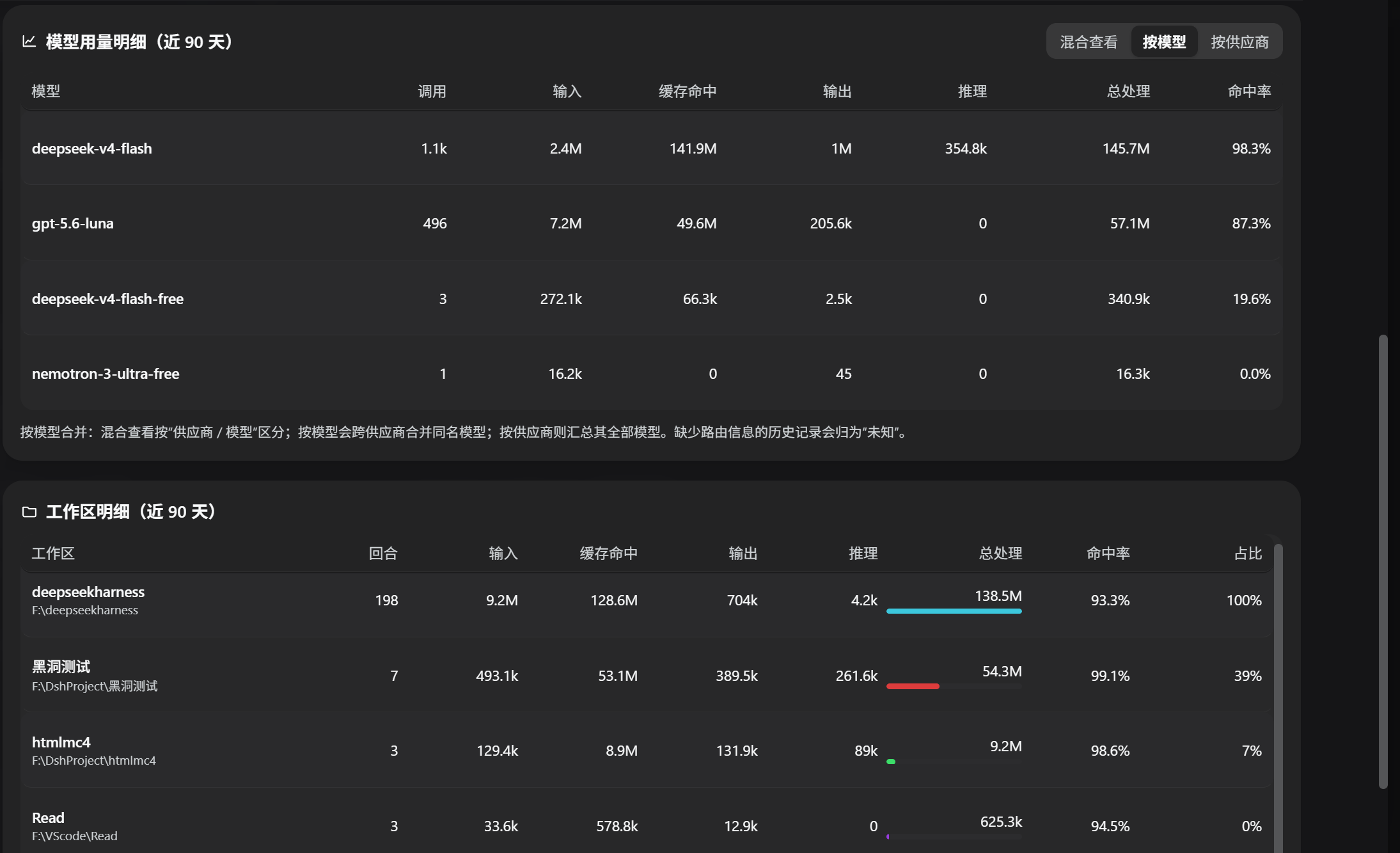
- 模型统计:支持混合查看、按模型合并、按供应商汇总三种维度,展示调用次数、各类 Token 与缓存命中率
- 摘要与工作区:Token 用量、缓存命中、账户余额、连续使用、工作区 Token 分布和明细
- 导出:按当前时间范围和模型聚合方式导出 CSV
- 时间范围:今日、近 30 天、近 90 天、全部,或在全部可扫描历史日数据中自定义起止日期;热力图始终展示最近 53 周
- 工作区别名:在侧栏入口打开看板后管理,持久化保存到 $DSH_HOME/storages 的 KV 单元
all_usage_aliases - 界面语言:在看板顶部切换中文与 English;选择会保存到浏览器本地
最近更新
v1.0.6
- 新增独立用量账本:会话删除后,已成功持久化的回合与 Token 仍会保留
- 修复 inactive Cordis timer 导致 DSH 启动崩溃的问题
- 修复账本重建、重复写入和插件卸载期间的竞态
完整版本记录见 CHANGELOG.md。
截图 / Screenshots
安装
本插件是标准的 DSH 社区插件包(声明 dsh.bundle manifest 与 Web Client),数据来自持久化会话日志和独立用量账本,安装后自动回填历史。
官方插件命令(推荐)
dsh plugin --profile web add github:ParticleLight/dsh-all-usage
安装命令会装配 bundle;随后刷新浏览器页面以加载 Client,无需手动修改 profile。若当前 DSH 版本未动态装配新包,请按 DSH 的提示重载包或重启进程。
手动注册(本地包)
把本目录放入任意位置,并在 $DSH_HOME/profiles/node_modules/ 下创建指向本目录的符号链接(Windows 用 junction):
New-Item -ItemType Junction -Path (Join-Path $env:DSH_HOME 'profiles/node_modules/dsh-all-usage') -Target '<本目录绝对路径>'在 $DSH_HOME/profiles/web/cordis.patch.yml 添加一行:
- insert:
    - id: all-usage
      name: dsh-all-usage
用户 patch 层会被热重载:保存后刷新页面即可。
架构
- Host 端(
lib/index.js):扫描持久化会话日志聚合用量(turn/end+assistant/message.usage),监听session/event实时折叠;通过webServer服务注册数据路由:GET /api/all-usage— 统计快照GET /api/all-usage/balance?force=1— 账户余额(复用llm-deepseek的 API Key 配置)POST /api/all-usage/alias— 设置工作区别名
- Client 端(
lib/client.js):window.__ModuleLoader__工厂格式的浏览器 bundle,注册侧边栏「用量统计」入口(sidebar.footer.action槽位)。所有 API 仅接受本机 loopback 请求并拒绝显式跨域请求;余额读取与别名写入还要求插件启动时生成、仅在当前进程有效的令牌(余额 GET 兼容浏览器省略 Origin)。英文模式的日期分桶、范围筛选、连续使用、热力图和导出时间统一按 UTC;中文模式按本地时区。
数据说明
- 使用次数与 Token 来自 DSH 会话日志,并在
session/flush时写入独立用量账本;插件激活时会回填日志与账本历史,插件卸载/重启后已成功持久化的数据不丢 - 按日范围统计会保留全部可读取历史会话的有使用记录日期;热力图仅作为最近 53 周的固定视图窗口
- 会话删除后,已成功 flush 的用量仍从独立账本恢复;会话销毁提示和周期对账只负责触发重建,不会删除账本记录
- 同一会话的同一
turn / step只保留一份最终 usage;重试或替换消息会替换旧贡献,不重复累计 - 看板中的总处理量 = 输入 + 输出 + 缓存读写 + 推理;缓存命中表示复用的上下文 Token,不等于新生成 Token 或实际费用
- 余额查询走 DeepSeek 官方
/user/balance接口;未配置 API Key 时卡片显示引导文案 - 仅统计能归属到已注册工作区(按会话 cwd 匹配)的会话
开发
- 修改
lib/client.js后刷新页面即可;修改lib/index.js后,需由 DSH 重载该包或重启进程,单纯刷新页面不会替换已运行的 Host 代码 - 插件包无第三方依赖:Host 端只使用 Cordis 服务,Client 端只使用 runtime 提供的 React 模块
English
A full usage dashboard for DeepSeek Harness. Analyze tokens, cache behavior, account balance, and activity by model, provider, workspace, and time range.
Features
- Heatmap: a 53-week activity heatmap with workspace filters and daily turn/token details
- Model analytics: mixed view, model-merged view, and provider summary with calls, token categories, and cache hit rate
- Summary and workspaces: processed tokens, cache hits, account balance, usage streaks, workspace distribution, and details
- CSV export: export data using the selected time range and aggregation mode
- Time ranges: today, last 30 days, last 90 days, all time, or a custom start/end date across all available historical daily data; the heatmap always shows the latest 53 weeks
- Workspace aliases: manage aliases from the sidebar dashboard; values persist in the $DSH_HOME/storages KV cell
all_usage_aliases - Interface language: switch between Chinese and English from the dashboard header; your choice persists locally in the browser
Latest Update
v1.0.6
- Added a durable usage ledger so successfully flushed turns and tokens survive session deletion
- Fixed inactive Cordis timer failures that could crash DSH during startup
- Hardened ledger rebuild, duplicate-write, and plugin-disposal races
See CHANGELOG.md for the complete version history.
Installation
This is a standard DSH community bundle. It declares a dsh.bundle manifest and a web client, and backfills its data from persisted session logs and the durable usage ledger after installation.
Official plugin command (recommended)
dsh plugin --profile web add github:ParticleLight/dsh-all-usage
The installation command assembles the bundle. Refresh the browser page to load the client; no manual profile edits are required. If your DSH version does not dynamically assemble newly installed packages, use its supported package reload or restart the process.
Manual local registration
Place this directory anywhere and create a symlink to it under $DSH_HOME/profiles/node_modules/ (use a junction on Windows):
New-Item -ItemType Junction -Path (Join-Path $env:DSH_HOME 'profiles/node_modules/dsh-all-usage') -Target '<absolute plugin path>'Add this entry to $DSH_HOME/profiles/web/cordis.patch.yml:
- insert:
    - id: all-usage
      name: dsh-all-usage
The profile patch layer hot-reloads; save the file and refresh the page.
Architecture
- Host (
lib/index.js): aggregates persisted session logs (turn/endandassistant/message.usage), folds livesession/eventupdates, and exposes data routes throughwebServer:GET /api/all-usage— usage snapshotGET /api/all-usage/balance?force=1— account balance using the configuredllm-deepseekAPI keyPOST /api/all-usage/alias— update workspace aliases
- Client (
lib/client.js): awindow.__ModuleLoader__browser bundle that registers the “Usage statistics” sidebar entry through thesidebar.footer.actionslot. All API routes accept loopback requests and reject an explicit cross-origin Origin; balance reads and alias writes also require a process-scoped token generated when the plugin starts (the balance GET tolerates browsers omitting Origin).
Data semantics
- Calls and tokens come from DSH session logs and a separate usage ledger written at
session/flush; readable logs and ledger history are backfilled when the plugin activates, so successfully persisted data survives reloads or session deletion - Day-level range data retains every readable historical session date with tracked usage; the heatmap is only a fixed latest-53-week view
- After a session is deleted, successfully flushed usage is restored from the separate ledger; disposal hints and periodic reconciliation trigger rebuilds without deleting ledger rows
- For each session and logical
turn / step, only the final usage contribution is kept; retries or replaced messages do not double-count - Processed tokens = input + output + cache read/write + reasoning; a cache hit means reused context, not newly generated tokens or actual cost
- Balance data comes from DeepSeek’s official
/user/balanceendpoint; the card shows guidance when no API key is configured - English mode uses UTC for date buckets, range filters, streaks, heatmap dates, and export timestamps; Chinese mode uses local time
- Only sessions that can be mapped to a registered workspace by their working directory are included
Development
- After editing
lib/client.js, refresh the page. After editinglib/index.js, reload the package through DSH or restart the process; a page refresh alone cannot replace running host code - The plugin has no third-party package dependencies: the Host uses Cordis services and the Client uses the runtime-provided React module
License / 许可证
MIT
原始 README: https://github.com/ParticleLight/dsh-all-usage/blob/main/README.md ↗
同类插件
查看全部 →
dsh-usage-plugin
DeepSeek Harness 用量与消耗插件(dsh-usage)—— 每次调用的 token 用量/缓存命中统计、峰谷计费、余额查询、CSV/JSON/PNG 导出,可经桌面端一键安装或命令行 dsh plugin add 安装。

dsh-whale-report
🐋 鲸鱼记事本 — 你的 Agent 年度报告:从会话事件日志生成日报/周报/月报/年报,任意区间、只读不改写

dsh-balance-meter
输入框 dock 显示 DeepSeek 账户余额与会话花费,自动拉取官方定价,支持高峰/低谷计价。

dsh-usage-stats
DeepSeek Harness 使用统计插件|Token 总量与构成、7/30 天趋势、年度活跃热力图、模型占比、工作区/任务筛选、CSV/JSON 导出

dsh-balance
DeepSeek 余额实时显示插件: 在 dsh Web UI 输入框 下方、命中率/输入输出 token 统计条所在的同一行 , 实时显示:

dsh-balance-monitor
DeepSeek 账户余额、剩余比例条与今日花费,显示在 dsh 侧边栏底部 · DeepSeek balance, remaining-ratio bar and today's spend in the dsh si