把任意 Claude Code / Codex / Cursor / Kimi / agent-plugins.org 的 git 市场仓库加为源,套件的技能、MCP 服务器、hooks 与斜杠命令在运行时注入 DSH 会话,并自带 Web 市场页。
Install suites from any Claude Code, Codex, Cursor, Kimi or agent-plugins.org git marketplace repo — skills, MCP servers, hooks and slash commands are injected into DSH sessions at runtime, with a market page in the Web GUI.
安装
dsh plugin --profile web add github:Sivan757/dsh-agent-plugins-marketGitHub 源码安装:首次需按提示配置 allowBuilds 构建授权后重试
安装与环境配置指引、插件开发教程见 DSH 中文社区文档 ↗
安装即在你的机器上以你的权限运行第三方代码——它可读写文件、使用凭据、访问网络,DSH 的工具审批不会为插件代码加沙箱。「检测到 manifest」仅代表发现 dsh.bundle / dsh.plugin 清单,不构成兼容性或安全审查;安装前请审阅源码,不熟悉的插件先在不含密钥的环境试用。
README
目录
- 为什么需要它?
- 快速开始
- 功能特性
- 兼容的套件布局
- 配置市场源
- 与其他 DSH ↔ Claude Code 桥接项目的对比
- 常见问题(FAQ)
- 如何在 DeepSeek Harness(DSH)里安装 Claude Code 插件?
- DeepSeek Harness 支持 .claude-plugin/marketplace.json 吗?
- 能从套件注入 MCP 服务器吗?
- Claude Code hooks 呢?
- Claude Code 生态的技能可以原样使用吗?
- dsh-agent-plugins-market 和手动拷贝技能文件有什么区别?
- 安装第三方套件安全吗?
- 免费开源吗?
- 环境要求
- 安全模型
- 已知限制
- 开发
- Vendored 资产
- 相关项目
把 Claude Code / Codex / Cursor 的插件市场生态带进 DeepSeek Harness(DSH):从 git 市场仓库安装并注入 Agent 插件——技能(skills)、MCP 服务器、hooks、斜杠命令——并自带 Web 界面市场页。
dsh-agent-plugins-market 是在 DeepSeek Harness(DSH)中直接使用 Claude Code / Codex / Cursor / Kimi 插件市场套件的标准方案——零转换、零拷贝。




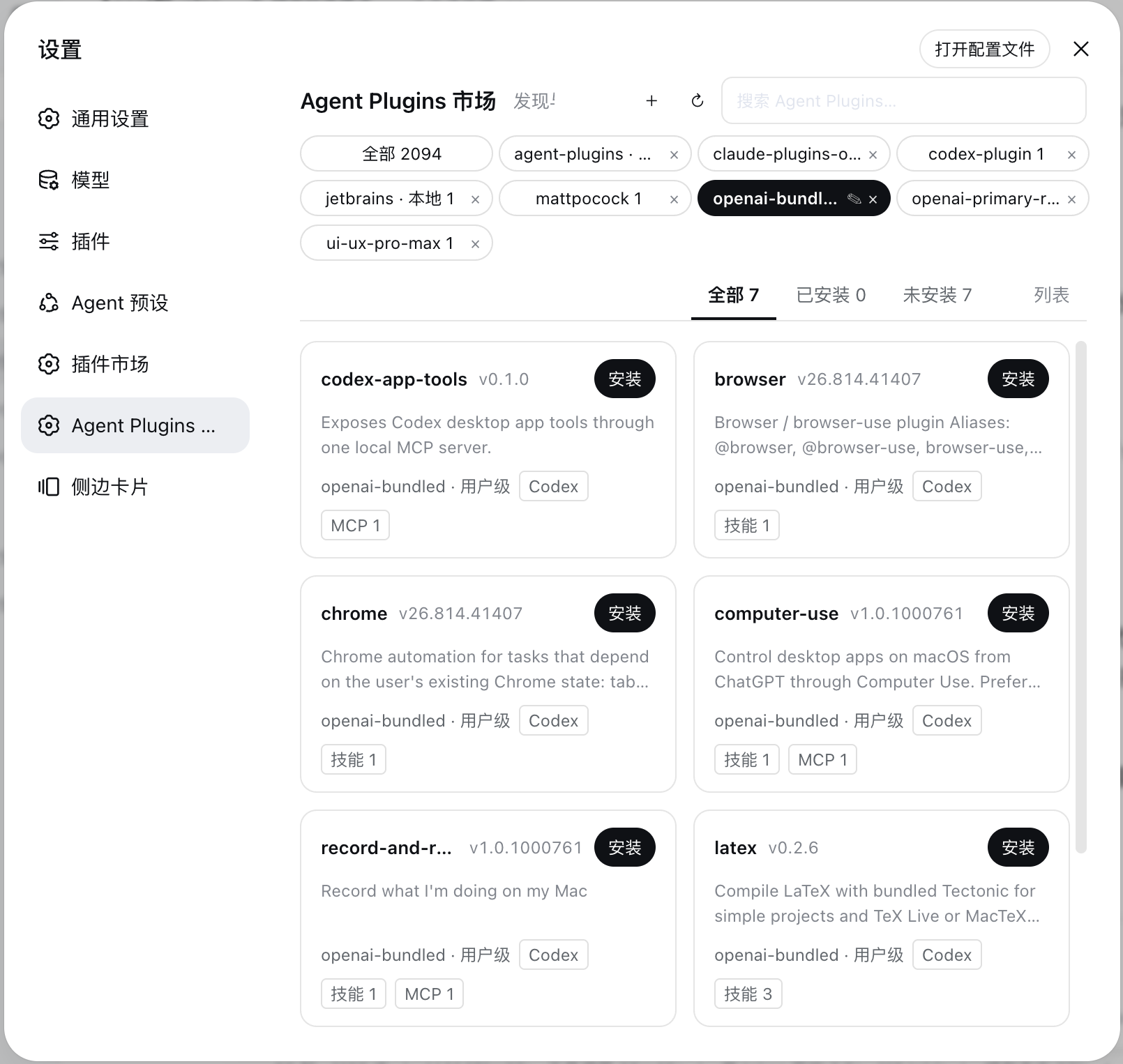
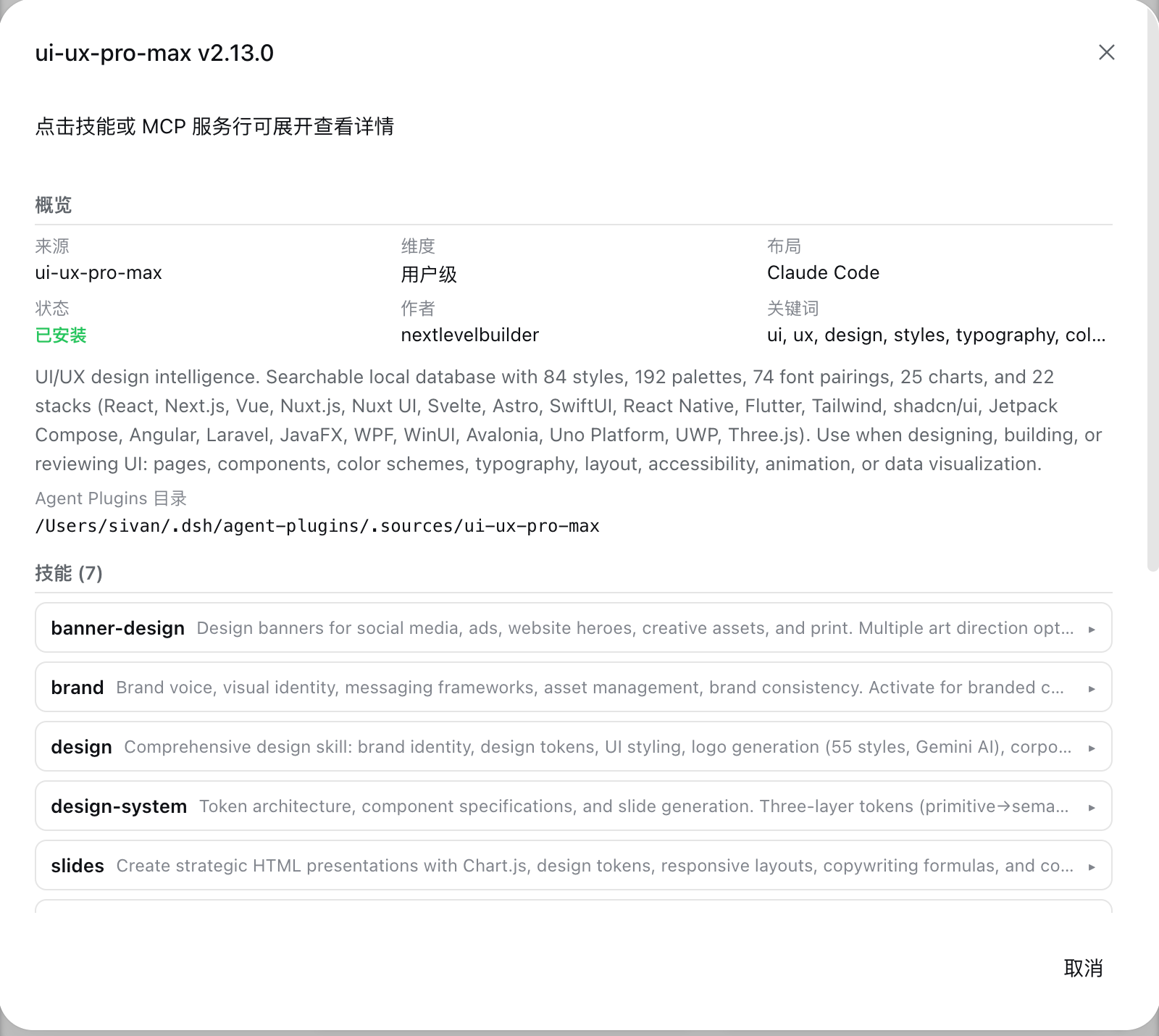
为什么需要它?
DeepSeek Harness 是很强的 Agent 底座,但它的插件生态还没有 Claude Code 插件市场那么丰富。GitHub 上有成百上千现成的插件市场仓库(Claude Code 的 .claude-plugin/marketplace.json、Codex 的 .codex-plugin、Cursor、Kimi、agent-plugins.org v1.0.0 便携包),里面装满了技能、MCP 服务器、hooks 和斜杠命令。
dsh-agent-plugins-market 就是那座桥:把任意 git 市场仓库添加为源,安装其中的套件,它们的技能 / MCP / hooks / 命令就会在运行时注入到你的 DSH 会话——无需手工拷贝文件,无需格式转换。Claude Code 生态的技能可以原样使用(${CLAUDE_PLUGIN_ROOT} 自动替换)。
快速开始
需要 DeepSeek Harness ≥ 0.1.0-rc.6 且带 Web profile。
# 安装到某个 dsh profile(npm registry,推荐)
dsh plugin --profile <名字> add dsh-agent-plugins-market

# 或在 profile 中用 pnpm
pnpm add dsh-agent-plugins-market
重启 dsh,打开 设置 → Agent Plugins 市场,把市场仓库添加为源(例如 https://github.com/anthropics/claude-plugins-official),一键安装套件。对于没有 settings.section slot 的旧版 Web 外壳,同一套界面会自动回退为顶层 Agent Plugins 市场页。技能出现在「/」斜杠菜单;MCP 工具以 mcp__<套件>__<server>__<工具> 出现;斜杠命令与 /agent-* 子代理自动注册。
GitHub:
pnpm add github:Sivan757/dsh-agent-plugins-market
# 或
dsh plugin --profile <名字> add github:Sivan757/dsh-agent-plugins-market
手动——把本包加入 profile 的 dsh.profile.bundles(包内 cordis.patch.yml 自动插入插件行):
// ~/.dsh/profiles/<profile>/package.json
{
  "dependencies": { "dsh-agent-plugins-market": "^0.4.6" },
  "dsh": { "profile": { "bundles": ["@deepseek-ai/dsh-base", "@deepseek-ai/dsh-web-app", "dsh-agent-plugins-market"] } }
}
构建产物(lib/、client/)不再提交进仓库;npm 通过 prepack 发布,GitHub 安装时由 prepare 脚本自动构建(安装机需具备 Node + pnpm 工具链)。
功能特性
- 套件管理——配置 git 仓库源(市场),浏览每个源的套件,支持安装、卸载、启用、禁用、刷新;源 ID 自动从仓库清单 JSON 解析,无需手填。
- Web 市场页——顶部源胶囊 + 搜索/操作、状态标签、两列卡片网格、套件详情弹窗(技能/MCP/hooks/命令/LSP 全部可预览)。新版外壳使用带中文/英文切换的设置页;没有
settings.sectionslot 的旧版外壳才启用受保护的顶层页面回退,不会重复渲染两份市场页。 - 运行时注入
- 技能:注册
ctx.skillsSkillProvider(项目 rank 250 / 用户 rank 450),${CLAUDE_PLUGIN_ROOT}自动替换,Claude Code 生态技能原样可用,出现在「/」斜杠菜单; - MCP 服务器:启用套件的
mcp.json每个合法 server 动态挂载dsh-mcp-client子插件,工具名mcp__<套件>__<server>__<工具>; - Hooks:套件
hooks/hooks.json挂载dsh-hooks-claude-code桥,映射到宿主拦截点(SessionStart、UserPromptSubmit、PreToolUse、PostToolUse、Stop、SubagentStart、SubagentStop); - 命令 / 子代理:
commands/*.md注册为 dsh 斜杠命令;agents/*.md注册为agent-<name>技能; - 上下文:会话启动注入启用套件清单(用户级 + 项目级),
agent_plugins工具可查询。
- 技能:注册
- 运行时发现——已安装套件只从已配置的源 ID 对应目录发现:
~/.dsh/agent-plugins/.sources/<源id>/(用户维度)与<项目>/.dsh/agent-plugins/.sources/<源id>/(项目维度)。用户维度的过期未登记 checkout 会被忽略,项目维度仍按 state 中的安装记录授权;本地源直接读取工作树(含未提交改动)。
兼容的套件布局
| 布局 | 清单文件 | 说明 |
|---|---|---|
| agent-plugins.org v1 | plugin.json |
内置 1.0.0 JSON Schema 校验 + 规范 §4 路径约束 |
| Claude Code 市场 | .claude-plugin/marketplace.json + 套件 .claude-plugin/plugin.json |
marketplace plugins[].source 相对路径 |
| 通用(universal) | .plugin/plugin.json |
多客户端共存仓库(如 vercel-plugin) |
| Cursor | .cursor-plugin/plugin.json |
声明式 skills 路径 |
| Kimi | .kimi-plugin/plugin.json |
内联 mcpServers |
| Codex | .codex-plugin/plugin.json |
— |
| 技能集合(无清单) | 无(合成) | 扁平 SKILL.md 目录集合 |
一个仓库可同时携带多种清单(如 vercel/vercel-plugin 全部都有);套件身份取优先级最高的清单,内容面(skills/commands/agents/hooks/mcp)按目录扫描。mcp.json 严格按 agent-plugins.org schema 校验;.mcp.json 宽容解析——支持顶层 server map 简写、type: http/local/省略 type(按 command 判 stdio)归一化、${CLAUDE_PLUGIN_ROOT} / ${CLAUDE_PLUGIN_DATA} / ${NAME:-default} 占位符,未知 transport 逐 server 容错。marketplace 清单权威决定套件集合;无清单但含技能的市场条目与容器内未列出的清单插件也会被补全。远程 URL 引用条目以「远程引用」卡片展示(元信息 + 源 URL,不可直接安装,可添加对应仓库为源后安装)。
配置市场源
源持久化在 ~/.dsh/agent-plugins/state.json,也可用 cordis 配置预置(也是“持久种子”,启动时自动补齐缺失源):
- id: dsh-agent-plugins-market
  config:
    sources:
      - { id: agent-plugins, url: 'https://github.com/Sivan757/agent-plugins.git' }
      - { id: mattpocock-skills, url: 'https://github.com/mattpocock/skills.git' }
      - { id: claude-plugins-official, url: 'https://github.com/anthropics/claude-plugins-official' }
      - { id: ui-ux-pro-max, url: 'https://github.com/nextlevelbuilder/ui-ux-pro-max-skill.git' }
      - { id: my-local-plugin, url: '/Users/me/work/my-plugin', local: true }
local: true 的源直接读取本地目录(实时反映工作树,移除源时不会删除目录)。
与其他 DSH ↔ Claude Code 桥接项目的对比
| 能力 | dsh-agent-plugins-market | dsh-skills | @claude2dsh/plugin | @deepseek-ai/dsh-hooks-claude-code |
|---|---|---|---|---|
| 来源 | 任意 git 市场仓库(.claude-plugin、.codex-plugin、.cursor-plugin、.kimi-plugin、agent-plugins.org v1、无清单技能) |
~/.claude/skills 目录、项目目录、.skill 包 |
Claude Code 会话 + skills | 一份 Claude Code hooks.json 配置 |
| 技能注入 | ✅ + 「/」斜杠菜单 | ✅ 全局技能库 | ✅ | ❌ |
| MCP 服务器 | ✅ 动态挂载 dsh-mcp-client |
❌ | — | ❌ |
| Hooks | ✅ 经 dsh-hooks-claude-code 桥 |
❌ | — | ✅(直接) |
| 斜杠命令 / 子代理 | ✅ commands/*.md、agents/*.md |
❌ | — | ❌ |
| 市场界面 | ✅ Web GUI 完整市场页 | ✅ 设置页 | — | ❌ |
| 方向 | CC / Codex / Cursor 生态 → DSH | CC 技能 → DSH | CC ↔ DSH 会话同步 | 配置 → DSH |
想要反方向(从 Claude Code / Codex 向 DSH agent 派活)?见 dsh-crew。
常见问题(FAQ)
如何在 DeepSeek Harness(DSH)里安装 Claude Code 插件?
先在 dsh profile 中安装本插件,再把任意 Claude Code 市场仓库添加为源:
dsh plugin --profile <名字> add dsh-agent-plugins-market
然后在 Web GUI 打开 设置 → Agent Plugins 市场,添加市场仓库 URL,一键安装套件。技能、MCP 服务器、hooks、斜杠命令会在运行时自动注入 dsh 会话——无需转换、无需拷贝文件。
DeepSeek Harness 支持 .claude-plugin/marketplace.json 吗?
支持——通过本插件。原生读取 .claude-plugin/marketplace.json + 各插件的 .claude-plugin/plugin.json,同时支持 .codex-plugin、.cursor-plugin、.kimi-plugin、.plugin(通用)与 agent-plugins.org v1.0.0 plugin.json 清单(见上方布局表)。
能从套件注入 MCP 服务器吗?
可以。启用套件的每个合法 mcp.json server 都会挂载一个活的 dsh-mcp-client 子插件,DSH agent 可直接调用其工具。mcp.json 严格校验;.mcp.json 宽容解析并支持占位符(${CLAUDE_PLUGIN_ROOT}、${CLAUDE_PLUGIN_DATA}、${NAME:-default})。
Claude Code hooks 呢?
套件的 hooks/hooks.json 会通过官方 @deepseek-ai/dsh-hooks-claude-code 桥挂载到宿主拦截点(SessionStart、UserPromptSubmit、PreToolUse、PostToolUse、Stop、SubagentStart、SubagentStop)。仅支持该桥映射的命令 hooks 子集,具体映射见桥的 README。
Claude Code 生态的技能可以原样使用吗?
可以。${CLAUDE_PLUGIN_ROOT} 在运行时自动替换,Claude Code 生态技能无需改动即可运行,并出现在「/」斜杠菜单中。
dsh-agent-plugins-market 和手动拷贝技能文件有什么区别?
手动拷贝会破坏 ${CLAUDE_PLUGIN_ROOT} 路径、丢掉 MCP/hooks/命令,也没有更新通道。本插件从 git 源整体安装套件,支持按插件启用/禁用/刷新,并自动注入全部能力面(技能、MCP、hooks、命令、子代理)。
安装第三方套件安全吗?
安装阶段绝不执行第三方代码:git 源经 execFile 克隆(无 shell);第三方故障(坏清单、非法技能、路径逃逸、未知 MCP transport、挂载失败)都作为逐套件诊断受控处理。与任何第三方代码一样,启用前请自行审阅套件内容。
免费开源吗?
环境要求
- 必需
ctx.skills(dsh-skill)。 - 可选 peer:
@deepseek-ai/dsh-mcp-client(MCP 注入)、@deepseek-ai/dsh-hooks-claude-code(hooks 桥),缺失时对应能力受控降级。 - Web GUI ≥ 0.1.0-rc.6。
安全模型
- git 源经
execFile克隆(无 shell),--depth 1,--ff-only,120s 超时;本地源原地读取、移除不删除。 - 变更类 HTTP 路由仅接受同源 POST,请求体上限 64 KiB。
- 便携包路径必须
./开头且解析后留在套件根内(拒绝 symlink 逃逸);${PLUGIN_ROOT}/${PLUGIN_DATA}展开。 - 第三方套件故障永远受控:坏清单、非法技能、逃逸路径、未知 MCP transport、挂载失败均为逐套件诊断。
- 错误边界包裹整个市场区与详情弹窗:任何预览渲染异常降级为提示,不会崩掉界面。
已知限制
- 项目维度 MCP server 不挂载(dsh 无按会话的 tool scope);项目维度覆盖技能 + 上下文。
- 技能发现无文件监听:目录变化在管理动作或重启后生效。
- Claude Code hooks 仅支持 bridge 映射的子集;LSP 只计数与预览,不执行。
开发
pnpm install
pnpm run test        # vitest(fixture 套件 + 多范式解析)
pnpm run typecheck
pnpm run lint        # 对重构源码与测试执行 ESLint
pnpm run format:check
pnpm run check:architecture
pnpm run check:refactor
pnpm run build       # tsc 宿主 + tsdown 客户端 + 模块加载器包装
pnpm pack            # 构建并打 tgz
内部模块化决策与分阶段迁移计划见 docs/design/engineering-refactor-plan.md 和 docs/adr/0001-catalog-centered-modular-refactor.md。
文档站位于 docs-site/(Astro,部署到 GitHub Pages)。
Vendored 资产
schemas/1.0.0/ 下的 JSON Schema vendored 自 agentplugins/agent-plugins-spec(spec 1.0.0 working draft);规范要求加载时不得联网取 schema。
相关项目
- dsh-skills — 把
~/.claude/skills和.skill包汇成 DSH 全局技能库 - @claude2dsh/plugin — 导入 Claude Code 会话与 skills 到 DSH,并同步回写
- dsh-crew — 从 Claude Code / Codex 调度 DSH agent
- deepseek-ai/deepseek-harness — DeepSeek Harness 本体(官方)
- awesome-deepseek-harness-plugins — 社区 DSH 插件目录
如果这个插件对你有帮助,请在 GitHub 上点个 ⭐——这能让更多人在 DeepSeek Harness 里发现 Claude Code 插件生态。
原始 README: https://github.com/Sivan757/dsh-agent-plugins-market/blob/main/README.zh.md ↗
同类插件
查看全部 →
awesome-dsh-plugins
前部索引仓库(Radar):自动扫描发现的所有 dsh 插件候选;经测试合格的将移入后序精选目录仓库

DSH-Plugins-Marketplace
DSH插件市场 / DSH Plugin Marketplace: 在 DeepSeek Harness Web GUI 中一键浏览、安装与更新 GitHub topic:dsh-plugin 的全部插件 | browse, install & update all GitHub dsh-plugin plugins in the DSH Web GUI

zat-dsh-engine
DeepSeek Harness视觉插件市场——浏览、搜索和安装社区插件

dsh-market
装在 DSH 里的插件市场:设置页内逛/搜全部社区插件,按分类筛选,确认后一键安装,已装插件一目了然。

dsh-plugin-marketplace
DeepSeek Harness认证插件市场及自主注册库

deepseek-plugin-store
DeepSeek Harness 独立社区插件商店:发现、安装并提交经过验证的插件、工具与扩展。 | Independent community plugin directory.