dsh-mobile-access
by alexcarterio
DeepSeek Harness手机端使用必备:设备批准的LAN网关、移动布局、推送通知和PWA资源
Everything you need to use DeepSeek Harness from your phone: LAN gate with device approval, mobile layout, push notifications, and PWA assets
安装
dsh plugin --profile web add github:alexcarterio/dsh-mobile-accessGitHub 源码安装:首次需按提示配置 allowBuilds 构建授权后重试
安装与环境配置指引、插件开发教程见 DSH 中文社区文档 ↗
安装即在你的机器上以你的权限运行第三方代码——它可读写文件、使用凭据、访问网络,DSH 的工具审批不会为插件代码加沙箱。「检测到 manifest」仅代表发现 dsh.bundle / dsh.plugin 清单,不构成兼容性或安全审查;安装前请审阅源码,不熟悉的插件先在不含密钥的环境试用。
README
目录
- Features
- Security model
- Requirements
- Installation
- 1. Place the plugin
- 2. Register the plugin
- 3. Restart DSH
- 4. Open from another device
- 5. Parse uploaded attachments (optional)
- Configuration
- Phone setup
- 1. Desktop side: join a tailnet (Tailscale)
- 2. Desktop side: HTTPS via Tailscale Serve (recommended)
- 3. Desktop side: phone notifications (ntfy)
- Limitations
- License
- Credits & References

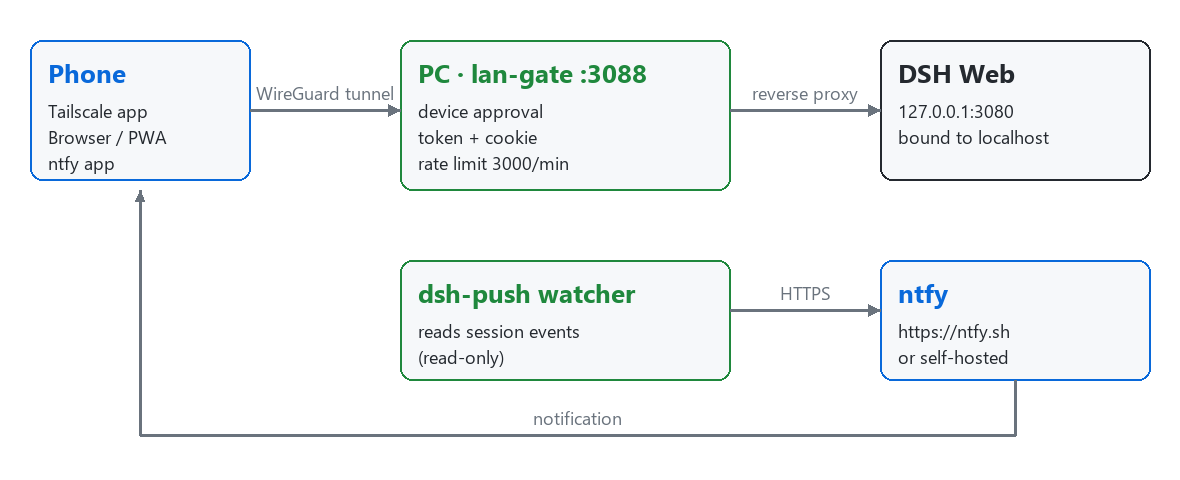
Everything you need to use DeepSeek Harness (DSH) from your phone: a secure LAN gate plugin with device approval, a mobile-friendly layout, phone push notifications, and PWA installation assets.
The core is a self-contained, dependency-free Cordis plugin (lan-gate.mjs)
that exposes your local DSH web UI to trusted LAN / Tailscale devices through a
device-approved, token-bound reverse proxy — plus an optional dsh-push helper
that forwards DSH session events to your phone over
ntfy.
Features
- Device approval flow — a new device sees a "waiting for approval" gate page and cannot reach DSH until you approve it from the desktop.
- Per-device access mode — each approved device can be set to
auto,phone, ordesktop. Phone mode injects a compact layout; desktop mode keeps the desktop layout even in a narrow window. - Token + cookie binding — one approval issues a 128-bit random token, issued once via an
HttpOnly/SameSite=Laxcookie (theSecureflag is added on the HTTPS/Tailscale Serve entry). Tokens expire after 90 days, and a browser on the same IP automatically re-claims instead of getting stuck on a "bound to another browser" page. Revoking a device drops its access immediately. - Rate limiting — per-IP sliding-window limit (default 3000 requests/minute, raised from the upstream 120), returning
429on overflow to blunt scanners and brute-force attempts. - Mobile layout — compact phone CSS, full-screen dialogs, non-obscuring model/context menus, iOS focus-zoom prevention, and a
crypto.randomUUIDpolyfill for non-HTTPS intranet contexts. - Attachment upload —
POST /lan-gate/uploadaccepts files up to 20 MB, saved under$DSH_HOME/uploads/with a 7-day automatic cleanup. A companion scripttools/parse_file.pyconverts common attachment formats (txt/docx/pdf/zip/7z/rar) to readable text. - Phone gallery / camera buttons — injected floating buttons that reuse the desktop paste path (or fall back to inserting an
<img>). - Admin panel — an in-app panel under Settings → LAN Access to view status, approve/deny devices, switch access modes, revoke devices, and copy access URLs.
- ntfy phone push (
dsh-push) — a standalone watcher that sends a high-priority notification when DSH is waiting for your approval or a reply, and a normal notification when a task turn finishes.
Security model
The plugin is designed to run only on trusted networks. It does not provide end-to-end HTTPS and must never be exposed directly to the public internet.
- Network layer (firewall) — allow inbound traffic to the gate port (
3088by default) only from your LAN or your Tailscale subnet (100.64.0.0/10). Everything else stays unreachable. - Application layer (approval + token) — every new device must be approved on the desktop, then receives a one-time token issued via a single-browser-bound cookie. Tokens expire after 90 days, and a same-IP device automatically re-claims instead of being stuck. Revocation cuts the connection.
- Host process — the DSH web server itself stays bound to
127.0.0.1:3080; only the in-process gate proxy forwards to it. The local-only control routes (/lan-gate/status,/lan-gate/action,/lan-gate/upload) reject non-local requests by checkingx-forwarded-forand additionally enforce anOriginallow-list (loopback / LAN IPs /*.ts.net) against CSRF. - Serve entry client IP resolution — traffic arriving through
tailscale serve(HTTPS entry) comes from loopback but carries thetailscale-user-loginheader andx-forwarded-for; the gate trusts that forwarded IP only on loopback + Serve-header requests, so per-device approval still applies to each tailnet device instead of collapsing them all into the local machine.
Warning: do not bind DSH itself to
0.0.0.0and do not port-forward the gate port to the public internet. Use it only inside a trusted LAN or a Tailscale tailnet.
Requirements
- DeepSeek Harness installed via npm (see the upstream repo for installation). The
webprofile must serve the UI on127.0.0.1:3080. - Node.js — whatever version your DSH runs on (the plugin is a single
.mjsfile with no dependencies). - Tailscale (optional, recommended for phone access) — a client on the desktop and on each phone, logged into the same account.
- ntfy (optional) — for phone notifications: the ntfy app on your phone, and Python 3 with the
requestsandzstandardpackages fordsh-push.
Installation
1. Place the plugin
Copy lan-gate.mjs into your DSH home:
~/.dsh/lan-gate/lan-gate.mjs
($DSH_HOME defaults to ~/.dsh; set DSH_HOME to override it.)
2. Register the plugin
Merge the following into ~/.dsh/profiles/web/cordis.patch.yml (see cordis.patch.yml.example for the full annotated version):
- insert:
    - id: lan-gate
      name: 'file:///C:/Users/<you>/.dsh/lan-gate/lan-gate.mjs'
Adjust the file:/// path to your real, absolute lan-gate.mjs location (Windows file:///C:/..., macOS/Linux file:///home/... or file:///Users/...).
3. Restart DSH
Restart DSH so the user patch is loaded. On startup the plugin logs:
[lan-gate] listening on 0.0.0.0:3088 -> 127.0.0.1:3080
4. Open from another device
On a device on the same LAN, visit:
http://<lan-ip>:3088
where <lan-ip> is this machine's LAN IP. The device shows a "waiting for approval" page until you approve it in Settings → LAN Access.
5. Parse uploaded attachments (optional)
tools/parse_file.py converts a downloaded attachment into readable text (or
extracts an archive):
py tools/parse_file.py <file> [output]
- Without
[output], it writes<file>.parsed.txtand prints the first 500 characters to stdout. - Supported:
txt/md/csv/json/xml/yaml/logand common code files (read as text),docx,pdf, and archiveszip/7z/rar(extracted to a same-named directory;rarneeds WinRAR/unrar installed).
Install its optional dependencies once:
pip install python-docx pypdf py7zr rarfile
Configuration
| Environment variable | Default | Description |
|---|---|---|
LAN_GATE_PORT |
3088 |
Port the gate proxy listens on. |
LAN_GATE_HOST |
0.0.0.0 |
Listen address. Set to 127.0.0.1 when a reverse proxy/tunnel (e.g. tailscale serve) sits in front. |
- Rate limit — hardcoded to
3000requests/minute per IP (sliding window). It is intentionally not tunable via env; edit theRATE_LIMIT_PER_MINconstant inlan-gate.mjsif you must, then restart DSH. - Approval state — persisted at
$DSH_HOME/lan-gate-state.json. Approvals expire after 90 days (TOKEN_TTL_MS); delete the file to reset all approvals immediately. - Uploads — stored at
$DSH_HOME/uploads/, auto-cleaned after 7 days.
Phone setup
On the phone, follow the platform guide:
| Platform | Guide |
|---|---|
| 📱 Android | docs/phone-guide-android.md — Tailscale, entry addresses, PWA install, ntfy, troubleshooting |
| 🍎 iPhone / iPad | docs/phone-guide-ios.md — same steps, with the iOS home-screen and notification specifics |
The full administrator-side manual (architecture, firewall, maintenance,
upgrade) lives in docs/install-guide.md.
1. Desktop side: join a tailnet (Tailscale)
- Install Tailscale on the desktop and on the phone.
- Log both devices into the same Tailscale account.
- Confirm both appear in the Tailscale admin console.
Find the desktop's Tailscale IP with:
tailscale ip -4
2. Desktop side: HTTPS via Tailscale Serve (recommended)
tailscale serve provides a valid TLS certificate so the phone browser offers
the "Install app" (PWA) flow:
tailscale serve --bg --yes --https=3443 http://127.0.0.1:3088
Then open https://<your-device>.your-tailnet.ts.net:3443 on the phone.
- Inspect:
tailscale serve status - Remove:
tailscale serve reset
The PWA icon/manifest/service-worker assets for the DSH frontend are documented
in pwa/pwa-setup.md.
3. Desktop side: phone notifications (ntfy)
dsh-push forwards DSH events to your phone via ntfy. See
dsh-push/README.md for the full guide, privacy notes,
and configuration.
| Environment variable | Description |
|---|---|
NTFY_URL |
Push server, default https://ntfy.sh (self-hosting supported). |
NTFY_TOPIC |
Your topic name — treat it like a secret; never publish it. |
NTFY_TOKEN |
Optional ntfy access token. |
Run it (from dsh-push/):
py dsh_push.py            # run continuously
py dsh_push.py --test     # send a test notification
Or start it as a background process on Windows with dsh-push/start_push.bat (uses %~dp0, so it works from any location).
Install dependencies once:
pip install requests zstandard
Subscribe your phone by opening https://ntfy.sh/<your-ntfy-topic> in the ntfy app.
Limitations
- No end-to-end HTTPS — the app layer is plain HTTP inside the WireGuard tunnel; the tunnel itself is the encryption boundary.
- Depends on the Tailscale control plane — device discovery relies on the Tailscale coordination service (data path is peer-to-peer). Self-hosted
headscaleis a more advanced alternative. - Notifications do not deep-link — Tailscale domains cannot pass WebAPK App Links verification, so tapping a notification opens the browser rather than the installed app.
- DSH upgrades may revert PWA changes — icon/manifest/service-worker edits to the built frontend
distneed to be re-applied after a DSH upgrade. - Same process as DSH — the plugin runs in-process (no subprocess, no external calls); re-audit after DSH upgrades.
License
MIT.
Credits & References
This project builds on the work of the following projects:
- hchao3335-maker/dsh-lan-gate — the
lan-gate.mjsplugin is derived from hchao3335-maker/dsh-lan-gate (MIT). This release preserves the upstream MIT license and adds: rate limit 120 → 3000, attachment upload endpoint, 7-day upload cleanup, phone gallery/camera buttons, and menu layout adjustments. SeeNOTICE. - Leon0555/dsh-lan-access — a similar solution, reviewed as research reference.
- DeepSeek Harness — the host platform.
- Tailscale — the mesh VPN used for secure remote access.
- ntfy — the push-notification
service used by
dsh-push.
原始 README: https://github.com/alexcarterio/dsh-mobile-access/blob/main/README.md ↗
同类插件
查看全部 →
dsh
将 DeepSeek Harness 的生命周期状态、错误与审批请求,桥接到本地运行的 OpenPets 桌面伙伴。

dsh-qqbot
让 QQ Bot 接入 DeepSeek Harness(dsh)的官方插件

dsh-open-in-vscode
从 Web GUI 一键在 VS Code 中打开工作区目录。
dsh-notification
回合完成桌面通知,按结果分控 + 关键词过滤。

dsh-notifier
DSH 统一通知推送与远程控制:一个 `notify()` API 打通 25+ 渠道(Telegram / 钉钉 / 飞书 / 企业微信 / QQ 机器人 / WxPusher / PushPlus / Server 酱 / Bark / Discord / Slack / ntfy / webhook 等),timeSensitive / active / passive 分级路由并重试;五通道反向审批(Telegram 按钮 / 飞书卡片 / QQ / WxPusher / 微信 iLink);QQ/钉钉/飞书官方扫码登录;本地 Web 管理台;多 agent 路由;系统桌面通知——以及**手机指挥中心**:在手机上发 `!status` / `!stop` / `!retry` 遥控 agent,通知带可操作按钮(查看结果 / 重试 / 日志,点击回调 agent)。密钥脱敏、工具限流、零运行时依赖。

chatccc
飞书(Lark)或微信(WeChat)聊天控制 DeepSeek Harness / Claude Code / Cursor / Codex / CCC Agent