dsh-emoji-wallet
by ankesu
DSH 的精简 DeepSeek 余额钱包:点击一次即可在会话头部查看 API 余额。
Minimal DeepSeek balance wallet for DSH: one click shows your API balance in the session header. · DSH 余额小钱包:顶栏一点看余额
安装
dsh plugin --profile web add github:ankesu/dsh-emoji-walletGitHub 源码安装:首次需按提示配置 allowBuilds 构建授权后重试
安装与环境配置指引、插件开发教程见 DSH 中文社区文档 ↗
安装即在你的机器上以你的权限运行第三方代码——它可读写文件、使用凭据、访问网络,DSH 的工具审批不会为插件代码加沙箱。「检测到 manifest」仅代表发现 dsh.bundle / dsh.plugin 清单,不构成兼容性或安全审查;安装前请审阅源码,不熟悉的插件先在不含密钥的环境试用。
README



A minimal DeepSeek balance wallet for DeepSeek Harness: one click shows your API balance right in the session header.
DSH 余额小钱包:顶栏一个 💰,点一下就知道 DeepSeek API 还剩多少钱。
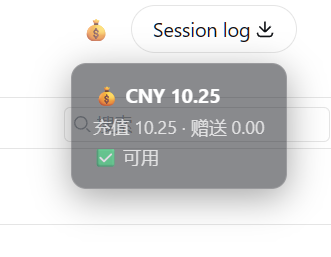
Features / 功能
- 💰 One-click balance — a small wallet button in the session header (right side, next to Session log)
- 🔒 Key never leaves the host — the browser only ever sees the balance numbers; the API key is read from the harness credentials file (
~/.dsh/.credentials.yaml) on the host - 🫧 Semi-transparent bubble — click to open, click again to close (auto-closes after 8s)
- 🎛️ No config needed — reads
DEEPSEEK_API_KEYautomatically
Install / 安装
dsh plugin --profile web add dsh-emoji-wallet
Restart the harness. A 💰 button appears in the session header, right next to Session log. Click it to see your balance.
How it works / 原理
- Host half:
GET /api/wallet/balancereadsDEEPSEEK_API_KEYfrom~/.dsh/.credentials.yamland querieshttps://api.deepseek.com/user/balance - Client half: a slot component in
conversation.session.header.utilities(the same container as Session log), positioned before it with flexorder: -1
License
MIT
原始 README: https://github.com/ankesu/dsh-emoji-wallet/blob/main/README.md ↗
同类插件
查看全部 →
archify
Agent 技能:生成美观、可校验的架构图、工作流图、时序图、数据流图与生命周期图——自包含 HTML、带动画与清晰导出

dsh-turn-rewind
对话回退:基于持久 Change Ledger 回滚会话与工作区状态。

dsh-plugin-cc
把 DeepSeek Harness 接入 Claude Code:评审、批评、委派与会话导入

dsh-interconnect
跨实例互联:经 interconnect 服务在多个 DSH 实例间转发消息与事件。

dsh-chat-import
把 13 家 coding agent(Claude Code、Codex、ChatGPT、Cursor、Gemini、opencode 等)的完整对话历史导入为可续聊的 DeepSeek Harness 会话,并支持反向导出回 Claude Code。

dsh-crew
DSH 插件:从 Claude Code / Codex 向 DSH agent 派活——原生 subagent 进度、宿主内 worker 会话(分级预设),以及为纯文本宿主补上视觉与图像生成的多模态桥