dsh-mermaid-image-preview
by baconbao
DeepSeek Harness插件,用于聊天会话中通过图像预览Mermaid图
A DeepSeek Harness Plugin for Previewing Mermaid Diagram by Images in Chat Sessions
安装
dsh plugin --profile web add github:baconbao/dsh-mermaid-image-previewGitHub 源码安装:首次需按提示配置 allowBuilds 构建授权后重试
安装与环境配置指引、插件开发教程见 DSH 中文社区文档 ↗
安装即在你的机器上以你的权限运行第三方代码——它可读写文件、使用凭据、访问网络,DSH 的工具审批不会为插件代码加沙箱。「检测到 manifest」仅代表发现 dsh.bundle / dsh.plugin 清单,不构成兼容性或安全审查;安装前请审阅源码,不熟悉的插件先在不含密钥的环境试用。
README
目录



A DeepSeek Harness Plugin for Previewing Mermaid Diagram Images
Preview mermaid syntax as images via local rendering in DSH Web when the chat message contains a mermaid fenced code block (```mermaid or ```mmd ).
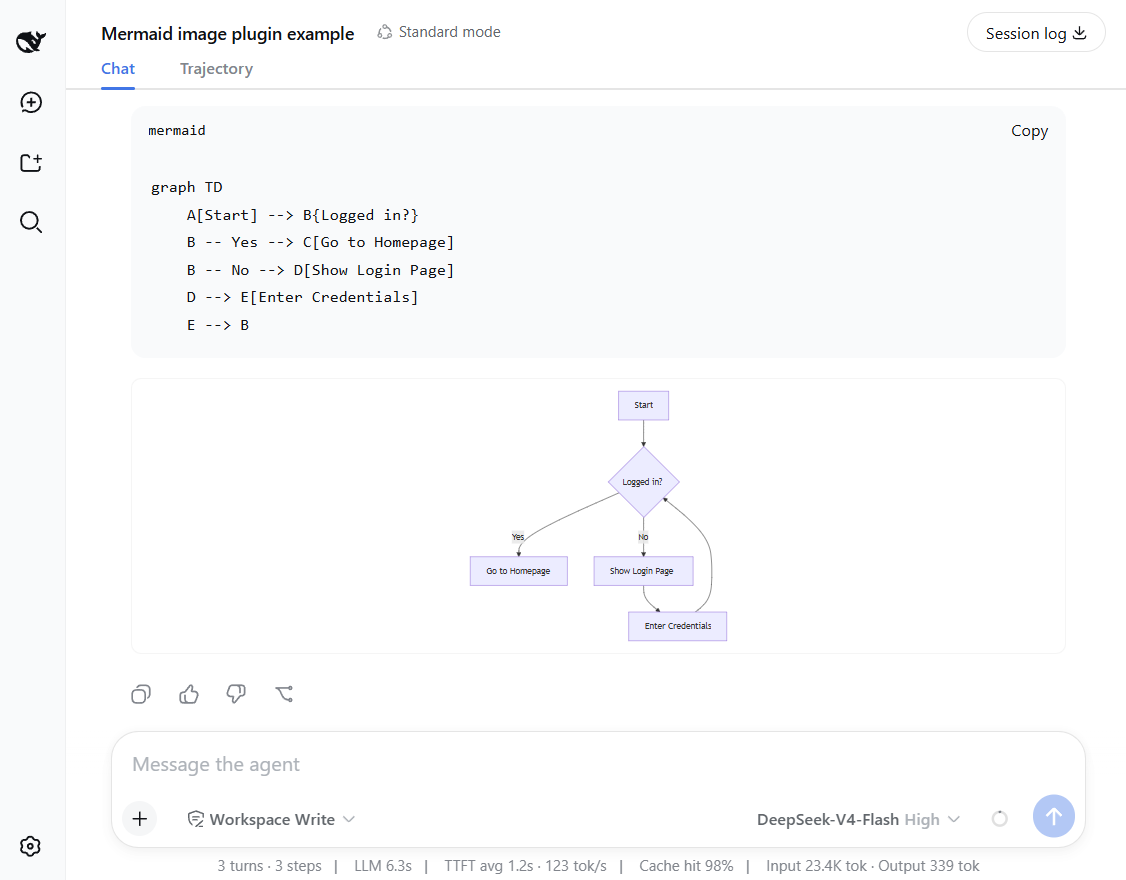
Features and how it works
- Preview mermaid diagrams by rendering images directly!
- Local renderer first! If it fails, it can fall back to an external or self-hosted rendering engine by configuring a fallback server.
- Setting card: you can adjust runtime settings in the UI - no restart needed.
- Mount point:
conversation.chat.turnTail(chain slot, additive - never shadows shipped UI). - Thumbnail display: the diagram renders as a thumbnail; click to enlarge in place, click again to shrink back (same element toggles, no popup).
- Light/dark themes follow the UI automatically.
Support diagram types
The plugin renders diagrams locally with a built-in renderer. It supports 14 diagram types out of the box.
Rendered locally: flowchart, sequenceDiagram, classDiagram, stateDiagram, erDiagram, pie, journey, gitGraph, requirementDiagram, timeline, quadrantChart, packet-beta, xychart-beta
Expand: gantt, mindmap, block-beta, sankey-beta, architecture-beta, zenuml, C4Context
[!NOTE] You can enable the fallback to render expanded types — see Configuration below.
Installation
Installation from github
### latest release version
$ npx @deepseek-ai/dsh plugin --profile web add github:baconbao/dsh-mermaid-image-preview#latest

### specific version
$ npx @deepseek-ai/dsh plugin --profile web add github:baconbao/dsh-mermaid-image-preview#<VERSION_TAG|GIT_TAG>

### dev version
$ npx @deepseek-ai/dsh plugin --profile web add github:baconbao/dsh-mermaid-image-preview#dev
Installation from source code
$ git clone https://github.com/baconbao/dsh-mermaid-image-preview
$ cd dsh-mermaid-image-preview
$ pnpm install
$ dsh plugin --profile web add .
[!IMPORTANT] Restart dsh web after installing.
Configuration
Change runtime settings on setting card
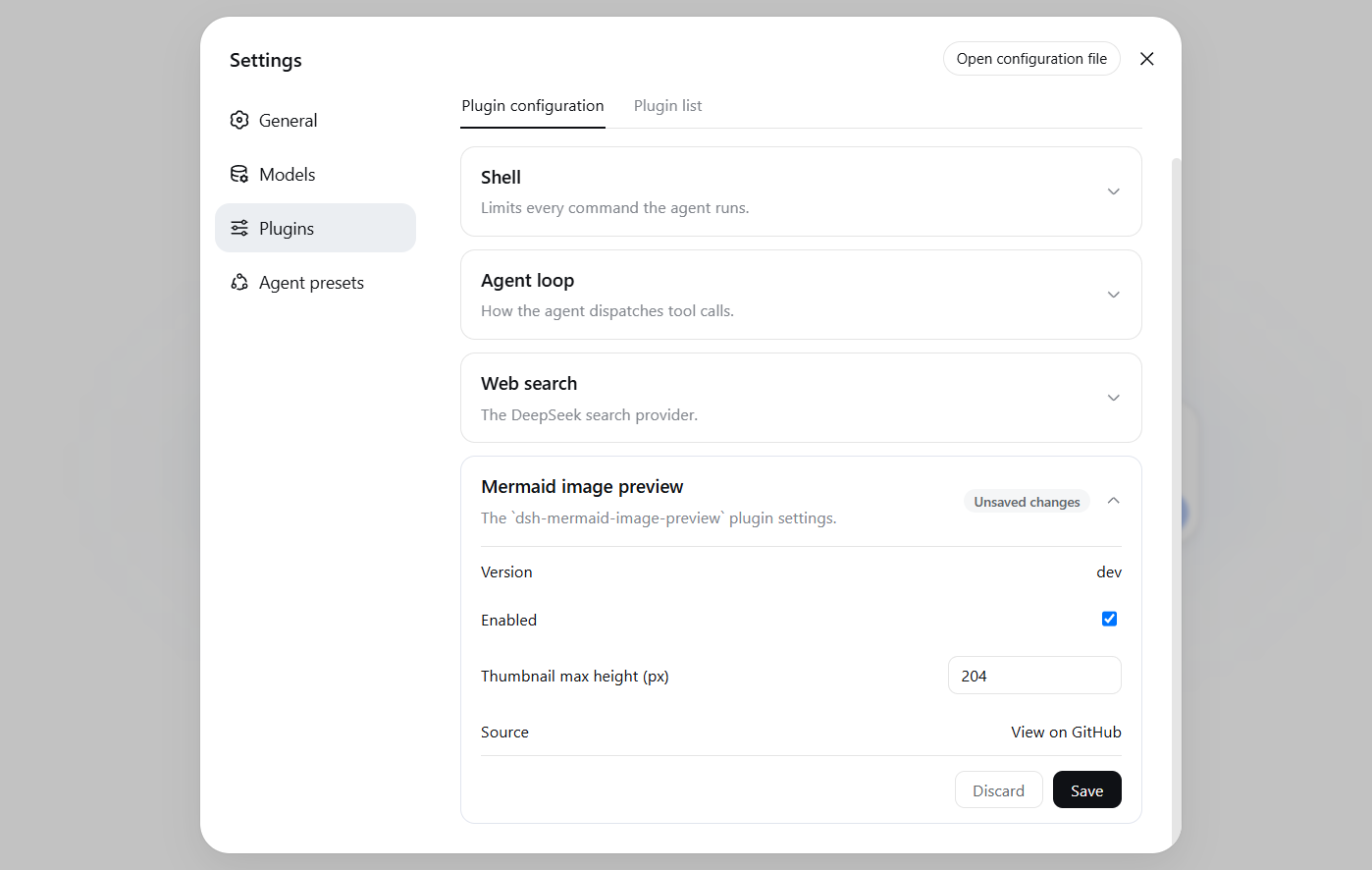
The Plugins settings page (Settings > Plugins) shows a Mermaid image preview card where
you can adjust plugin's runtime settings directly - no restart needed.
Values are stored in localStorage and applied immediately across all sessions.
Change render server by profile patch
Diagrams are rendered locally by default. To use your own render server or
enable the external fallback, edit the profile's cordis.patch.yml (e.g.
~/.dsh/profiles/web/cordis.patch.yml):
- id: ui-dsh-mermaid-image-preview
  config:
    enableLocalRender: true
    fallbackRenderUrl: https://mermaid.ink
    enableFallback: false
enableLocalRender: render locally (defaulttrue). Setfalseto always use the fallback server (enableFallbackis ignored).fallbackRenderUrl: fallback render server (defaulthttps://mermaid.ink).enableFallback: use the fallback server when local rendering fails (defaultfalse).- Restart dsh web after changing these settings.
- To host your own fallback render server, see https://github.com/jihchi/mermaid.ink for the details.
Uninstallation
$ dsh plugin --profile web remove @baconbao/dsh-mermaid-image-preview
[!NOTE] Since v0.2.0 the plugin/package id is changed from
dsh-mermaid-image-previewto@baconbao/dsh-mermaid-image-preview.
Test
Ask the agent to produce:
```mermaid
graph TD
  A[Start] --> B{Success?}
  B -->|Yes| C[Done]
  B -->|No| D[Retry]
```
Author
baconbao, vibe coding with deepseek ai
License
原始 README: https://github.com/baconbao/dsh-mermaid-image-preview/blob/latest/README.md ↗
同类插件
查看全部 →
dsh-web-ui-all
DSH Web UI 插件与皮肤合集:任务看板、git 图、右侧面板、远程移动端 UI、桌宠、实时 token 统计与皮肤中心。
dsh-web-ui
DSH Web UI 插件与皮肤合集:任务看板、git 图、右侧面板、远程移动端 UI、桌宠、实时 token 统计与皮肤中心。

dsh-TUI
Claude Code 风格全屏终端 UI:像素鲸鱼顶栏、实时工作状态行、思考流式展开。

DSH-better-sidebar
侧边栏完整工作台:内置文件渲染编辑、终端、Git 与子代理,支持三方插件注册新 Tab。
working-activity
让 agent 的"工作状态行"活过来——实时工具动态与进度、俏皮文案、模型自述、上下文预警。同一套想法,适配两个平台: pi CLI 与 DeepSeek Harness(DSH) 。

deepseek-idesign
可视化设计工作室,支持网站、App 原型、海报、信息卡、报告和杂志的模板创建、元素编辑、选区级 AI 草稿衔接与导出。