dsh-desktop-plugin
by beex-labs
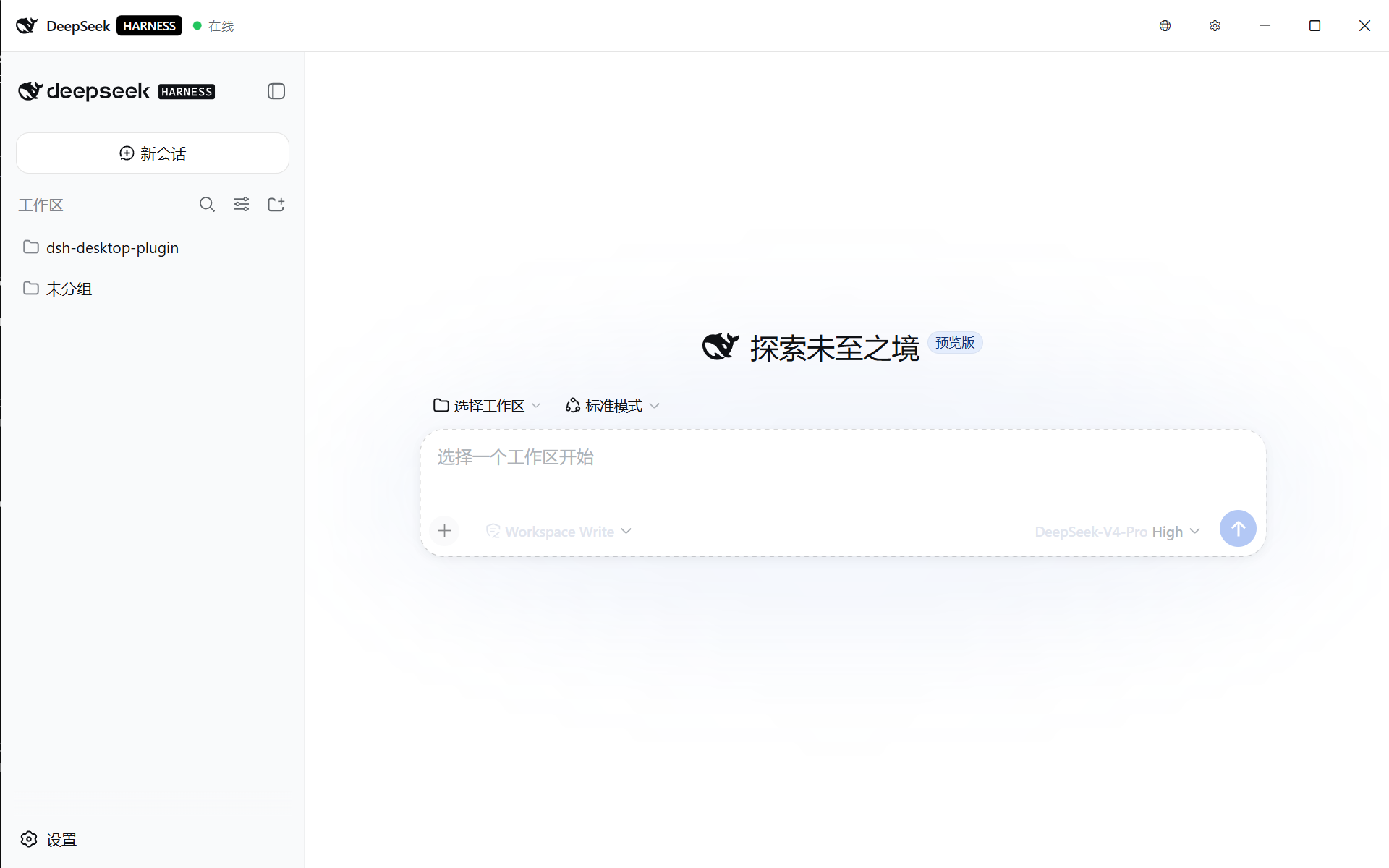
Windows 桌面壳:双击一个 exe,就能启动已安装的 DeepSeek Harness 并注入桌面体验。不依赖 harness 源码仓库,不替用户安装任何东西,不修改用户的任何资料。
dsh-desktop-plugin
安装
dsh plugin --profile web add github:beex-labs/dsh-desktop-pluginGitHub 源码安装:首次需按提示配置 allowBuilds 构建授权后重试
安装与环境配置指引、插件开发教程见 DSH 中文社区文档 ↗
安装即在你的机器上以你的权限运行第三方代码——它可读写文件、使用凭据、访问网络,DSH 的工具审批不会为插件代码加沙箱。「检测到 manifest」仅代表发现 dsh.bundle / dsh.plugin 清单,不构成兼容性或安全审查;安装前请审阅源码,不熟悉的插件先在不含密钥的环境试用。
README
Windows 桌面壳:双击一个 exe,就能启动已安装的 DeepSeek Harness 并注入桌面体验。不依赖 harness 源码仓库,不替用户安装任何东西,不修改用户的任何资料。
简体中文
这是什么
dsh-desktop-plugin 是一个独立插件工作区:只发布一个自包含的 DeepSeekHarness.Desktop.exe(WPF 壳,.NET 8 自包含发布,无需任何运行时)。壳做的事:
- 启动已安装的 DeepSeek Harness(PATH 上的
dsh),从未安装则显示安装教程 + 一键安装按钮(npm install -g @deepseek-ai/dsh,仅用户点击才执行,绝不自动下载); - 端口上已有正在运行的 harness 则直接复用附着,不重复拉起;
- 通过 WebView2 注入两个小脚本:主题同步(壳的标题栏跟随网页明暗主题)与「关闭窗口时」设置行(注入到 dsh 网页设置对话框中,可切换 完全关闭 / 最小化到托盘 / 每次询问);
- 关闭窗口默认弹窗询问 托盘 or 完全关闭(可勾选记住选择);托盘菜单「退出」始终完全退出;
- 关闭即杀死整棵服务器进程树(含
dsh web --desktop交接的服务器),进程永不残留;子进程挂载 kill-on-close Job Object,壳崩溃也不留孤儿; - 不写用户任何资料,只写自己的
%LOCALAPPDATA%\DeepSeekHarness\shell.json与日志。
快速开始
pnpm install                                  # 解析 @deepseek-ai/* 依赖
pnpm --filter dsh-desktop build:shell         # dotnet publish -> packages/dsh-desktop/bin/
pnpm --filter dsh-desktop build               # tsc -> lib/index.js
pnpm --filter dsh-desktop pack                # npm 包(含 bin/)
用户侧只需双击 packages/dsh-desktop/bin/DeepSeekHarness.Desktop.exe。
布局
packages/
  desktop-shell/    WPF 壳(.NET 8,自包含发布到 win-x64)
  dsh-desktop/      npm 包:挂载桌面启动器 host row,bin/ 携带壳的可执行文件
截图
English
What this is
dsh-desktop-plugin is a standalone plugin workspace that ships one
self-contained DeepSeekHarness.Desktop.exe (a WPF shell, .NET 8
self-contained publish, no runtime needed). The shell:
- launches the already-installed DeepSeek Harness (the
dshCLI on PATH); when none is installed it shows an install tutorial with a one-click button (npm install -g @deepseek-ai/dsh— user-initiated only, never downloads on its own); - reuses a harness already serving on the port instead of spawning a second one;
- injects two small WebView2 scripts: theme sync (the window chrome follows the web app's light/dark theme) and a "close behavior" row injected into the dsh web settings dialog (Quit / Minimize to tray / Ask every time);
- asks on close by default — tray or full exit, with a remember-me checkbox; the tray menu's 退出 always exits fully;
- kills the whole server process tree on exit (including a
dsh web --desktophand-off), so nothing survives; spawned children live in a kill-on-close job object, so even a shell crash orphans nothing; - touches none of the user's data — only its own
%LOCALAPPDATA%\DeepSeekHarness\shell.jsonand logs.
Quick start
pnpm install                                  # resolves @deepseek-ai/* packages
pnpm --filter dsh-desktop build:shell         # dotnet publish -> packages/dsh-desktop/bin/
pnpm --filter dsh-desktop build               # tsc -> lib/index.js
pnpm --filter dsh-desktop pack                # npm tarball including bin/
End users just double-click packages/dsh-desktop/bin/DeepSeekHarness.Desktop.exe.
Layout
packages/
  desktop-shell/    The WPF shell (.NET 8, self-contained publish to win-x64)
  dsh-desktop/      The npm package: mounts the desktop-launcher host row and ships the shell executable in bin/
Screenshots
繁體中文
這是什麼
dsh-desktop-plugin 是一個獨立外掛工作區:只發佈一個自包含的 DeepSeekHarness.Desktop.exe(WPF 外殼,.NET 8 自包含發佈,無需任何執行環境)。外殼會:
- 啟動已安裝的 DeepSeek Harness(PATH 上的
dsh);若未安裝則顯示安裝教學與一鍵安裝按鈕(npm install -g @deepseek-ai/dsh,僅在使用者點擊時才執行,絕不自動下載); - 連接埠上已有執行中的 harness 則直接複用附著,不重複啟動;
- 透過 WebView2 注入兩個小指令碼:主題同步(外殼標題列跟隨網頁明暗主題)與「關閉視窗時」設定列(注入到 dsh 網頁設定對話方塊中,可切換 完全關閉 / 最小化到系統匣 / 每次詢問);
- 關閉視窗預設彈窗詢問 系統匣 or 完全關閉(可勾選記住選擇);系統匣選單「退出」一律完全退出;
- 關閉即殺死整棵伺服器行程樹(含
dsh web --desktop交接的伺服器),行程絕不殘留;子行程掛載 kill-on-close Job Object,外殼崩潰也不留孤兒; - 不寫入使用者任何資料,只寫自己的
%LOCALAPPDATA%\DeepSeekHarness\shell.json與日誌。
快速開始
pnpm install                                  # 解析 @deepseek-ai/* 相依套件
pnpm --filter dsh-desktop build:shell         # dotnet publish -> packages/dsh-desktop/bin/
pnpm --filter dsh-desktop build               # tsc -> lib/index.js
pnpm --filter dsh-desktop pack                # npm 套件(含 bin/)
使用者只需雙擊 packages/dsh-desktop/bin/DeepSeekHarness.Desktop.exe。
佈局
packages/
  desktop-shell/    WPF 外殼(.NET 8,自包含發佈至 win-x64)
  dsh-desktop/      npm 套件:掛載桌面啟動器 host row,bin/ 攜帶外殼可執行檔
截圖
原始 README: https://github.com/beex-labs/dsh-desktop-plugin/blob/main/README.md ↗
同类插件
查看全部 →
dsh-anchored-standard
两阶段 DeepSeek Harness 预设:先 Minimal 对齐的 bootstrap,再切完整 Standard 工具(Project2 98/99)

PicGo-Core
极致的图片上传引擎,CLI 与 API 双支持

awesome-deepseek-harness
DeepSeek Harness(DSH)及其优秀社区插件的精选指南。

awesome-deepseek-harness
DeepSeek Harness (DSH)生态系统:来自dsh-external/hub和公共dsh-plugin主题的精选插件、工具和基础设施。

AI-Novel-Writer
本地优先 AI 小说创作工作台,提供 Windows/macOS 桌面版与 DeepSeek Harness 插件开发预览,支持角色、大纲、章节蓝图、审稿修稿和本地模型。

mcp-for-stata
MCP-for-Stata:把 Stata 集成进你的 agent