dsh-plugin-center
by cpp285
DeepSeek Harness 插件的紧凑发现与生命周期控制台
A compact discovery and lifecycle console for DeepSeek Harness plugins.
安装
dsh plugin --profile web add github:cpp285/dsh-plugin-centerGitHub 源码安装:首次需按提示配置 allowBuilds 构建授权后重试
安装与环境配置指引、插件开发教程见 DSH 中文社区文档 ↗
安装即在你的机器上以你的权限运行第三方代码——它可读写文件、使用凭据、访问网络,DSH 的工具审批不会为插件代码加沙箱。「检测到 manifest」仅代表发现 dsh.bundle / dsh.plugin 清单,不构成兼容性或安全审查;安装前请审阅源码,不熟悉的插件先在不含密钥的环境试用。
README
目录
- Features
- Live installed-plugin inventory
- Clear descriptions for unfamiliar modules
- GitHub plugin discovery
- Curated starter collection
- Plugin lifecycle management
- Native, resilient interface
- Requirements
- Install from GitHub
- 1. Add the plugin
- 2. Generate the web profile configuration
- 3. Start or restart DeepSeek Harness
- 4. Open Plugin Center
- Install from a local checkout
- Use
- Troubleshooting
- Configuration
- Security model
- Development
- Status
Understand, discover, and manage DeepSeek Harness plugins from one compact settings page.
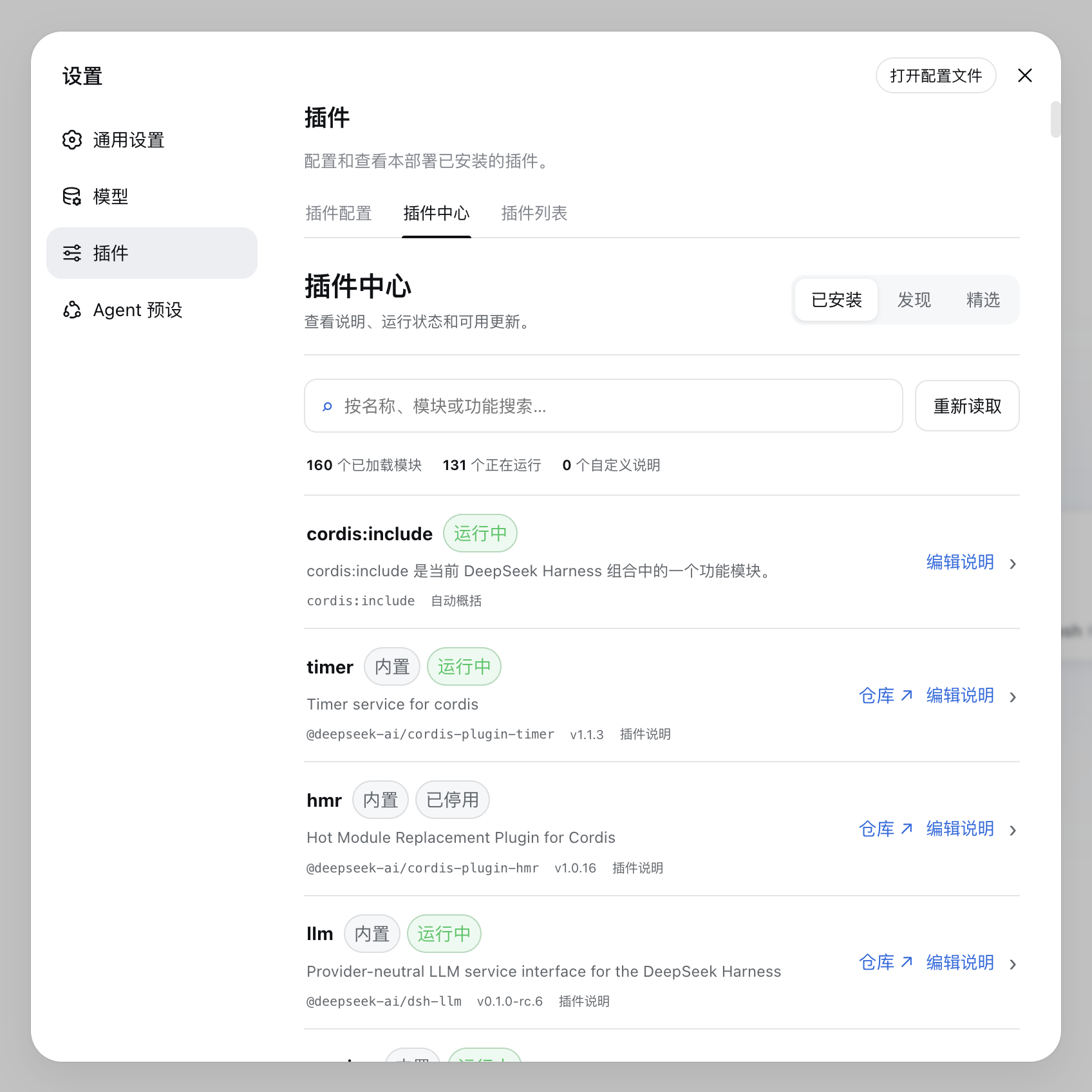
DSH Plugin Center adds a native-looking workspace to Settings → Plugins. It turns the active Loader tree into a readable plugin inventory, adds GitHub discovery, and keeps common lifecycle actions close at hand.
Features
Live installed-plugin inventory
- Reads the active DeepSeek Harness Loader tree instead of relying on the dependency file alone.
- Shows each module's effective enabled state, runtime phase, version, package name, repository, and description.
- Detects plugins disabled by a parent entry and separates built-in modules from user-manageable packages.
- Summarizes how many modules are loaded, running, and using a custom description.
- Opens the source repository directly when package metadata provides a valid GitHub URL.
Clear descriptions for unfamiliar modules
- Uses the package description when one is available and creates a simple fallback when it is not.
- Lets you add separate Chinese and English descriptions to any currently loaded module.
- Prefers your description in the interface, while keeping its source visible as user, package, or generated text.
- Stores overrides locally in
$DSH_HOME/plugin-center/descriptions.jsonusing atomic file replacement.
GitHub plugin discovery
- Finds up to 100 recently updated, non-archived repositories published under the
dsh-pluginGitHub topic. - Supports instant search across repository name, owner, description, category, and recommendation reason.
- Automatically groups projects into categories such as memory, interface, automation, vision, developer tools, and connectors.
- Shows Stars, category, and last update time, with direct links to each repository.
- Has no Stars limit by default; administrators can add an optional
maxStarsceiling. - Caches GitHub results for 10 minutes and provides a manual refresh button when fresh data is needed.
Curated starter collection
- Provides a shorter list for users who do not want to inspect every discovery result.
- Adds a plain-language reason and category to each selected project.
- Retrieves live repository descriptions, Stars, and update dates instead of storing stale copies.
- Skips unavailable repositories without breaking the rest of the collection.
Plugin lifecycle management
- Installs plugins from an npm package name or
github:owner/repository[#ref]specifier. - Updates and removes non-built-in packages that belong to the selected DSH profile.
- Recognizes already installed discovery results and disables duplicate installation.
- Displays operation progress, command output, useful errors, and the required restart notice.
- Protects DeepSeek Harness foundation packages and Plugin Center itself from removal through the page.
- Runs one management operation at a time to avoid overlapping profile changes.
Native, resilient interface
- Lives inside Settings → Plugins and follows the surrounding DeepSeek Harness visual language.
- Uses a compact list layout that works in standard and narrow windows.
- Inherits host colors for light and dark mode and respects reduced-motion preferences.
- Includes loading, empty, error, retry, confirmation, and disabled states for everyday failures.
Requirements
- DeepSeek Harness with the
webprofile - Node.js 22 or newer
- Permission to restart
dsh webafter changing installed plugins
Install from GitHub
1. Add the plugin
Open a terminal and run:
dsh plugin --profile web add github:cpp285/dsh-plugin-center
Wait for the command to finish before continuing.
2. Generate the web profile configuration
dsh --profile web --dump-config
This makes the new bundle entry available to the web profile.
3. Start or restart DeepSeek Harness
dsh web
If dsh web is already running, stop the current process and start it again so the new plugin is loaded.
4. Open Plugin Center
Open DeepSeek Harness, then go to:
Settings → Plugins → Plugin Center
The installation is successful when you can see the Installed, Discover, and Featured views shown in the screenshot above.
Install from a local checkout
Run the following commands from the directory that contains this project:
dsh plugin --profile web add ./dsh-plugin-center
dsh --profile web --dump-config
dsh web
The local project is linked into the profile, which is useful while developing the plugin. No build step is required.
Use
- Open Installed to review plugin status, versions, descriptions, repositories, updates, and removal actions.
- Open Discover to browse repositories published under the
dsh-pluginGitHub topic. - Open Featured for a shorter starter list.
- Use Edit description when an installed module needs a clearer explanation.
- Restart
dsh webafter an install, update, or removal when the interface asks you to do so.
Troubleshooting
- Plugin Center is missing: run the configuration command again, restart
dsh web, and reload the DeepSeek Harness page. - The page still shows an older version: perform a hard refresh after restarting the host.
- GitHub discovery is rate-limited: set
GITHUB_TOKENbefore startingdsh web.
Configuration
The bundle defaults live in cordis.patch.yml:
config:
  profile: web
  allowMutations: true
  trustedHosts: !!js ctx.webRuntime.trustedHosts
Override the row with id: dsh-plugin-center in your profile's cordis.patch.yml when you need different settings.
| Option | Default | Purpose |
|---|---|---|
profile |
web |
Selects the DSH profile to manage. |
maxStars |
unlimited | Optionally hides discovery results above a Stars threshold. |
allowMutations |
true |
Enables install, update, and removal actions. |
allowRemoteMutations |
false |
Allows management actions from non-loopback addresses when enabled. |
dshCommand |
dsh |
Sets the DSH executable path. |
trustedHosts |
Web defaults | Defines which Host values may access the Plugin Center API. |
GitHub applies a lower API quota to anonymous requests. Set GITHUB_TOKEN before starting dsh web if you need a higher quota. The token is used only by the host process and is never exposed to the browser.
Security model
- Install targets accept npm package names or
github:owner/repository[#ref]only. - URLs, local paths, and shell fragments are rejected.
- Plugin commands run as argument arrays without a shell.
- Management actions are limited to local requests by default.
- API requests validate Host, Origin, and cross-site request metadata.
- Only one lifecycle operation can run at a time.
- The interface asks for confirmation before running third-party plugin code.
Development
npm test
npm run check
The project is written in plain JavaScript and does not require a bundler.
Status
Version 0.1.0 is the first public development release.
原始 README: https://github.com/cpp285/dsh-plugin-center/blob/main/README.md ↗
同类插件
查看全部 →
dsh-anchored-standard
两阶段 DeepSeek Harness 预设:先 Minimal 对齐的 bootstrap,再切完整 Standard 工具(Project2 98/99)

PicGo-Core
极致的图片上传引擎,CLI 与 API 双支持

awesome-deepseek-harness
DeepSeek Harness(DSH)及其优秀社区插件的精选指南。

awesome-deepseek-harness
DeepSeek Harness (DSH)生态系统:来自dsh-external/hub和公共dsh-plugin主题的精选插件、工具和基础设施。

AI-Novel-Writer
本地优先 AI 小说创作工作台,提供 Windows/macOS 桌面版与 DeepSeek Harness 插件开发预览,支持角色、大纲、章节蓝图、审稿修稿和本地模型。

mcp-for-stata
MCP-for-Stata:把 Stata 集成进你的 agent