deepseek-harness-tui
by gxinxing
DeepSeek Harness(dsh)的终端原生交互 TUI——用 Ink(终端版 React)构建
Terminal-native interactive TUI for DeepSeek Harness (dsh) — built with Ink, React for terminals
安装
dsh plugin --profile web add github:gxinxing/deepseek-harness-tuiGitHub 源码安装:首次需按提示配置 allowBuilds 构建授权后重试
安装与环境配置指引、插件开发教程见 DSH 中文社区文档 ↗
安装即在你的机器上以你的权限运行第三方代码——它可读写文件、使用凭据、访问网络,DSH 的工具审批不会为插件代码加沙箱。「检测到 manifest」仅代表发现 dsh.bundle / dsh.plugin 清单,不构成兼容性或安全审查;安装前请审阅源码,不熟悉的插件先在不含密钥的环境试用。
README
目录
为 DeepSeek Harness 打造的交互式终端聊天界面——终端原生风格,基于 Ink(React 终端 UI 框架)构建。
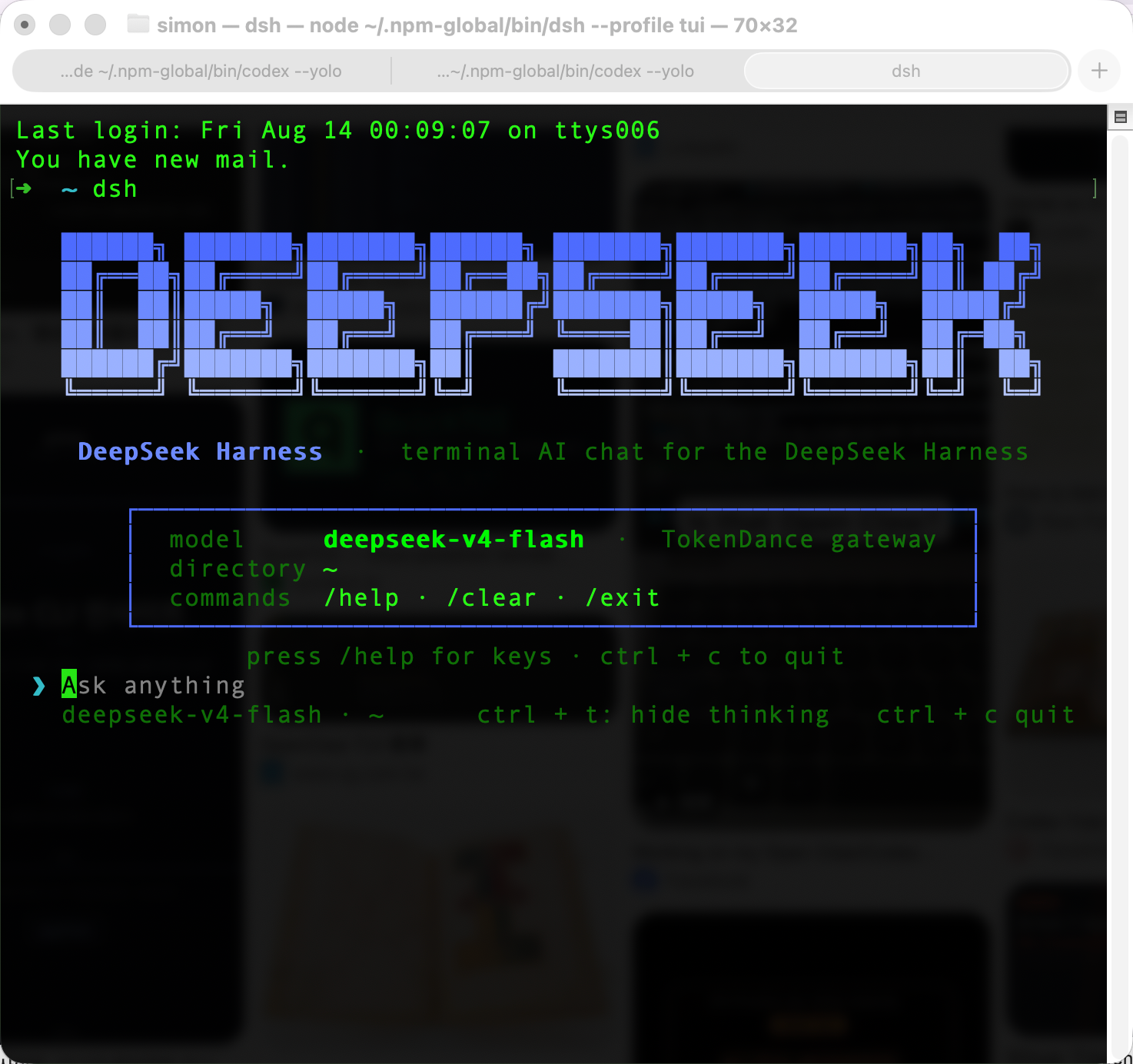
准备一个 TokenDance key 和 dsh 安装,运行 dsh --profile tui 即可获得一个 zero-chrome 的终端聊天界面:底部锚定对话流、工具调用折叠成 cell、thinking 折叠、背景色经 OSC 11 自适应终端主题。它是一个精简、可读的插件(约 800 行 UI),不是对 harness 的重实现。


安装
需要 Node.js ≥ 20 和 DeepSeek Harness CLI:
npm install -g @deepseek-ai/dsh        # 安装 harness(暂无 Homebrew tap)
git clone https://github.com/gxinxing/deepseek-harness-tui
cd deepseek-harness-tui && pnpm install
把插件包装进 tui profile(一次性):
dsh plugin --profile tui add @deepseek-ai/dsh-headless
dsh plugin --profile tui add /path/to/deepseek-harness-tui
使用
export TOKENDANCE_API_KEY=sk-...   # 或写入 ~/.dsh/.credentials.yaml(0600)
dsh --profile tui                  # 打开 TUI
TUI 内:ctrl + t 折叠 thinking,esc 中断当前回合,/help 查看全部按键与命令。
它能做什么
- 终端原生 UI,而不是换个皮的复读机。 transcript 即界面——无边框、无装饰。DeepSeek 品牌 banner(ANSI Shadow logo,渐变配色)只在空态出现;model · cwd 放在底部 dim footer。
- 工具调用折叠成 cell。 执行中
⠋ Running <cmd>→ 结束后✓ <cmd> • 1.2s(出错为✗),输出合并进 cell、置暗显示,按 head + tail 截断(… +N lines),不会刷出一大墙原始输出。 - 主题由终端推导。 OSC 11 探测真实背景色:消息底色与代码 chip 由它混合而来(深色 12% 白、浅色 4% 黑),绝不写死十六进制;可用
DSH_TUI_BG=#ffffff强制主题测试。 - Thinking 可折叠。
ctrl + t切换推理轨迹;esc随时通过agent.cancel({ kind: 'user' })中止回合。 - Markdown 保持原形。 标题保留
#、围栏代码块保留围栏、行内代码有 chip 底色;中英文/emoji 按正确字符宽度折行,gutter 对齐。 - 实时视口。 transcript 底部锚定,最新内容始终可见;忙碌时显示 braille spinner + 紧凑计时(
Working 5s)。
了解更多
- INTEGRATION-NOTES.md —— 事件结构、patch 语义、集成深入解析(
session/event如何映射到 UI) - DeepSeek Harness —— 底层 agent 框架
- 模型路由(TokenDance) —— 网关配置、凭据、一次性 tool-call 守卫
模型路由(TokenDance)
profile 补丁(cordis.patch.yml)把 llm-deepseek 路由到 TokenDance 网关:
llm-deepseek:
  apiKeyEnv: TOKENDANCE_API_KEY
  baseURL: https://tokendance.space/gateway/v1
provider 注册在 ~/.dsh/settings.yaml(llm-pi-ai.providers.tokendance):OpenAI 兼容端点、thinkingFormat: deepseek,模型为 deepseek-v4-flash(默认)与 deepseek-v4-pro。切换模型:编辑该文件的 models 列表,或在 profile patch 里覆盖 llm-deepseek.model。
前置修复(一次性,每次安装 dsh 后需重打)。 TokenDance 流式返回 tool-call 增量时
name/id为空串,官方@deepseek-ai/dsh-llm-deepseek适配器会用空串覆盖首个 frame 的 call id,导致 harness 陷入unknown tool ""死循环。请在node_modules/@deepseek-ai/dsh-llm-deepseek/lib/index.js应用守卫:- if (call.id !== void 0) block.callId = call.id + if (call.id) block.callId = call.id - ... if (call.function?.name !== void 0) ... + ... if (call.function?.name) ...已于 2026-08-13 在本机应用。该改动位于全局 dsh 安装中,升级
dsh后会丢失——升级后需重新应用(值得提一个上游 PR)。
自检 · 自修 · 自更新闭环
本项目内置完整的自动化质量门控,形成 自检 → 自修 → 自更新 闭环:
┌──────────────┐    ┌──────────────┐    ┌──────────────┐
│  本地开发时   │    │  提交前      │    │  CI / PR时   │
│  pnpm check  │───▶│ lint-staged  │───▶│  ci.yml     │
│  (一键全检)   │    │  (git commit) │    │  (GitHub)    │
└──────────────┘    └──────────────┘    └──────────────┘
      ▲                                       │
      │                                       ▼
      │                            ┌──────────────────────┐
      │                            │  lint + format:check  │
      │                            │  + test (Node 20/22)  │
      │                            └──────────────────────┘
      │                                       │
      ▼                                       ▼
┌──────────────────────────────────────────────────────────┐
│              deps.yml  (每周一自动依赖扫描)              │
│  发现更新 → 自动开 PR → review 后合并 → 闭环更新         │
└──────────────────────────────────────────────────────────┘
本地自检
pnpm check        # 一键全检:lint → format:check → test
pnpm lint         # 代码质量(ESLint)
pnpm format:check # 格式一致性(Prettier)
pnpm test         # 单元测试(Node built-in test runner)
本地自修
pnpm lint:fix     # ESLint 自动修复可修复的问题
pnpm format       # Prettier 自动格式化全部源码
提交时自动触发(husky + lint-staged):
git commit→ lint-staged 对 staged 文件自动执行prettier --write+eslint --fix- 无需手动执行
pnpm format/pnpm lint:fix,已提交的代码始终整洁
依赖自更新
pnpm deps:check   # 扫描所有依赖的可用更新(分组展示 + 安全审计)
pnpm deps:update  # 将 package.json 升级到最新兼容版本并 pnpm install
GitHub Actions 自动执行(.github/workflows/deps.yml):
- 每周一 06:00 UTC 自动扫描依赖
- 发现更新 → 自动创建
deps/auto-update-YYYYMMDD分支 + PR - 可随时在 GitHub 手动触发
Dependency Updateworkflow
CI 门控(.github/workflows/ci.yml)
| 触发 | 节点 | 矩阵 |
|---|---|---|
push / pull_request to main |
inspect |
Node 20 + Node 22 |
| lint | ✅ | |
| format:check | ✅ | |
| test (57 cases) | ✅ | |
| coverage upload | Node 22 only |
任一阶段失败均阻断合并,确保主线始终通过全部自检。
贡献
欢迎提 issue 和 PR。适合新手的好任务:把两个运行时补丁提到上游(TokenDance tool-call 守卫、grep 权限错误容忍)、补充浅色主题截图、把欢迎 banner 移植到其他模型 provider。动事件桥之前先读 INTEGRATION-NOTES.md。
License
MIT。独立社区项目,与 DeepSeek、TokenDance 无关联。
原始 README: https://github.com/gxinxing/deepseek-harness-tui/blob/main/README.zh-CN.md ↗
同类插件
查看全部 →
dsh-web-ui-all
DSH Web UI 插件与皮肤合集:任务看板、git 图、右侧面板、远程移动端 UI、桌宠、实时 token 统计与皮肤中心。
dsh-web-ui
DSH Web UI 插件与皮肤合集:任务看板、git 图、右侧面板、远程移动端 UI、桌宠、实时 token 统计与皮肤中心。

dsh-TUI
Claude Code 风格全屏终端 UI:像素鲸鱼顶栏、实时工作状态行、思考流式展开。

DSH-better-sidebar
侧边栏完整工作台:内置文件渲染编辑、终端、Git 与子代理,支持三方插件注册新 Tab。
working-activity
让 agent 的"工作状态行"活过来——实时工具动态与进度、俏皮文案、模型自述、上下文预警。同一套想法,适配两个平台: pi CLI 与 DeepSeek Harness(DSH) 。

deepseek-idesign
可视化设计工作室,支持网站、App 原型、海报、信息卡、报告和杂志的模板创建、元素编辑、选区级 AI 草稿衔接与导出。