dsh-model-provider-label
by haiyoucuv
通过显示供应商消歧同名模型的插件
DeepSeek Harness plugin that disambiguates same-named models by showing their provider
安装
dsh plugin --profile web add github:haiyoucuv/dsh-model-provider-labelGitHub 源码安装:首次需按提示配置 allowBuilds 构建授权后重试
安装与环境配置指引、插件开发教程见 DSH 中文社区文档 ↗
安装即在你的机器上以你的权限运行第三方代码——它可读写文件、使用凭据、访问网络,DSH 的工具审批不会为插件代码加沙箱。「检测到 manifest」仅代表发现 dsh.bundle / dsh.plugin 清单,不构成兼容性或安全审查;安装前请审阅源码,不熟悉的插件先在不含密钥的环境试用。
README
⚠️ 已停止维护(Deprecated)
本插件已停止维护:「显示厂商名」功能已并入新插件 dsh-chat-tweaks(DSH 界面美化合集:独立设置页、更多开关,持续更新)。
安装新插件:
dsh plugin --profile web add https://github.com/haiyoucuv/dsh-chat-tweaks/archive/refs/tags/v0.1.0.tar.gz安装新插件后请卸载本插件(二者占用同一 UI 槽位,共存会报错):
dsh plugin --profile web remove dsh-model-provider-label以下内容保留作历史存档。
在 DeepSeek Harness 对话框模型选择器同时显示 provider 显示名 与 模型名, 让不同 provider 下的同名模型一眼可辨。
Show the provider display name next to the model name in the DeepSeek Harness composer model seat, so identical model names from different providers become distinguishable.


中文 | English
默认模型选择器只显示模型名(如 DeepSeek V4 Flash)。当你配置多个
provider、且不同 provider 下有同名的模型时无法区分。本插件把 provider
的 displayName 一并显示:DeepSeek · DeepSeek V4 Flash。
效果
| 默认 | 安装本插件后 |
|---|---|
DeepSeek V4 Flash |
DeepSeek · DeepSeek V4 Flash |
GPT-5 (provider A) |
ProviderA · GPT-5 |
GPT-5 (provider B) |
ProviderB · GPT-5 |
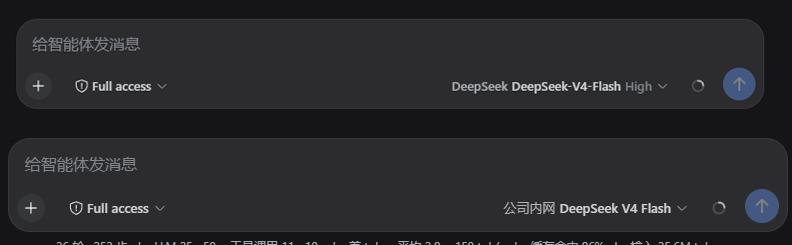
下拉菜单、推理等级选择、模型目录加载、错误提示等行为与默认实现完全一致——
本插件只是遮蔽了 conversation.input.model UI 槽位,用 priority 更低
的组件替换默认渲染,其余逻辑 100% 复用宿主 modelDirectories 服务。
安装
# 从 GitHub 安装(推荐)
dsh plugin --profile web add https://github.com/haiyoucuv/dsh-model-provider-label/archive/refs/tags/v0.1.0.tar.gz

# 或从本地目录安装(开发调试)
dsh plugin --profile web add link:/path/to/dsh-model-provider-label
安装后重启 dsh web 使浏览器端加载 client bundle。
提示:也可以直接用 pnpm 在 profile 目录安装:
cd ~/.dsh/profiles/web && pnpm add https://github.com/haiyoucuv/dsh-model-provider-label/archive/refs/tags/v0.1.0.tar.gz
开发
pnpm install          # 安装 esbuild / typescript 等 dev 依赖
pnpm build            # 生成 lib/client.js(ModuleLoader 格式)+ lib/index.js
- 源码:
src/client/index.tsx(apply / inject + 槽位遮蔽)、src/client/ModelSelect.tsx(改造后的模型选择器) - 样式:
src/client/ModelSelect.module.css - 构建产物
lib/已提交,安装无需本地构建
工作原理
DSH 的 conversation.input.model 是一个 single 类型 UI 槽位(slot),
默认由 dsh-client-ui-model-selection 以 priority: 0 注册。slot 系统规定
同 priority 只能有一个注册,更低 priority 的注册会遮蔽(shadow)默认实现
(lowest renders)。本插件用 priority: -100 注册同名槽位,因此渲染的是
我们的组件;目录数据仍来自宿主注入的 modelDirectories service(按会话共享,
与 /model 命令同一份状态),翻译复用宿主已注册的 model locale namespace
(不重复注册,避免 locale 冲突)。
自定义显示格式
编辑 src/client/ModelSelect.tsx 里的 providerLabel / modelLabel /
triggerLabel 组合即可,然后 pnpm build + 重启。
License
MIT — 见 LICENSE
原始 README: https://github.com/haiyoucuv/dsh-model-provider-label/blob/main/README.md ↗
同类插件
查看全部 →
agent-vision-toolkit
为纯文本模型"看图“设计更好的视觉工具箱和技能,支持多图理解,图片问答,前端UI还原、GUI 自动化等,并可选无缝接入多个主流agent,直接识别粘贴图片| A vision toolkit and skill designed for text-only llms — image Q&A, long-screenshot OCR, frontend UI restoration, and GUI automation, with optional seamless integration for Codex, Claude Code, Pi, Oh My Pi, and OpenCode

api-relay-audit
从 DeepSeek Harness 对 AI API 中转站和 LLM 代理运行本地安全审计,生成 Markdown 报告,覆盖提示词注入、模型替换信号、工具调用改写、错误泄漏、流完整性和按 profile 启用的 Web3 风险。

OpenStory
✨ OpenStory 现已支持 DeepSeek Harness 插件! 现在可以通过 dsh-openstory 将 OpenStory 多智能体推演接入 DeepSeek Harness,让 agent 直接启动模拟、查看角色、下达指令并逐回合推进故事。查看 DSH 插件配置与使用指南。

phi
pi的编码代理 ∞ 提供者、子代理、hashline编辑和权限门

anysearch-dsh
DeepSeek Harness(DSH)的 AnySearch 网络搜索提供方与高级搜索工具。

codex-switch
Codex Switch 是一个 macOS 工具,一键配置 Codex 的自定义 API,同时保留官方 OpenAI 登录。保存后 Codex 的模型选择器里只会出现你选的那个 provider 的模型。也支持 Claude Code 的官方 / 自定义 API 切换。Codex Switch is a lightweight helper for configuring multiple coding-agent API routes. For Codex, it keeps Official OpenAI and a custom API provider configured in parallel, registers the custom model in Codex's mod