dsh-telegram-channel
by hi-wenw
Telegram 手机遥控器:附着本机正在跑的 Web 会话,支持 /sessions 工作区→会话选择、/last 查看上次问答、/model 切换模型,以及原生 Rich Message 回复。
Telegram mobile remote that attaches the phone to a live DeepSeek Harness Web session: workspace-then-session picker (/sessions), /last for the previous Q/A, /model switch, and native Rich Message replies.
安装
dsh plugin --profile web add github:hi-wenw/dsh-telegram-channelGitHub 源码安装:首次需按提示配置 allowBuilds 构建授权后重试
安装与环境配置指引、插件开发教程见 DSH 中文社区文档 ↗
安装即在你的机器上以你的权限运行第三方代码——它可读写文件、使用凭据、访问网络,DSH 的工具审批不会为插件代码加沙箱。「检测到 manifest」仅代表发现 dsh.bundle / dsh.plugin 清单,不构成兼容性或安全审查;安装前请审阅源码,不熟悉的插件先在不含密钥的环境试用。
预览截图
README
目录
Telegram 手机遥控器 for DeepSeek Harness:附着本机正在跑的 Web 会话,与电脑 同轨迹、双向可见(Codex-style)。
发现: dsh-plugin topic · 安装:dsh plugin --profile web add github:hi-wenw/dsh-telegram-channel
Keywords: Telegram · Bot · Mobile · Remote · DSH · Cordis · dsh-plugin · sessions · bind
中文
使用前需要什么
| 需要 | 说明 |
|---|---|
DeepSeek Harness(dsh) |
本机已能跑通 dsh web |
| Node.js | 跟 Harness 走,建议 ≥22 |
| Telegram Bot Token | @BotFather → /newbot |
| 数字 User ID | @userinfobot |
| 代理(可选) | 若直连不上 api.telegram.org,需本机 HTTP(S)_PROXY |
不需要 Python。
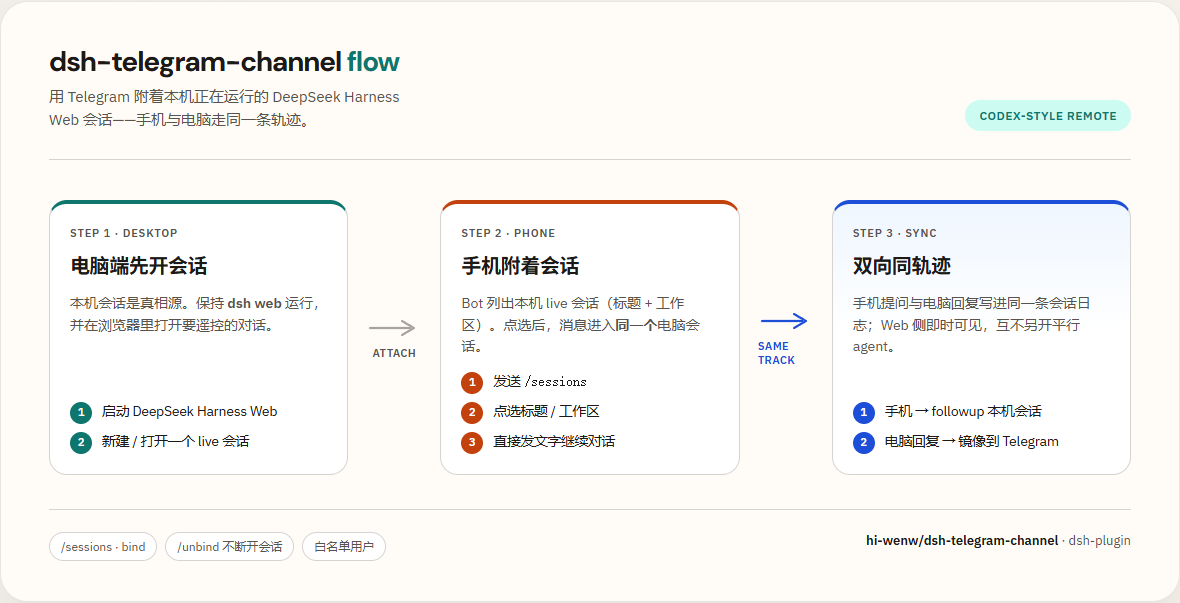
30 秒理解
- 电脑
dsh web开着(会话列表与 Web 对齐,已归档除外) - 手机 Bot:
/sessions→ 工作区 → 会话 → 附着 - 之后手机 ↔ Web 走同一条轨迹;可用
/model切换模型(下一回合生效)
效果截图
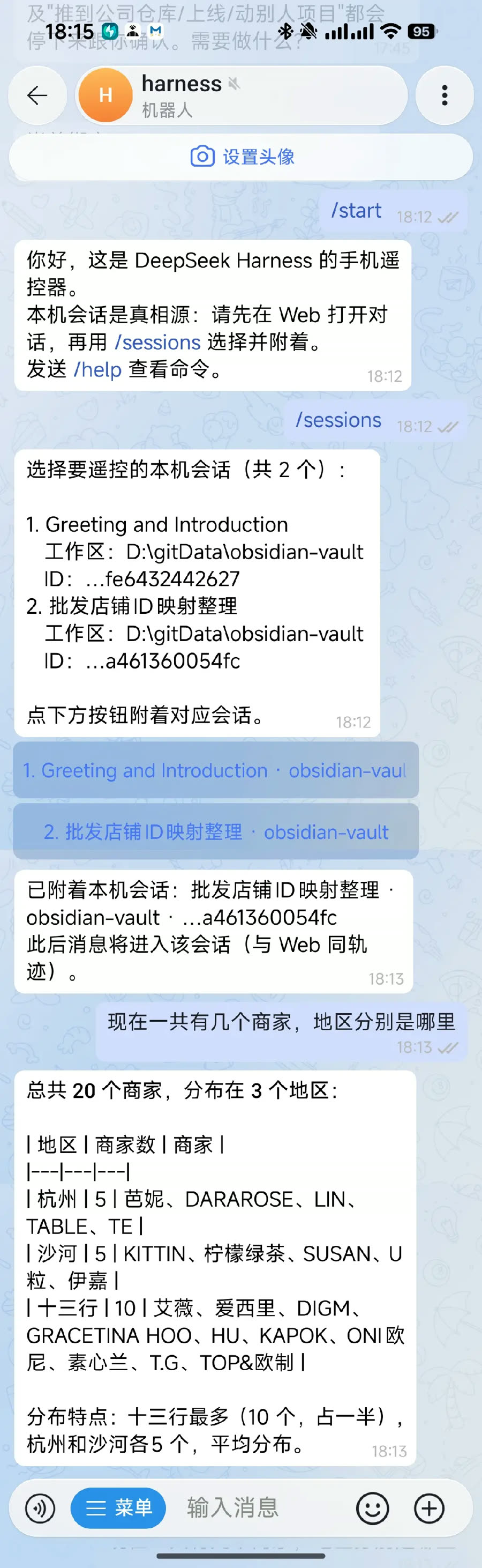
手机选择会话并发问:
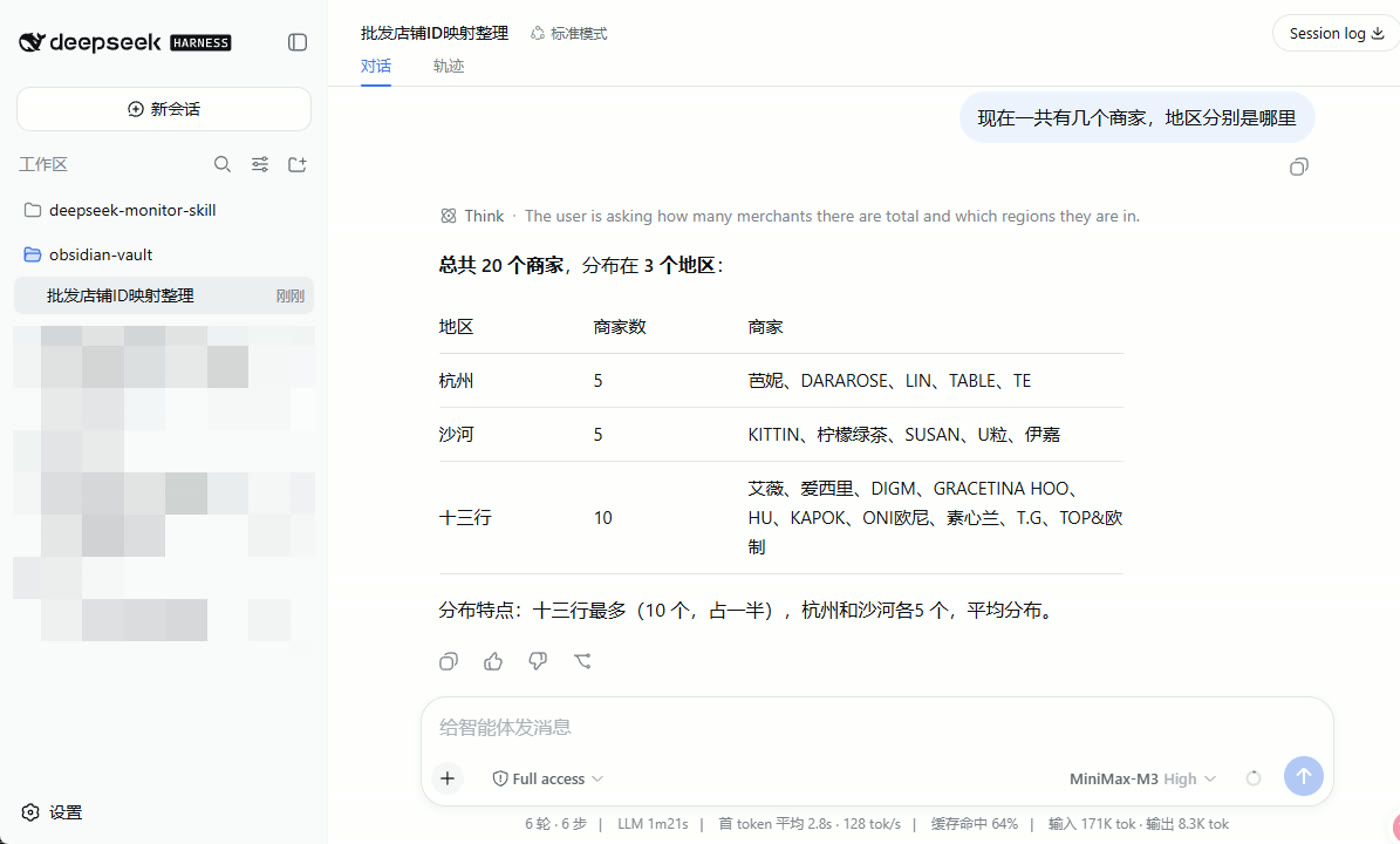
电脑 Web 同步收到同一条消息与回复:
一键管理菜单(推荐)
先准备两样东西:
| 准备 | 怎么拿 |
|---|---|
| Bot Token | Telegram 搜 @BotFather → /newbot → 复制 token |
| 数字 User ID | 搜 @userinfobot → Start → 复制纯数字 |
Token 不要发到公开群;泄露了去 BotFather
/revoke。
Windows
请在 PowerShell 执行。若当前是 CMD,用下面「CMD 一键」那行。
irm https://raw.githubusercontent.com/hi-wenw/dsh-telegram-channel/master/scripts/install.ps1 | iex
脚本已兼容
irm | iex(菜单逻辑包在 scriptblock 里)。CMD 请用下面整行。
CMD 一键:
powershell -NoProfile -ExecutionPolicy Bypass -Command "irm https://raw.githubusercontent.com/hi-wenw/dsh-telegram-channel/master/scripts/install.ps1 | iex"
备用(先下载再执行):
powershell -NoProfile -ExecutionPolicy Bypass -Command "iwr -UseBasicParsing https://raw.githubusercontent.com/hi-wenw/dsh-telegram-channel/master/scripts/install.ps1 -OutFile $env:TEMP\dsh-tg.ps1; & $env:TEMP\dsh-tg.ps1"
启动后用数字选择:
1) 安装 / 重装插件(写入 Token + 白名单)
2) 启动 dsh web(新窗口)
3) 停止 dsh web
4) 查看状态
5) 打开浏览器
0) 退出
也可直接指定动作(不进菜单):
.\scripts\install.ps1 -Action install -Token '...' -UserId '123456789'
.\scripts\install.ps1 -Action start
.\scripts\install.ps1 -Action stop
.\scripts\install.ps1 -Action status
安装时脚本会:写环境变量、补 allowBuilds、执行 dsh plugin add(不会再 insert 同名 id)。
macOS / Linux
curl -fsSL https://raw.githubusercontent.com/hi-wenw/dsh-telegram-channel/master/scripts/install.sh | bash
# 同样出现数字菜单;或:
# ./scripts/install.sh install --token '...' --user-id '...'
# ./scripts/install.sh start|stop|status
手机怎么用
- 菜单选 2 启动
dsh web(或自己运行dsh web) - 浏览器里可看到工作区与会话(归档会话不会出现在手机列表)
- 手机对 Bot:
/start→/sessions→ 选工作区 → 选会话 → 聊天 - 需要换模型时:
/model→ 点选(与 Web 同 API,下一回合生效) - 续接上下文:附着后点 查看上次对话,或发
/last
输入框旁的 / 菜单应有:start sessions last model status unbind help。
| 命令 | 作用 |
|---|---|
/sessions |
先列工作区,再列该工作区会话(与 Web 对齐,排除归档/空白/子代理);冷会话附着时会自动 resume |
/last |
查看绑定会话的上次问答(附着后也会出现「查看上次对话」按钮) |
/model |
切换当前绑定会话的模型 |
/status |
当前绑定 |
/unbind |
只断开手机,不关电脑会话 |
/help |
帮助 |
手工安装(可选)
若不想跑脚本:
# 用户环境变量(或当前会话 $env:...)
# DSH_TELEGRAM_TOKEN = BotFather token
# DSH_TELEGRAM_ALLOWED_USER_IDS = 数字ID

dsh plugin --profile web add github:hi-wenw/dsh-telegram-channel
dsh web
本地目录安装:
dsh plugin --profile web add D:\path\to\dsh-telegram-channel
需要改 YAML 白名单时,只能按 id 覆盖,不要再 insert 同名 id:
- id: dsh-telegram-channel
  config:
    token: ""
    allowedUserIds: [123456789]
示例:examples/telegram-agent/cordis.patch.example.yml。
配置
| 键 / 环境变量 | 含义 |
|---|---|
token / DSH_TELEGRAM_TOKEN |
Bot token |
allowedUserIds / DSH_TELEGRAM_ALLOWED_USER_IDS |
白名单;都空 = 谁都不能用 |
allowAllUsers |
true 仅调试 |
maxMessageLength |
默认 4096 |
pollingTimeoutSec |
默认 30 |
rendering |
rich(默认,原生 Rich Message)或 html(旧 Markdown→HTML 兼容) |
若本机用了 HTTP(S)_PROXY 访问 Telegram,插件会自动走代理(无需再设 NODE_USE_ENV_PROXY)。
故障排查
| 现象 | 处理 |
|---|---|
ERR_PNPM_IGNORED_BUILDS / allowBuilds |
pnpm 11 起:仅 dsh-telegram-channel: true 不够(git 包无效)。在 ~\.dsh\profiles\web\pnpm-workspace.yaml 写入仓库级授权后重装:'dsh-telegram-channel@git+https://github.com/hi-wenw/dsh-telegram-channel.git': true再跑菜单 1(新版安装脚本会自动写) |
duplicate loader entry id: dsh-telegram-channel |
用户 patch 不要 insert 同名 id;用上面的 - id: 覆盖,或只用环境变量白名单 |
| 手机完全没回复 / ConnectTimeout | 打开本地代理(如 7890),重启 dsh web |
missing bot token |
检查环境变量;新开终端再 dsh web |
| 「无权限」 | User ID 必须是 @userinfobot 的数字 |
/sessions 无会话 |
确认 Web 有未归档会话;空白会话会被隐藏 |
/sessions 比电脑少很多 |
升级到 ≥0.3.0:应按工作区列出;仍少则检查是否归档 |
/model 不可用 |
需 dsh web(apiProxy);先 /sessions 绑定。≥0.3.2 已修复「未 inject 读不到 apiProxy」 |
| Telegram 401 | Token 错了或被 revoke |
开发
git clone https://github.com/hi-wenw/dsh-telegram-channel.git
cd dsh-telegram-channel
npm install --legacy-peer-deps
npm test
npm run build
发布与发现(社区插件)
社区发现入口主要是 GitHub topic,不是封闭应用商店审核:
- 仓库 公开,
package.json声明dsh.bundle.patch(本仓库已有) - About → Topics 加上
dsh-plugin(已加;可浏览 topic 列表) - 用户安装:
dsh plugin --profile web add github:hi-wenw/dsh-telegram-channel
- 可选:收录到 awesome-deepseek-harness 等精选列表;可选再发 npm
官方也建议插件作者使用 dsh-plugin topic 方便检索。
许可证
English
Prerequisites
- Working DeepSeek Harness (
dsh web) - Node.js (typically ≥22 with Harness)
- Telegram bot token + numeric user id
- Optional HTTP(S)_PROXY if Telegram API is blocked
- No Python required
What this is
Telegram mobile remote for DeepSeek Harness Web sessions. Desktop/Web is the source of truth; the phone attaches (no parallel hidden agent). /sessions is workspace → session (Web-aligned, archived excluded). /model switches the bound session’s model for the next turn.
Screenshots
Phone: pick a session and chat:
Desktop Web shows the same trajectory:
One-click manager (Windows)
Run in PowerShell (not CMD). Opens a number menu: install / start / stop / status / open browser.
irm https://raw.githubusercontent.com/hi-wenw/dsh-telegram-channel/master/scripts/install.ps1 | iex
CMD:
powershell -NoProfile -ExecutionPolicy Bypass -Command "irm https://raw.githubusercontent.com/hi-wenw/dsh-telegram-channel/master/scripts/install.ps1 | iex"
Direct actions:
.\scripts\install.ps1 -Action start
.\scripts\install.ps1 -Action stop
.\scripts\install.ps1 -Action install -Token '...' -UserId '123456789'
The script sets user env vars, ensures allowBuilds, and runs dsh plugin add. After start, phone: /sessions → workspace → session → bind; optional /model.
Unix
export DSH_TELEGRAM_TOKEN='...'
export DSH_TELEGRAM_ALLOWED_USER_IDS='123456789'
curl -fsSL https://raw.githubusercontent.com/hi-wenw/dsh-telegram-channel/master/scripts/install.sh | bash
Manual
dsh plugin --profile web add github:hi-wenw/dsh-telegram-channel
Allowlist via DSH_TELEGRAM_ALLOWED_USER_IDS (preferred) or id-targeted YAML override — never re-insert the same plugin id.
Discoverability
Listed under the public GitHub topic dsh-plugin. Install:
dsh plugin --profile web add github:hi-wenw/dsh-telegram-channel
License
MIT
原始 README: https://github.com/hi-wenw/dsh-telegram-channel/blob/master/README.md ↗
同类插件
查看全部 →
dsh
将 DeepSeek Harness 的生命周期状态、错误与审批请求,桥接到本地运行的 OpenPets 桌面伙伴。

dsh-qqbot
让 QQ Bot 接入 DeepSeek Harness(dsh)的官方插件

dsh-open-in-vscode
从 Web GUI 一键在 VS Code 中打开工作区目录。
dsh-notification
回合完成桌面通知,按结果分控 + 关键词过滤。

dsh-notifier
DSH 统一通知推送与远程控制:一个 `notify()` API 打通 25+ 渠道(Telegram / 钉钉 / 飞书 / 企业微信 / QQ 机器人 / WxPusher / PushPlus / Server 酱 / Bark / Discord / Slack / ntfy / webhook 等),timeSensitive / active / passive 分级路由并重试;五通道反向审批(Telegram 按钮 / 飞书卡片 / QQ / WxPusher / 微信 iLink);QQ/钉钉/飞书官方扫码登录;本地 Web 管理台;多 agent 路由;系统桌面通知——以及**手机指挥中心**:在手机上发 `!status` / `!stop` / `!retry` 遥控 agent,通知带可操作按钮(查看结果 / 重试 / 日志,点击回调 agent)。密钥脱敏、工具限流、零运行时依赖。

chatccc
飞书(Lark)或微信(WeChat)聊天控制 DeepSeek Harness / Claude Code / Cursor / Codex / CCC Agent