dsh-billing-plugin
by imeepos
deepseek harness 账单插件
安装
dsh plugin --profile web add github:imeepos/dsh-billing-pluginGitHub 源码安装:首次需按提示配置 allowBuilds 构建授权后重试
安装与环境配置指引、插件开发教程见 DSH 中文社区文档 ↗
安装即在你的机器上以你的权限运行第三方代码——它可读写文件、使用凭据、访问网络,DSH 的工具审批不会为插件代码加沙箱。「检测到 manifest」仅代表发现 dsh.bundle / dsh.plugin 清单,不构成兼容性或安全审查;安装前请审阅源码,不熟悉的插件先在不含密钥的环境试用。
README
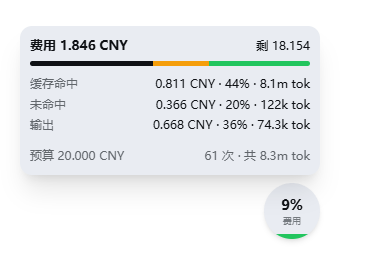
《深入拆解 DeepSeek Harness》随书代码:事件溯源实时计费(峰谷价格表)。账单是"会话日志 + 部署价格表"的纯函数,零上下文注入;Web 客户端右下角的悬浮水满仪表实时显示当前单个会话的账单(统计的是当前选中的会话,不是全部会话的费用汇总)。
安装
从 GitHub Releases 下载打包产物(仅含 lib/ 构建产物,无需源码构建),安装到 dsh 部署目录:
# 1. 下载 release 产物(请把 v0.2.0 换成最新版本号)
curl -LO https://github.com/imeepos/dsh-billing-plugin/releases/latest/download/dsh-billing-0.2.0.tgz
# 2. 在 dsh 部署目录安装(写入依赖,cordis 加载器即可解析到该插件)
npm install ./dsh-billing-0.2.0.tgz
注意:目标机器连不上 GitHub 时(如国内网络),可先从可达机器把 tarball 传过去,安装本身只依赖本地文件。
从源码安装(开发用途):
git clone <本仓库地址> && cd billing-plugin && npm install && npm run build && npm run build:client && npm install <路径>/dsh-billing-0.2.0.tgz
配置
在 profile 的 cordis.patch.yml(~/.dsh/profiles/<你的profile>/)中追加(必须用 - insert: 列表,patch 层只能对已有条目覆盖,顶层直接写条目会报 entry "billing" not found):
- insert:
    - id: billing
      name: dsh-billing
      config:
        currency: CNY
        budget: 5.0                       # 每 session 预算(元),仅 UI 展示,不做限制
        prices:
          deepseek-v4-flash:
            effectiveFrom: 1786896000000  # 2026-08-17 00:00 北京时间,此前的调用按 0 元计费
            offPeak: { inputPerMillion: 1.5, outputPerMillion: 4.5, cacheReadPerMillion: 0.05 }
            peak:    { inputPerMillion: 3.0, outputPerMillion: 9.0, cacheReadPerMillion: 0.10 }
          deepseek-v4-pro:
            effectiveFrom: 1786896000000  # 同上
            offPeak: { inputPerMillion: 4.5, outputPerMillion: 13.5, cacheReadPerMillion: 0.15 }
            peak:    { inputPerMillion: 9.0, outputPerMillion: 27.0, cacheReadPerMillion: 0.30 }
然后用下面的命令确认插件已挂载(插件树中应出现 # == ...cordis.patch.yml 段落的 id: billing):
dsh --profile <你的profile> --dump-config # 插件树中应出现 id: billing
一键安装(发给 AI 助手)
把下面整段复制发给任意 AI 助手(Claude Code / Codex / dsh 自身),它会替你完成安装与配置(已按 102 服务器实测通过):
请帮我安装并配置 dsh-billing(DeepSeek Harness 实时计费插件),profile 为 web:

1. 下载插件产物到服务器临时目录:
   curl -LO https://github.com/imeepos/dsh-billing-plugin/releases/latest/download/dsh-billing-0.2.0.tgz
   (如果该 URL 不可达,提示我先把 dsh-billing-0.2.0.tgz 传到这台机器再继续)

2. 在 web profile 目录安装:
   cd ~/.dsh/profiles/web
   cp /tmp/dsh-billing-0.2.0.tgz .
   npm install ./dsh-billing-0.2.0.tgz
   检查 ~/.dsh/profiles/web/package.json 的 dependencies 出现
   "dsh-billing": "file:dsh-billing-0.2.0.tgz"

3. 编辑 ~/.dsh/profiles/web/cordis.patch.yml,在末尾追加
   (如果文件内容只是注释,把注释删掉换成下面的内容;注意必须用 insert 列表语法):

   - insert:
       - id: billing
         name: dsh-billing
         config:
           currency: CNY
           budget: 5.0
           prices:
             deepseek-v4-flash:
               effectiveFrom: 1786896000000
               offPeak: { inputPerMillion: 1.5, outputPerMillion: 4.5, cacheReadPerMillion: 0.05 }
               peak: { inputPerMillion: 3.0, outputPerMillion: 9.0, cacheReadPerMillion: 0.10 }
             deepseek-v4-pro:
               effectiveFrom: 1786896000000
               offPeak: { inputPerMillion: 4.5, outputPerMillion: 13.5, cacheReadPerMillion: 0.15 }
               peak: { inputPerMillion: 9.0, outputPerMillion: 27.0, cacheReadPerMillion: 0.30 }

4. 验证挂载:dsh --profile web --dump-config
   插件树中应出现 id: billing(来源 cordis.patch.yml)。

5. 如果第 4 步报 patch: entry "billing" not found,
   说明没写进 insert 列表,回到第 3 步检查。
   任何一步失败,把完整报错贴给我,我会修复后重试。
配置字段说明
| 字段 | 默认值 | 含义 |
|---|---|---|
currency |
CNY |
币种代码,所有金额均以此显示。 |
prices |
{} |
按模型 id 的峰谷价格表(见下表);未配置的模型按 0 计费。 |
peakWindows |
[[9, 12], [14, 18]] |
峰时窗口,[start, end) 整点区间(配置时钟)。 |
utcOffsetMinutes |
480 |
东偏 UTC 分钟数,480 = 北京时间(UTC+8)。 |
budget |
未设置 | 每 session 预算:仅作为账单字段(budget / remaining / exhausted)供 UI 展示,不做任何限制。 |
prices 中每个模型的价格桶(offPeak 非峰、peak 峰时)字段:
| 字段 | 含义 |
|---|---|
inputPerMillion |
每百万输入 token(缓存未命中)价格。 |
outputPerMillion |
每百万输出 token 价格。 |
cacheReadPerMillion |
每百万缓存命中输入 token 价格(省略按 0)。 |
cacheWritePerMillion |
每百万缓存写入 token 价格(省略按 0)。 |
effectiveFrom |
价格表生效时间(Unix 毫秒时间戳),此前的调用按 0 计费,用于提前部署新价格表。 |
使用
启动后 Web 客户端右下角出现可拖动的悬浮水满仪表,只统计当前选中的单个会话(切换到其他会话后,仪表会实时刷新为该会话的账单,不会累加所有会话的费用):
- 水满高度:当前会话费用占预算的百分比;按消耗分四档颜色:绿(<25%)、蓝(25–50%)、橙(50–75%)、红(≥75%)。
- 单击仪表:展开/收起明细面板,显示当前会话的费用与剩余预算、缓存命中 / 未命中 / 输出占比及 token 数、调用次数。
- 拖动仪表:移动位置,位置保存在浏览器 localStorage。
未配置 budget 时仪表高度恒为 0,明细面板仍显示当前会话的完整费用与 token 分解。
License
MIT。
原始 README: https://github.com/imeepos/dsh-billing-plugin/blob/main/README.md ↗
同类插件
查看全部 →
dsh-usage-plugin
DeepSeek Harness 用量与消耗插件(dsh-usage)—— 每次调用的 token 用量/缓存命中统计、峰谷计费、余额查询、CSV/JSON/PNG 导出,可经桌面端一键安装或命令行 dsh plugin add 安装。

dsh-whale-report
🐋 鲸鱼记事本 — 你的 Agent 年度报告:从会话事件日志生成日报/周报/月报/年报,任意区间、只读不改写

dsh-balance-meter
输入框 dock 显示 DeepSeek 账户余额与会话花费,自动拉取官方定价,支持高峰/低谷计价。

dsh-usage-stats
DeepSeek Harness 使用统计插件|Token 总量与构成、7/30 天趋势、年度活跃热力图、模型占比、工作区/任务筛选、CSV/JSON 导出

dsh-balance
DeepSeek 余额实时显示插件: 在 dsh Web UI 输入框 下方、命中率/输入输出 token 统计条所在的同一行 , 实时显示:

dsh-balance-monitor
DeepSeek 账户余额、剩余比例条与今日花费,显示在 dsh 侧边栏底部 · DeepSeek balance, remaining-ratio bar and today's spend in the dsh si