dsh-trading
by maddogfinance
DeepSeek Harness(dsh)交易研究工作台:类型化行情接口、确定性指标、严格禁止执行的边界与交互式图表卡片——仅作研究
Trading research workbench for DeepSeek Harness (dsh): typed market-data seam, deterministic indicators, hard no-execution boundary, interactive chart cards — research only
安装
dsh plugin --profile web add github:maddogfinance/dsh-tradingGitHub 源码安装:首次需按提示配置 allowBuilds 构建授权后重试
安装与环境配置指引、插件开发教程见 DSH 中文社区文档 ↗
安装即在你的机器上以你的权限运行第三方代码——它可读写文件、使用凭据、访问网络,DSH 的工具审批不会为插件代码加沙箱。「检测到 manifest」仅代表发现 dsh.bundle / dsh.plugin 清单,不构成兼容性或安全审查;安装前请审阅源码,不熟悉的插件先在不含密钥的环境试用。
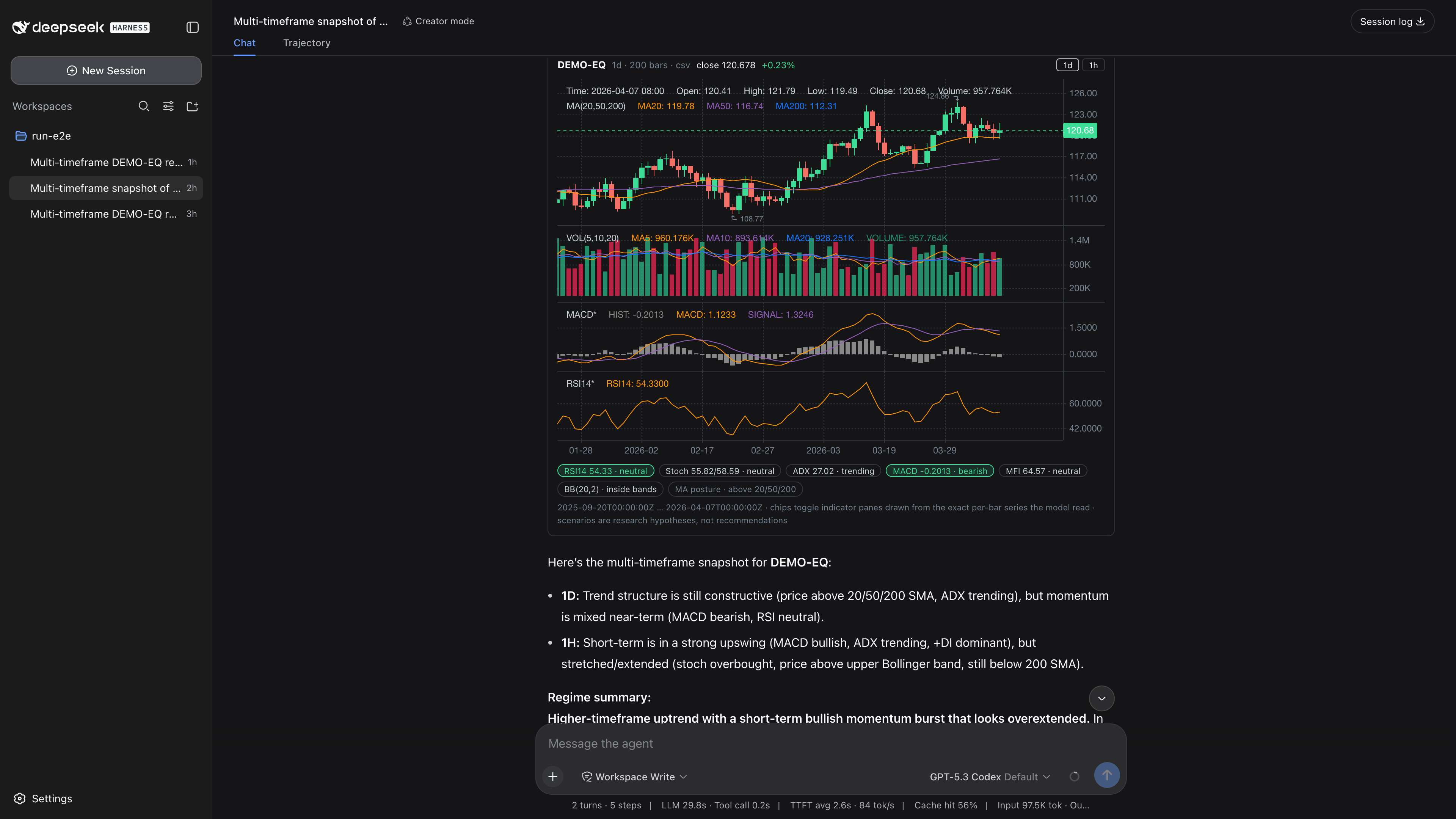
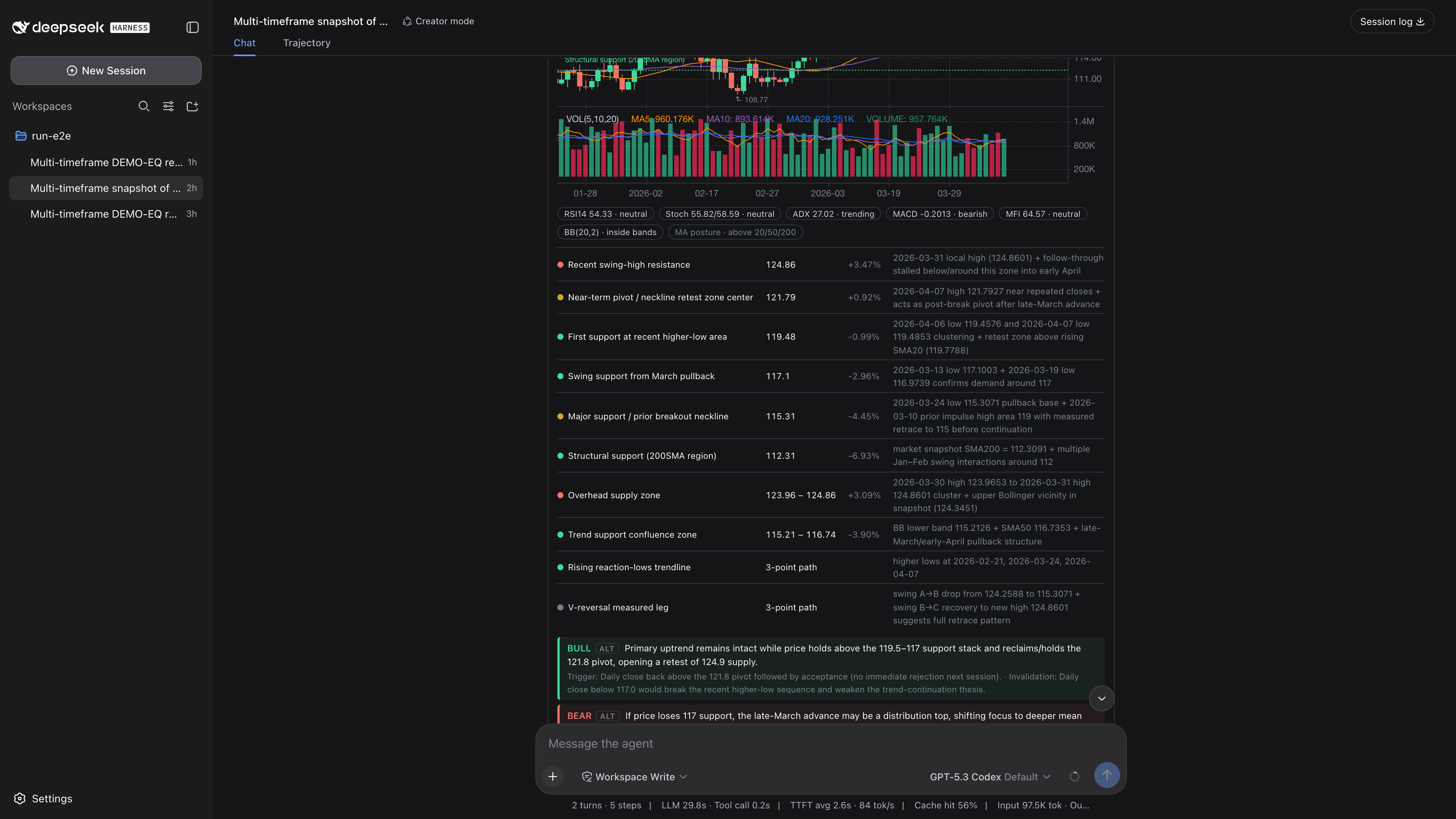
预览截图
README
目录
A trading research workbench built as plugins for DeepSeek Harness (dsh). No fork, no patched core — just a bundle you stack on the stock web or headless profile.
Status: early scaffold. dsh itself is in developer preview and moves fast; expect breaking changes on both sides.
Demo
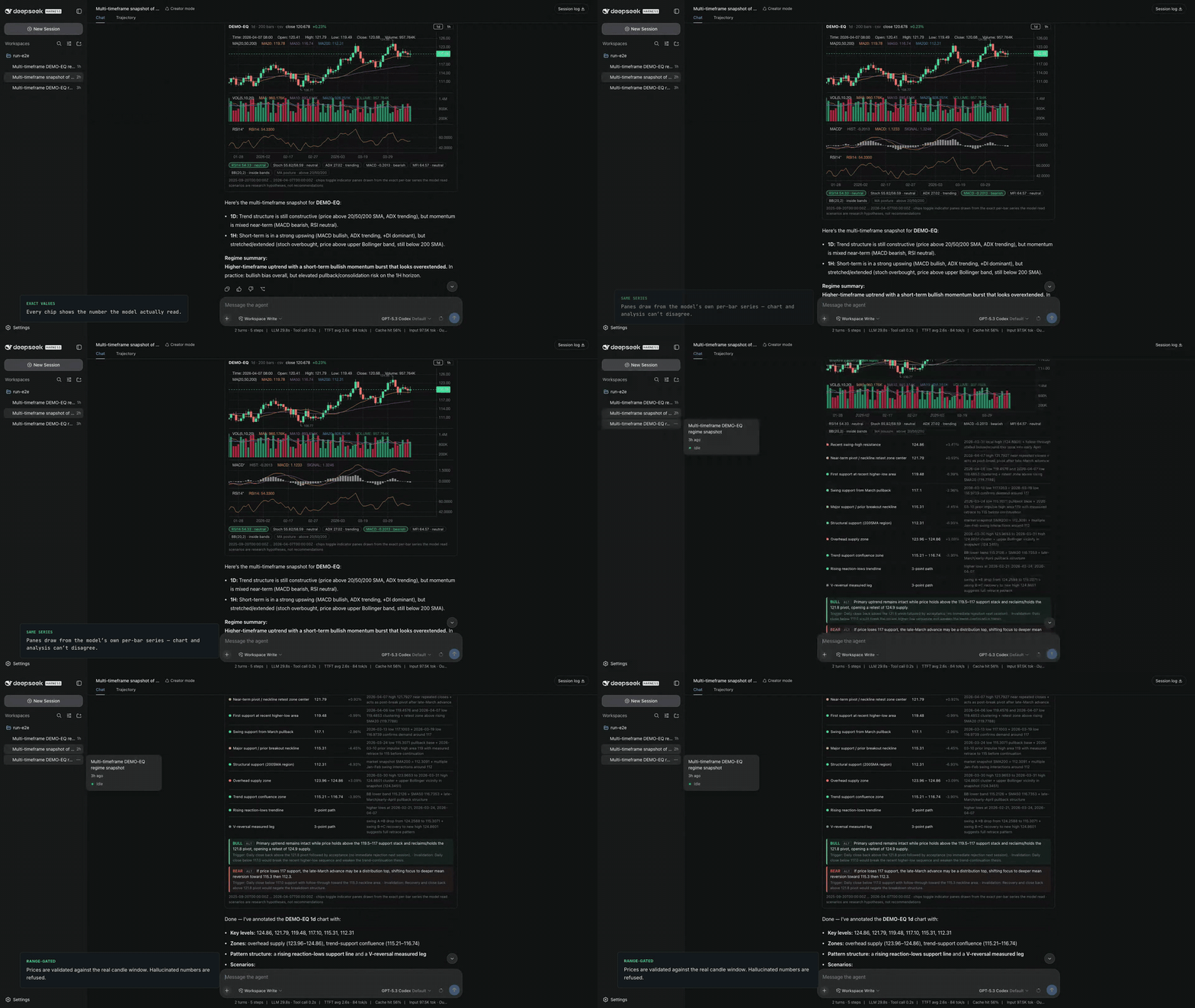
▶ Watch the full 80-second demo with narration on YouTube —
the agent answers with an interactive chart card, chips draw indicator panes
from the exact per-bar series the model read, and annotate_chart puts levels
on the chart through a trust gate: mandatory provenance, prices validated
against the real candle window. All footage is a live session, no mockups.
Design
Eight packages, one direction of dependency:
@dsh-trading/tool-market      model-facing tools (list_symbols, get_ohlcv,
                              market_snapshot) + the indicator library
        │  consumes
        ▼
@dsh-trading/market-data      the seam: ctx.marketData — typed candle/symbol interface
        ▲  implements
        │
@dsh-trading/provider-csv     reference provider: local CSV files
@dsh-trading/provider-futu    live provider: HK / US / A-share candles from a
                              local Futu OpenD

@dsh-trading/risk-guard       independent: refuses execution-shaped tool names
                              from any plugin, at dsh's tools/pre-execute gate

@dsh-trading/verdict          the evaluation harness: audit_backtest validates
                              fills against real candles, runs a seeded
                              random baseline and sample-size power check;
                              lint_strategy_code hunts lookahead leaks.
                              Verdicts may honestly be NOT PROVEN.

@dsh-trading/client-chart     web-only: candlestick cards for market_snapshot /
                              get_ohlcv results, plus the persistent chart
                              column and the loopback channel that feeds it
        │  fills the chart seat of
        ▼
@dsh-trading/client-frame     web-only: the shell frame. Replaces dsh's stock
                              three-column layout row with a chart-first one —
                              sidebar | chart | conversation | details,
                              70/30 by default with the sidebar railed — and
                              declares the `trading.chart` seat
market-datadefines the seam and nothing else (its only peer is cordis). Every consumer talks toctx.marketData; every data source hides behindMarketDataProvider.provider-csvis the bring-your-own-data template: ~100 lines, local<root>/<symbol>/<timeframe>.csvfiles. Copy it to put ClickHouse, a broker API, or CCXT behind the same interface — tools upstream never change.provider-futuis that template filled in against a real broker gateway. It readsQot_GetKLrather thanQot_RequestHistoryKLon purpose: GetKL rides the subscription quota and serves the most recent bars (≤1000), while RequestHistoryKL spends a scarce historical quota OpenD rations by account assets. The trade is stated in the provider's owndescriptionand honoured in its behaviour —start/endfilter the fetched window, they do not seek, so a query for an older range returns honestly empty rather than quietly wrong. Needs OpenD's websocket listener enabled; note that OpenD is an account-bound personal gateway, which is a licensing fact, not a configuration one.futu-apiis a peer dependency, deliberately unpinned. The SDK's version is coupled to the OpenD you have installed, not to this package, and Futu states outright that its package versions follow its own scheme rather than semver — so no range expresses "compatible" and the two must be aligned by hand. Install thefutu-apimatching your OpenD (10.9.xSDK for a10.9.xOpenD). The provider checks this itself at connect, viaGetGlobalState, and logs a warning naming both versions if the protocol lines differ — a skew otherwise surfaces as a rejected handshake or an empty decode, with nothing to point at.tool-marketregisters read-only analysis tools onctx.tools.market_snapshotreturns a whole multi-timeframe indicator regime in one call (RSI, slow stochastic, ADX/DI, MACD, MFI, ATR, SMA/EMA posture, Bollinger) with coarse state labels;get_ohlcvserves raw bars when structure matters. The indicator math is pure and deterministic — textbook definitions with Wilder smoothing where Wilder defined it — so values reconcile against any charting platform and a session-log replay recomputes identical model-visible numbers.client-chartdraws the charts, and drives them from two independent ends. The model'smarket_snapshot/annotate_chartresults render as cards through thetool.call.toolviewseam and are lifted into the persistent column. The USER drives the same column directly: a symbol box and timeframe row talk toctx.marketDataover a loopback RPC channel the package's host half publishes. That second path is the point — a workbench whose only input is "hope the agent calls the right tool" stops working the moment the agent would rather chat, which is exactly what happens in practice. The channel is read-only by construction (the two verbs ofMarketDataProvider, nothing else) and never touches the tool layer, so risk-guard's execution gate is neither weakened nor bypassed.The panel also publishes what it is showing back to the host, and the host feeds that to the model two ways: a one-line context injection each turn, and a
get_chart_viewtool for the same facts on demand. This closes a loop that was conspicuously open — the panel's data path bypasses the tool layer by design, so nothing about the user's chart reached the agent on its own, and the agent would ask the user to screenshot a chart it was rendering two columns away. The injection costs nothing while the panel is idle (empty text is no contribution) and the published value is validated on arrival: it lands in a model's context, which makes it a prompt-injection surface as much as a correctness one.The panel keeps the chart live: it re-reads the last few bars every few seconds and merges them by open time, so a forming bar is replaced in place and a new one is appended — append blindly and a live chart grows a duplicate candle every poll. Updates go through
updateDataon the existing plot rather than a rebuild, so the canvas never flickers. A poll rather than a push, deliberately: the host channel is unary, and a chart seconds old is worth far less engineering than a streaming transport. When the tape stops moving the panel notices it is learning nothing and backs off to once a minute, springing back the moment a bar moves — which is cheaper and more honest than shipping a market calendar. Hidden tabs and a closed column poll not at all.client-frameis the layout half of the same row-swap idea. dsh's shell is one plugin row (ui-layout) that occupies the built-inrootslot and declares thesidebar/conversation/details/shell.overlayseats inside it. Slot core permits exactly one declarer per seat, so a frame cannot sit beside the stock one — the bundle disables that row and inserts ours, which re-declares those four seats under the same names.ui-sidebarandui-conversationregister by name, so dsh's real sidebar and its real conversation surface mount into a third-party frame unchanged; we only decide the column order. On top of them it adds a fifth seat,trading.chart, for the persistent chart column.Its defaults differ from the stock shell on purpose. The chart takes 70% of the free width and the conversation 30 — stored as a ratio, not a pixel width, because "the chart takes 70%" has to survive a window resize to mean anything. The conversation floor drops from dsh's 640px to 420, since here it is a side column rather than the whole app; holding 640 would make the split impossible on a laptop. The sidebar starts collapsed to its rail: a permanent session-history column is a poor trade against chart width, so the frame contributes a session switcher to
conversation.session.header.utilitiesinstead — the route to your sessions lives in the conversation's own top-right, next to the thing it switches. No fork, no patched core — the same mechanism as swappingmarket-data-provider.Opt-in, not bundled. This row is deliberately absent from
@dsh-trading/bundle: replacing the whole shell is far too opinionated to impose on everyone who installs the bundle. Add it from your own profile patch when you want it:- id: ui-layout disabled: true - insert: - id: trading-frame name: '@dsh-trading/client-frame'bundle/tradingwires the rows into a dsh profile viacordis.patch.yml. Users repoint or replace themarket-data-providerrow from their own profile patch — that row swap is the BYO mechanism. The shell frame is not among those rows — seeclient-frameabove for the two lines that enable it.
Why this and not another finance plugin?
Data plugins hard-wire one source; dsh-trading defines the seam they can all plug
into. Quant toolkits ship one tool per indicator; market_snapshot returns the
whole multi-timeframe regime in one call, with state labels computed from the
rounded reported values so chart and number never disagree. And everyone else's
"research only" is a README sentence — ours is a tools/pre-execute gate you can
test.
Hard boundary: research only
This project deliberately has no order-execution capability and no execution seam. Tools read data and compute; nothing places, routes, or simulates-then-forwards orders. Contributions adding live trading execution are out of scope. Nothing here is investment advice.
@dsh-trading/risk-guard extends that stance over plugins this project does not ship: it refuses order-execution and fund-movement tool names at dsh's tools/pre-execute gate, so mounting a broker plugin in a trading profile does not quietly gain the ability to trade. Name matching is a heuristic and cannot be complete — the guard is defense in depth, not the guarantee. The guarantee is structural: there is no execution seam to reach.
Data format (CSV provider)
data/
  AAPL/
    1d.csv        # header: time,open,high,low,close,volume
  BTC-USDT/
    1h.csv        # ISO-8601 UTC bar-open times, ascending
Try it with dsh
One command — the published bundle pulls every plugin package from npm:
dsh plugin --profile trading add @dsh-trading/bundle
Build, then compose the profile from local paths (dsh resolves plugin rows from the profile directory, so the packages must be linked alongside the bundle):
pnpm install && pnpm build
node examples/generate-sample-data.mjs

dsh plugin --profile trading add ./bundle/trading \
    ./packages/market-data ./packages/provider-csv ./packages/tool-market \
    ./packages/risk-guard ./packages/client-chart
Add "@deepseek-ai/dsh-headless" (or "@deepseek-ai/dsh-web-app") after
@deepseek-ai/dsh-base in the profile's dsh.profile.bundles list
($DSH_HOME/profiles/trading/package.json) to pick a surface, configure a model
key (environment DEEPSEEK_API_KEY, or the Models page under dsh web), and
run from any directory whose ./data holds candles in the layout below:
cd examples && dsh --profile trading "pull DEMO-EQ daily candles with sma20/sma50 and describe the trend"
Verify the composed layers any time with dsh --profile trading --dump-config.
The Market Analyst preset
presets/analyst/ is an agent preset that turns the raw tools into a structured
analysis workflow: it scopes the request first (horizon, focus, timeframes),
then reports higher-timeframe context, a key-level table, the multi-timeframe
indicator regime with conflicts named rather than averaged away, bull and bear
scenarios with triggers and invalidation, and the levels that resolve the
ambiguity. Install it and pick Market Analyst in the session's preset menu:
mkdir -p "$DSH_HOME/.agent-presets" && cp -r presets/analyst "${DSH_HOME:-$HOME/.dsh}/.agent-presets/"
The persona holds the research boundary in prose the way risk-guard holds it
in code: report what the data shows, never recommend a position or an entry.
Chart cards in dsh web
Under the web surface, market_snapshot and get_ohlcv results render as
interactive candlestick cards (@dsh-trading/client-chart): K-line + volume +
SMA20/50/200, timeframe tabs, and a chip strip showing the exact indicator
values the model read. The chart data rides the durable tool/result event's
presentation metadata — it never enters the model's context (zero token cost)
and it replays with the session log. The chart pane draws only unambiguous
math (candles, SMA, volume); every other indicator appears as the
RegimeSnapshot's own numbers, so the card can never contradict the analysis
text beside it. Headless profiles ignore the package; without it, dsh falls
back to the generic text card.
Development
pnpm install
pnpm typecheck
pnpm build
Roadmap
- Profile template + docs for stacking onto
dsh --profile web - Chart cards in
dsh web(@dsh-trading/client-chart):market_snapshot/get_ohlcvrender as interactive candlesticks with chip-toggled indicator panes -
annotate_chart: model-authored levels/zones/paths with mandatory provenance and a hard price-range gate, plus base/alternative scenarios — rendered on the card with a levels table - Open contracts for ecosystem builders (CONTRACTS.md): chart payload, open annotation envelope, pure-renderer registry
- Chart panel deepening: user-drawing feedback to the agent,
@Remotehost service for pan-back data - Watch/alert contract (notify-only),
@dsh-trading/contractspackage, conformance fixtures - Research-journal session events (hypotheses, signals — replayable)
- Deterministic backtest runner as a
ctx.commandsCLI command (never model-executed) - More providers: Parquet, ClickHouse, CCXT
License
MIT
原始 README: https://github.com/maddogfinance/dsh-trading/blob/main/README.md ↗
同类插件
查看全部 →
dsh-anchored-standard
两阶段 DeepSeek Harness 预设:先 Minimal 对齐的 bootstrap,再切完整 Standard 工具(Project2 98/99)

PicGo-Core
极致的图片上传引擎,CLI 与 API 双支持

awesome-deepseek-harness
DeepSeek Harness(DSH)及其优秀社区插件的精选指南。

awesome-deepseek-harness
DeepSeek Harness (DSH)生态系统:来自dsh-external/hub和公共dsh-plugin主题的精选插件、工具和基础设施。

AI-Novel-Writer
本地优先 AI 小说创作工作台,提供 Windows/macOS 桌面版与 DeepSeek Harness 插件开发预览,支持角色、大纲、章节蓝图、审稿修稿和本地模型。

mcp-for-stata
MCP-for-Stata:把 Stata 集成进你的 agent