DSH-Plugin-API-Usage-Monitor
by ninedaywoo-web
一个为 DeepSeek Harness Web 侧边栏设计的 API 用量、余额与费用监控插件:把 API 余额做成血条,把当天消耗做成架势条,并用“梁子 / 梁圣”提示峰谷时段。
DeepSeek Harness plugin for API balance monitoring, daily cost and token tracking, peak/off-peak pricing indicators, recharge refresh, and one-click restart.
安装
dsh plugin --profile web add github:ninedaywoo-web/DSH-Plugin-API-Usage-MonitorGitHub 源码安装:首次需按提示配置 allowBuilds 构建授权后重试
安装与环境配置指引、插件开发教程见 DSH 中文社区文档 ↗
安装即在你的机器上以你的权限运行第三方代码——它可读写文件、使用凭据、访问网络,DSH 的工具审批不会为插件代码加沙箱。「检测到 manifest」仅代表发现 dsh.bundle / dsh.plugin 清单,不构成兼容性或安全审查;安装前请审阅源码,不熟悉的插件先在不含密钥的环境试用。
README
目录
简体中文
一个为 DeepSeek Harness Web 侧边栏设计的 API 用量、余额与费用监控插件:把 API 余额做成血条,把当天消耗做成架势条,并用“梁子 / 梁圣”提示峰谷时段。
非官方社区插件,与 DeepSeek 官方无隶属或背书关系。截图中的金额为演示数据。
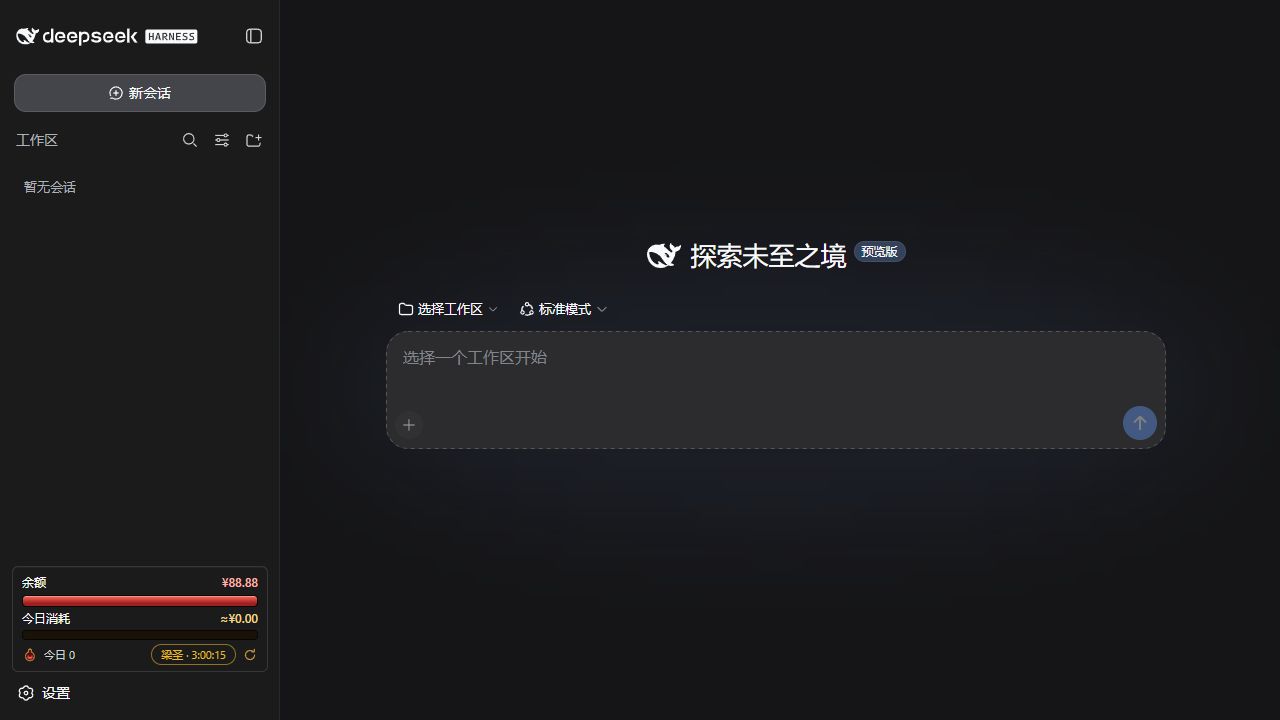
它能做什么
| 功能 | 说明 |
|---|---|
| 余额血条 | 当前余额相对本管血量上限的比例;正常消费只扣血,不会莫名回满。 |
| 今日架势条 | 显示当天消费相对每日预算的比例;充值或刷新血条不会把它清零。 |
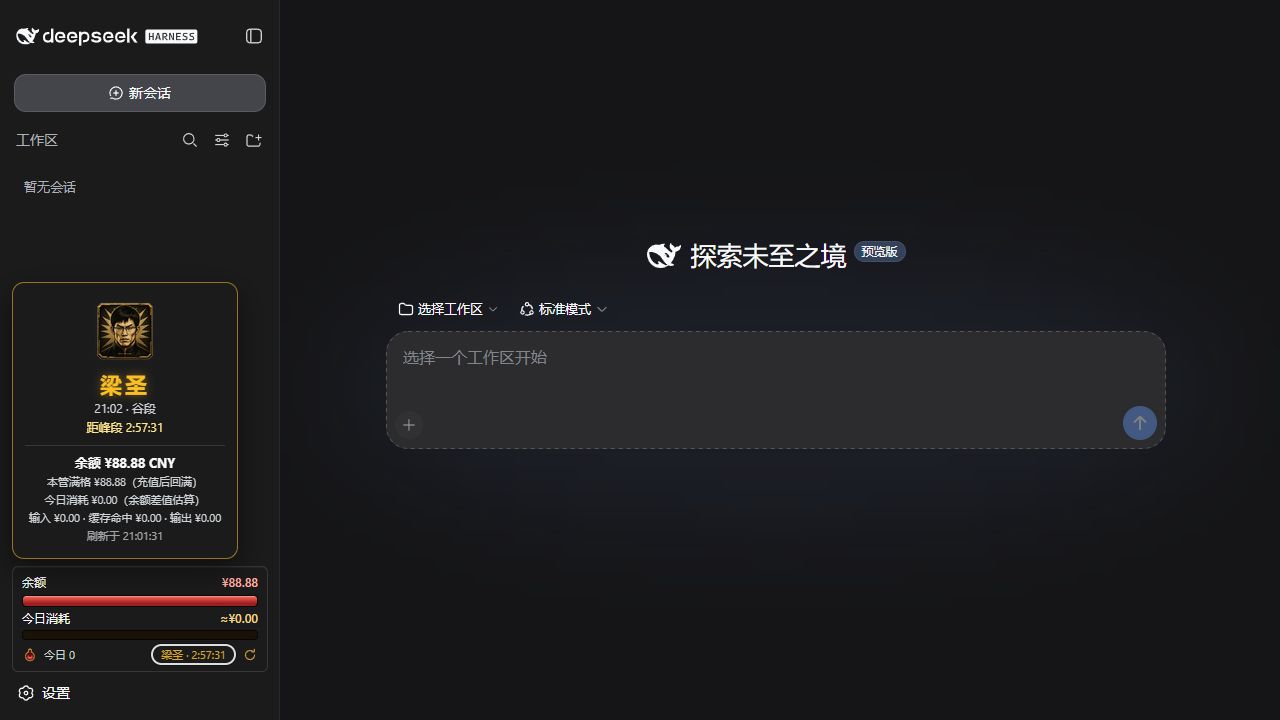
| 峰谷状态 | 峰段显示“梁子”,谷段显示“梁圣”,点击可展开价格时段与余额详情。 |
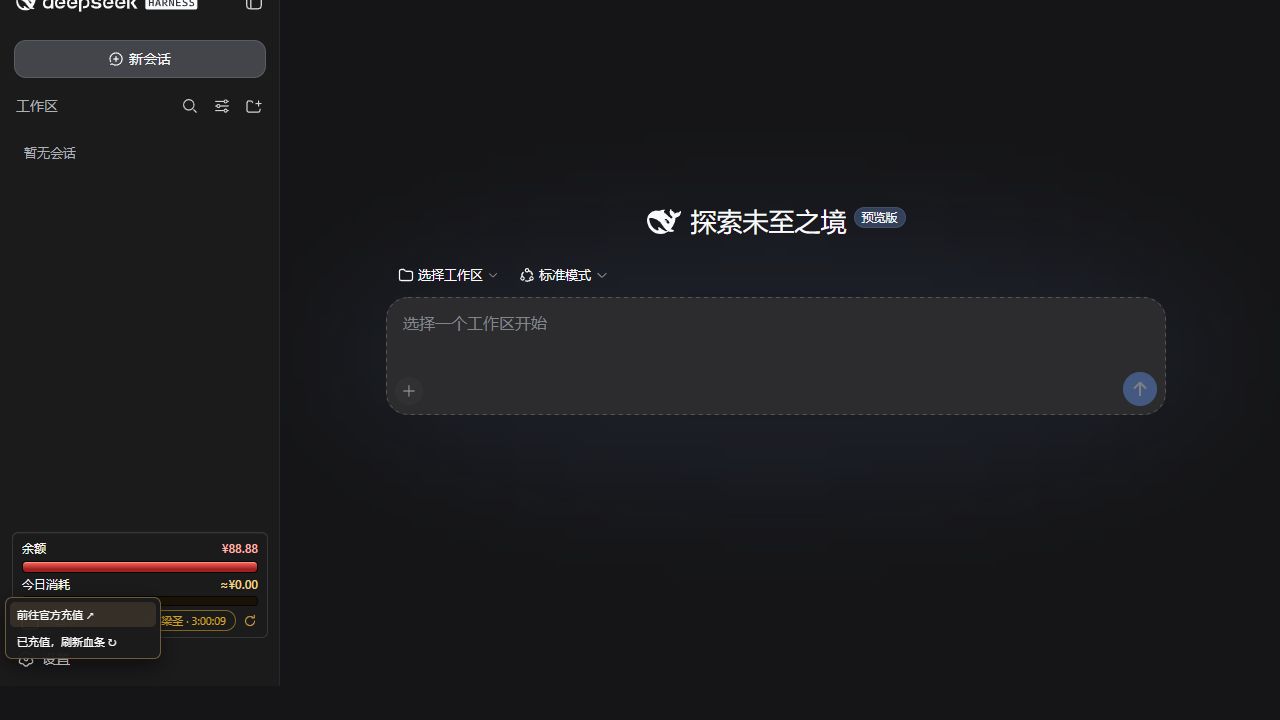
| 充值与刷新 | 点击血瓶后可前往 DeepSeek 官方充值页,充值完成后可手动刷新血条上限。 |
| 一键重启 | 从侧边栏重启当前 Harness;Windows 使用最小化监督终端,macOS 使用后台监督器。 |
| 状态持久化 | 重启 Harness 后保留血条基准和当天消费状态。 |
使用条件
- 已经能够正常运行的 DeepSeek Harness,且已配置
DEEPSEEK_API_KEY - DeepSeek Harness
0.1.0-rc.6或兼容版本 - Node.js
^22.19.0或>=24.0.0 - Windows 10/11 已完成隔离安装测试;macOS 为候选支持,仍需真机验收
插件不负责安装 Harness,也不会替 Harness 配置 API Key。
从 GitHub 安装
- 在 GitHub 的 Releases 页面下载最新的
dsh-plugin-api-usage-monitor-*.tgz。 - 在终端运行下面的命令,把路径换成你刚下载的文件:
dsh plugin --profile web add "/absolute/path/to/dsh-plugin-api-usage-monitor-1.9.0-rc.4.tgz"
- 启动或重启 Web profile:
dsh web
- 刷新 Harness 网页。插件会保留在
webprofile 中,不需要每次重新安装。
日常使用
- 点击血瓶:展开“前往官方充值”和“刷新血条”两个操作。
- 充值完成后:点击“刷新血条”,当前余额会成为新的满血上限;今日架势条不会清零。
- 点击“梁子 / 梁圣”:查看当前峰谷状态、倒计时、余额、今日消费和计价分桶。
- 点击圆形箭头:重启当前 Harness。网页会等待新的 Harness 实例真正启动后再恢复。
- 拖动状态栏:可把它临时放到页面其他位置;双击可归位。
Windows 与 macOS
Windows 的重启监督器使用一个最小化常驻终端,以避免周期性弹出 PowerShell 窗口。macOS 不显示常驻终端,监督日志写入:
$DSH_HOME/logs/dsh-balance-bar-supervisor.log
macOS 真机验收请重点检查:安装、余额读取、点击重启、重启后的状态保留,以及是否出现残留进程。
隐私与安全
- API Key 只由 Harness 的凭据模块在宿主端读取,不会发送到浏览器。
- 插件直接向 DeepSeek 官方余额接口读取余额,不上传遥测数据。
- 重启接口只接受本机环回地址发出的同源请求。
- 安装包不含安装脚本,也不包含作者电脑上的 API Key、会话或余额状态。
卸载
dsh plugin --profile web remove dsh-plugin-api-usage-monitor
卸载不会删除 Harness 会话。插件自己的血条状态位于:
$DSH_HOME/storages/balance-bar-day.json
如需完全清理,可在 Harness 停止后手动删除该文件。
开发与验证
npm test
npm run preflight
npm pack --dry-run
当前自动化测试覆盖余额扣减、手动充值刷新、跨日状态、价格策略、重复重启、崩溃恢复、随机端口和 Windows/macOS 启动方式。
许可证与素材
代码使用 MIT License。角色图片不包含在 MIT 授权范围内,详见 ASSET-NOTICE.md。
English
A DeepSeek Harness plugin for API balance monitoring, daily cost and token tracking, peak/off-peak pricing indicators, recharge refresh, and one-click restart. Its game-style interface turns your API balance into an HP bar and today's spend into a posture bar.
This is an unofficial community plugin and is not affiliated with or endorsed by DeepSeek. Amounts shown in screenshots are demo data.
Features
| Feature | What it does |
|---|---|
| Balance HP bar | Shows the current balance relative to the confirmed full-HP baseline. Normal spending lowers HP without unexpectedly resetting it. |
| Daily posture bar | Shows today's spend relative to the daily budget. Recharging or refreshing HP does not clear it. |
| Peak/off-peak status | Displays “Liangzi” during peak pricing and “Liangsheng” off peak. Click it for timing, balance, spend, and pricing-bucket details. |
| Recharge and refresh | The flask opens DeepSeek's official top-up page or manually refreshes the full-HP baseline after a recharge. |
| One-click restart | Restarts the current Harness from the sidebar, using a minimized supervisor on Windows and a background supervisor on macOS. |
| Persistent state | Preserves the HP baseline and today's usage state across Harness restarts. |
Requirements
- A working DeepSeek Harness installation with
DEEPSEEK_API_KEYalready configured - DeepSeek Harness
0.1.0-rc.6or a compatible release - Node.js
^22.19.0or>=24.0.0 - Windows 10/11 has passed an isolated install test; macOS support is a release candidate pending real-device verification
This plugin does not install Harness or configure your API key.
Install from GitHub
- Download the latest
dsh-plugin-api-usage-monitor-*.tgzfrom GitHub Releases. - Run the following command and replace the example with the downloaded file path:
dsh plugin --profile web add "/absolute/path/to/dsh-plugin-api-usage-monitor-1.9.0-rc.4.tgz"
- Start or restart the web profile:
dsh web
- Refresh the Harness page. The plugin remains installed in the
webprofile across future launches.
Everyday use
- Click the flask to reveal Official top-up and Refresh HP.
- After recharging, click Refresh HP. The current balance becomes the new full-HP baseline, while the daily posture bar remains intact.
- Click Liangzi / Liangsheng to open the peak/off-peak card with timing, balance, spend, and pricing-bucket details.
- Click the circular arrow to restart the current Harness. The page waits for a genuinely new Harness instance before reconnecting.
- Drag the widget to detach it temporarily; double-click it to restore its default position.
Windows and macOS
On Windows, the restart supervisor uses one minimized persistent console to prevent recurring PowerShell pop-ups. On macOS, it runs in the background and writes logs to:
$DSH_HOME/logs/dsh-balance-bar-supervisor.log
For real-device macOS acceptance, verify installation, live balance loading, one-click restart, state persistence, and the absence of orphan processes.
Privacy and security
- The API key is resolved by Harness on the host and is never sent to the browser.
- The plugin reads the balance directly from DeepSeek's official endpoint and sends no telemetry.
- The restart endpoint accepts only same-origin requests from the local loopback interface.
- The package contains no install scripts, API keys, conversations, or author-specific balance state.
Uninstall
dsh plugin --profile web remove dsh-plugin-api-usage-monitor
Uninstalling does not remove Harness conversations. The plugin's own meter state is stored at:
$DSH_HOME/storages/balance-bar-day.json
Stop Harness and delete that file manually only if you want a complete state reset.
Development and verification
npm test
npm run preflight
npm pack --dry-run
The automated suite covers spending, manual recharge refresh, day rollover, pricing policies, duplicate restarts, crash recovery, ephemeral ports, and Windows/macOS launch behavior.
License and artwork
Source code is released under the MIT License. Character artwork is not covered by the MIT license; see ASSET-NOTICE.md.
原始 README: https://github.com/ninedaywoo-web/DSH-Plugin-API-Usage-Monitor/blob/main/README.md ↗
同类插件
查看全部 →
agent-vision-toolkit
为纯文本模型"看图“设计更好的视觉工具箱和技能,支持多图理解,图片问答,前端UI还原、GUI 自动化等,并可选无缝接入多个主流agent,直接识别粘贴图片| A vision toolkit and skill designed for text-only llms — image Q&A, long-screenshot OCR, frontend UI restoration, and GUI automation, with optional seamless integration for Codex, Claude Code, Pi, Oh My Pi, and OpenCode

api-relay-audit
从 DeepSeek Harness 对 AI API 中转站和 LLM 代理运行本地安全审计,生成 Markdown 报告,覆盖提示词注入、模型替换信号、工具调用改写、错误泄漏、流完整性和按 profile 启用的 Web3 风险。

OpenStory
✨ OpenStory 现已支持 DeepSeek Harness 插件! 现在可以通过 dsh-openstory 将 OpenStory 多智能体推演接入 DeepSeek Harness,让 agent 直接启动模拟、查看角色、下达指令并逐回合推进故事。查看 DSH 插件配置与使用指南。

phi
pi的编码代理 ∞ 提供者、子代理、hashline编辑和权限门

anysearch-dsh
DeepSeek Harness(DSH)的 AnySearch 网络搜索提供方与高级搜索工具。

codex-switch
Codex Switch 是一个 macOS 工具,一键配置 Codex 的自定义 API,同时保留官方 OpenAI 登录。保存后 Codex 的模型选择器里只会出现你选的那个 provider 的模型。也支持 Claude Code 的官方 / 自定义 API 切换。Codex Switch is a lightweight helper for configuring multiple coding-agent API routes. For Codex, it keeps Official OpenAI and a custom API provider configured in parallel, registers the custom model in Codex's mod