dsh-easyvision
by s3yf1337
给纯文本模型视觉能力:describe_image 工具把图片委派给 dsh 模型列表中的视觉模型,跑在 harness 自带的 LLM 运行时上
Give text-only models vision: a describe_image tool that delegates images to a vision model from your dsh model list over the harness's own LLM runtime.
安装
dsh plugin --profile web add github:s3yf1337/dsh-easyvisionGitHub 源码安装:首次需按提示配置 allowBuilds 构建授权后重试
安装与环境配置指引、插件开发教程见 DSH 中文社区文档 ↗
安装即在你的机器上以你的权限运行第三方代码——它可读写文件、使用凭据、访问网络,DSH 的工具审批不会为插件代码加沙箱。「检测到 manifest」仅代表发现 dsh.bundle / dsh.plugin 清单,不构成兼容性或安全审查;安装前请审阅源码,不熟悉的插件先在不含密钥的环境试用。
README
目录


Give your text-only agent eyes — with one command and zero extra APIs.
A DeepSeek Harness (dsh) plugin that lets a text-only conversation model "see" images by delegating them to a vision model from your own dsh model list, called over the harness's own LLM runtime.
Why
Your main model (e.g. deepseek-v4-flash) is text-only, so dsh's built-in
read_image tool refuses to send image blocks to it. dsh-easyvision fixes
that in two complementary ways:
- Attached images in the web chat just work. When you drop an image into the composer and send it, the message is admitted and the image is described through the vision model — no more "The current model does not support images; switch to a model that does" refusal. This happens only while the plugin is active, configured, and resolves a vision-capable model; if anything is wrong with the plugin you get an actionable "configure EasyVision" error instead.
describe_imagetool — the model can also inspect image files on its own by calling the tool, which hands the picture to the vision-capable model and returns the description as plain text.
No external API keys. No extra plumbing. Just a model that can see, picked from the models you already have.
Features
- One command install — idempotent, safe to re-run
- Zero external APIs — the vision call goes through
ctx.llm, the exact same runtime the agent loop uses: your keys, your retry policy, your middleware - Any vision model — pick anything from your dsh model list in Settings → EasyVision; no vendor lock-in
- Live configuration — model changes apply immediately, no restart
- Multiple images per call — validated PNG/JPEG/WebP/GIF, same
attachment pipeline as
read_image - Composer image drops — images attached to a chat message are described automatically when the conversation model is text-only
Screenshots
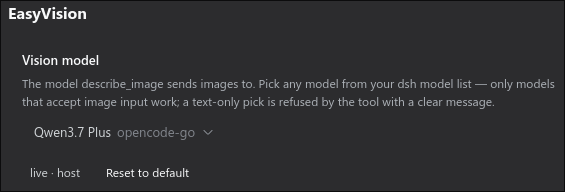
Configure the vision model in the dsh Settings UI — no file editing:
Quick start
curl -fsSL https://raw.githubusercontent.com/s3yf1337/dsh-easyvision/main/install.sh | bash
That's it. Then open Settings → EasyVision and pick a vision-capable
model from your list (the default is qwen3.7-plus on opencode-go).
Only models that declare image input work — a text-only pick is refused by the tool with a clear message.
Demo
$ dsh "what's in testpics/1.jpg?"

  ✦ describe_image(file_paths=["testpics/1.jpg"])
  ✓ qwen3.7-plus (opencode-go) · 1024×1024

  A futuristic cityscape at night — glowing cyan and blue towers
  under three moons, rendered in a digital painting style.
How it works
Two entry points, one pipeline:
composer: drop an image into the chat ──▶ host session.prompt admission
                                              │  model text-only?
                                              ▼
                          easyvision bridge (ctx service, health check)
                                              │  admitted AS-IS: the message
                                              ▼  keeps its real image blocks
                        the chat shows the picture; the model request is
                        transformed at dispatch time (llm prepareCall/stream):
                                              │
                         ctx.llm.stream(provider, model, messages=[image blocks + prompt])
                                              │
                                   vision model (e.g. qwen3.7-plus)
                                              │
                    description text replaces the image blocks in the request
                                              │
                               text-only model reads the description

model turn: describe_image(paths, prompt?) ──▶ same vision pipeline, called as a tool
The install.sh / scripts/patch-dsh-host.mjs host patch changes the
session.prompt admission: when the conversation model is text-only and the
message carries images, the host asks the plugin's easyvision service to
confirm it can take them instead of refusing outright. The prompt is admitted
only while the service is present (plugin active) and the configured
model resolves and declares image input (plugin configured and healthy) —
and the message keeps its real image blocks, so the web chat shows the
picture. The describing itself happens at dispatch time: the plugin wraps the
shared LLM runtime's prepareCall/stream, and any request whose model is
text-only has its user-message image blocks replaced by the EasyVision
description before the adapter sees them. Otherwise the client gets an
actionable error naming the fix (see Troubleshooting).
The plugin validates the configured model against your dsh model list and
refuses to run when it is missing or does not declare image input — before
any image bytes are accepted.
Configuration
Everything is optional — the defaults work out of the box.
| Control | Meaning |
|---|---|
| Vision model (picker) | Any model from your dsh model list, grouped by provider — the same catalog the composer's picker uses. |
| Advanced → Max tokens | Optional output cap for the vision call. |
| Advanced → System prompt | System prompt sent to the vision model before every call. |
| Advanced → Default prompt | Question used when describe_image is called without a prompt. |
Profile-level defaults live in the plugin's entry config
(cordis.patch.yml) and act as the base layer: Settings overrides inherit
from it, and "Reset to default" restores it.
Tool
describe_image(file_paths: string[], prompt?: string) — sends one or more
image files to the vision model and returns its description, plus the
resolved provider/model, per-image dimensions, and whether the response hit
the token limit.
Troubleshooting
The harness's API gateway serves only an explicit allowlist of settings
namespaces to the browser, so the plugin cannot extend it through a seam
yet. Run node scripts/patch-dsh-host.mjs (one-time, idempotent — re-run
after every dsh upgrade). The tool itself keeps working without it, using
the profile-level defaults.
Sending an image to a text-only conversation model is admitted only while
the easyvision service is active and resolves a vision-capable model. The
error code tells you what to fix:
| Code | Meaning | Fix |
|---|---|---|
easyvision-unavailable |
the plugin is not loaded/active in this profile | add it to the profile (install.sh, or the cordis.patch.yml row) and restart |
easyvision-not-configured |
the resolved vision model is not in your dsh model list | open Settings → EasyVision and pick a model from the list |
easyvision-model-text-only |
the picked model does not accept images | open Settings → EasyVision and pick a vision-capable model |
The image-count/byte limits and format validation stay with the harness (the same rules as for a vision-capable conversation model). If the vision call itself fails while the agent turn is running (upstream outage, quota), the request degrades to a short "could not describe it" note so the turn keeps working — the error the vision model returned is included in the note.
A text-only conversation model with a vision-capable main model pick never consults the bridge: image blocks go straight to the model as before.
Model choice matters for quotas. On the opencode.ai Zen GO plan (requests per 5 h / week / month) good vision-capable options include: qwen3.7-plus 4 300 / 10 800 / 21 600 (the default), MiniMax M3 3 200 / 8 000 / 16 000, Qwen3.6 Plus 3 300 / 8 200 / 16 300, GPT-5.6 Luna 2 050 / 5 100 / 10 250, Kimi K2.6 1 150 / 2 880 / 5 750.
MiMo-V2.5 has by far the best quota (30 100 / 75 200 / 150 400), but as of
this writing the opencode.ai gateway answers all mimo-* model ids on
some accounts with 403 (AUTH), while other models on the same key work
fine. If describe_image fails with AUTH, pick another vision-capable
model from your list.
Manual installation
Add
"dsh-easyvision": "file:/path/to/dsh-easyvision"to the profile'spackage.jsondependencies and link it into the profile'snode_modules(ordsh plugin --profile NAME add dsh-easyvision).Load it in the profile's
cordis.patch.yml:- insert: - id: easyvision name: 'dsh-easyvision' config: provider: opencode-go model: qwen3.7-plusPatch the installed host so the Settings page exposes the namespace AND
session.promptadmits images through the bridge:node scripts/patch-dsh-host.mjs(one-time; re-run after dsh upgrades).Restart the harness. The model must be present in your dsh model list (
~/.dsh/settings.yamlor Settings → Models) and the provider must actually serve it.
Install script options: --profile NAME (default desktop), --link
(symlink a dev checkout), --no-restart.
Development
# headless smoke test (plugin must be installed in the headless profile)
dsh --profile headless "Use describe_image on testpics/1.jpg and report what it returns"
License
MIT
原始 README: https://github.com/s3yf1337/dsh-easyvision/blob/main/README.md ↗
同类插件
查看全部 →
modlens
为纯文本模型架起视觉桥梁:粘贴图片,输出结构化 JSON 证据(OCR、版面、语义)。

dsh-vision-toolkit
让纯文本模型更好地做视觉任务:带意图的图片问答、长截图 OCR、UI 还原等。

dsh-vision-router
为纯文本 Agent 提供视觉能力:内置免 Key 视觉链 + 像素级视觉工具(看图问答、定位、裁剪、像素对比、取色、OCR、矢量化、抠图、截图);粘贴图片即可用。

dsh-vision-complete
给 DeepSeek 补上「眼睛和耳朵」的多模态视觉插件:看图 / OCR / 物体检测 / 视频理解 / 语音转写 / 截图直读,一键安装(DSH 插件)。

dsh-media-skills
面向纯文本模型的免费视觉桥与生图:粘贴读图、GLM-4V-Flash 与 Gemini 引擎故障转移、modlens 同款结构化证据输出,并自动播种免费视觉模型路由。

dsh-vision-opencode
给纯文本主模型加可配置识图模型:vision_read_image 工具、输入框识图模型选择器,以及纯文本路由的图片自动转文字。