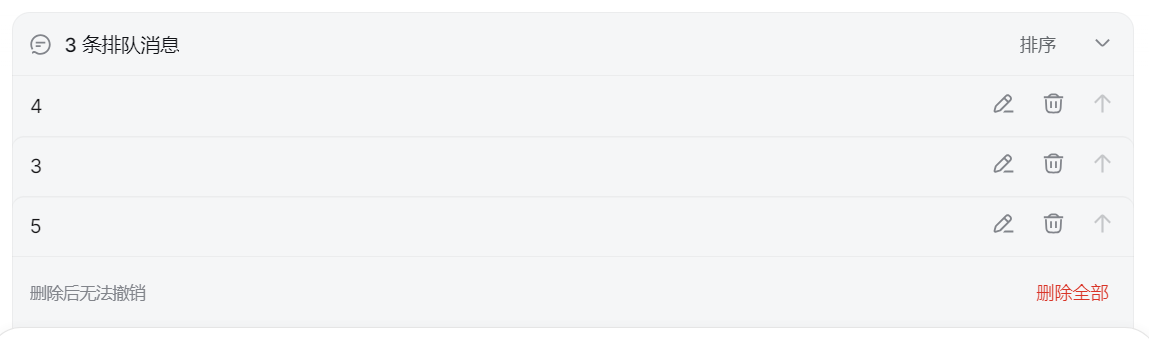
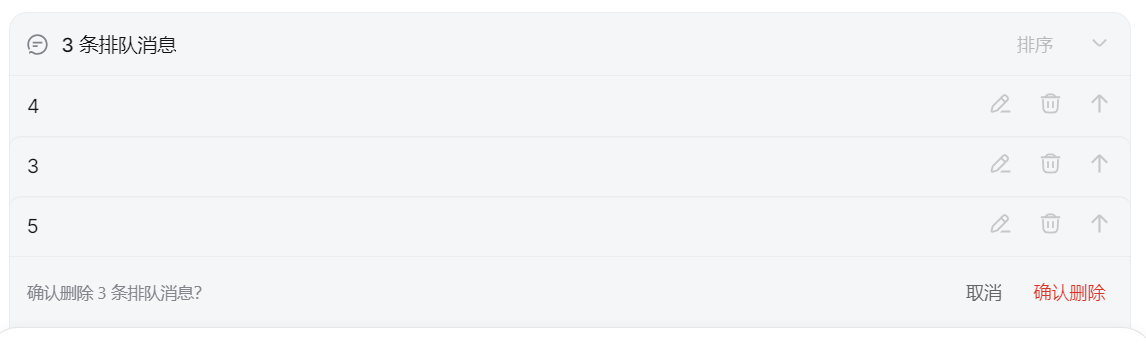
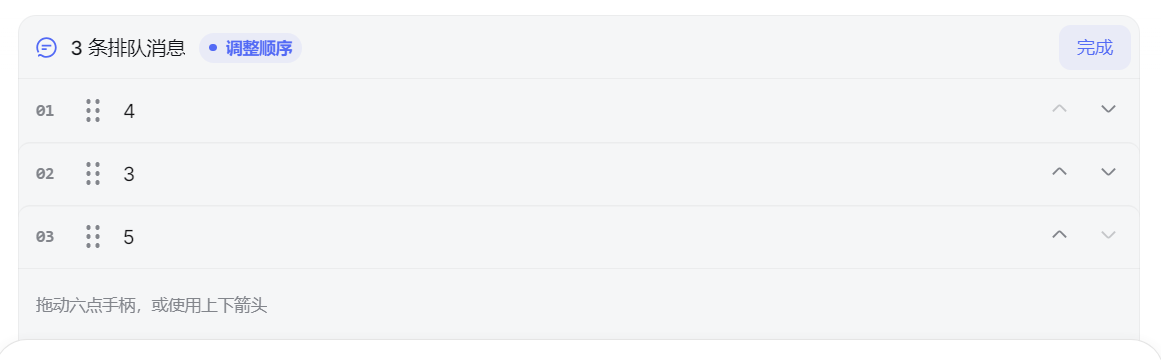
出厂排队消息的增强面板:编辑、删除、插话,再加上排序、清空和 10 秒撤销。
Stock queue plus edit, remove, steer, reorder, clear-all, and 10-second undo.
安装
dsh plugin --profile web add github:starslittle/dsh-queue-plusGitHub 源码安装:首次需按提示配置 allowBuilds 构建授权后重试
安装与环境配置指引、插件开发教程见 DSH 中文社区文档 ↗
安装即在你的机器上以你的权限运行第三方代码——它可读写文件、使用凭据、访问网络,DSH 的工具审批不会为插件代码加沙箱。「检测到 manifest」仅代表发现 dsh.bundle / dsh.plugin 清单,不构成兼容性或安全审查;安装前请审阅源码,不熟悉的插件先在不含密钥的环境试用。
预览截图

README
English | 简体中文
一个更好用的 DSH 排队消息面板:编辑、删除、插话、排序和批量删除。
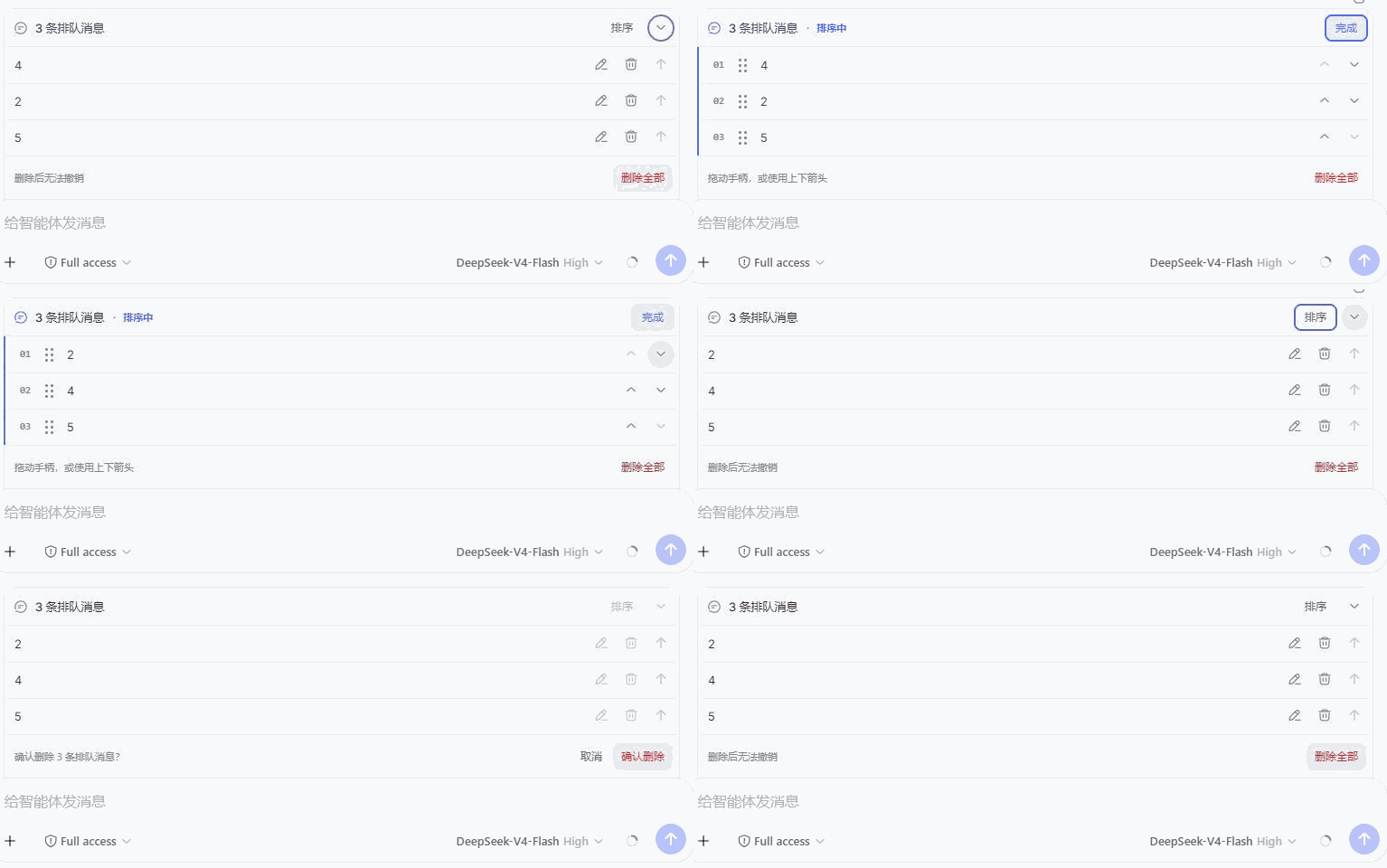
Queue Plus 使用 DSH 官方插槽接管 QueueDock,不隐藏或复制排队消息;停用或卸载插件后,官方队列会自动恢复。
功能
- 编辑、删除或插话发送排队消息。
- 拖动消息,或使用上下箭头调整执行顺序。
- 一键批量删除,确认后按 DSH 官方方式逐条处理。
- 新队列自动展开,并记住手动收起状态。
- 支持中文、英文、键盘和触屏操作。
安装
推荐安装 Release 中的预构建包,无需授权安装脚本:
dsh plugin --profile web add -w https://github.com/starslittle/dsh-queue-plus/releases/download/v0.3.0/dsh-queue-plus-0.3.0.tgz
重启 dsh web。运行中连续发送至少两条“排队”消息,队列标题旁会出现“排序”。
装完怎么验
| 现象 | 怎么办 |
|---|---|
| 排队两条后标题旁出现「排序」 | 已生效 |
| 没有「排序」 | 确认已重启,并选「排队发送」而不是马上发送 |
| 关掉或卸载后队列变回原样 | 正常 |
边界
- 单条和批量删除都调用 DSH 官方
conversation.updateQueue(..., { kind: 'remove' })。 - 删除全部只处理确认时可见的消息;并发变化时可能部分完成,不会误删随后加入的消息。
- 排序使用服务端确认和并发保护;若队列已经变化,本次排序会拒绝而不是排乱。
- 不操作 steering / context 队列,也不管理父 Agent 所有的 subagent 队列。
- 卸载后官方队列自动恢复。
锁定版本、从 GitHub 源码安装:
dsh plugin --profile web add github:starslittle/dsh-queue-plus#v0.3.0
源码安装会跑仓库自带的 prepare 构建。pnpm 10 及以上需要先在对应 profile 的 pnpm-workspace.yaml 里允许 dsh-queue-plus 执行构建;只对可信源码开这个权限。
本地开发:
pnpm install
pnpm run check
dsh plugin --profile web add -w link:/absolute/path/to/dsh-queue-plus
更新与卸载:
dsh plugin --profile web update dsh-queue-plus
dsh plugin --profile web remove dsh-queue-plus
面向 @deepseek-ai/* 0.1.0-rc.6 的公开 Agent Inbox 与 Web 插件契约。DSH 仍在 RC,契约若改需要同步升级插件。
许可
MIT
原始 README: https://github.com/starslittle/dsh-queue-plus/blob/main/README.md ↗
同类插件
查看全部 →
archify
Agent 技能:生成美观、可校验的架构图、工作流图、时序图、数据流图与生命周期图——自包含 HTML、带动画与清晰导出

dsh-turn-rewind
对话回退:基于持久 Change Ledger 回滚会话与工作区状态。

dsh-plugin-cc
把 DeepSeek Harness 接入 Claude Code:评审、批评、委派与会话导入

dsh-interconnect
跨实例互联:经 interconnect 服务在多个 DSH 实例间转发消息与事件。

dsh-chat-import
把 13 家 coding agent(Claude Code、Codex、ChatGPT、Cursor、Gemini、opencode 等)的完整对话历史导入为可续聊的 DeepSeek Harness 会话,并支持反向导出回 Claude Code。

dsh-crew
DSH 插件:从 Claude Code / Codex 向 DSH agent 派活——原生 subagent 进度、宿主内 worker 会话(分级预设),以及为纯文本宿主补上视觉与图像生成的多模态桥