dsh-balance-plugin
by stevenx65
dsh 网页侧边栏的 DeepSeek 余额与 token 用量监控:今日/累计切换,并按 provider 过滤其他厂商。
DeepSeek balance and token usage in the web sidebar, with a today/all-time toggle and provider filtering.
安装
dsh plugin --profile web add github:stevenx65/dsh-balance-pluginGitHub 源码安装:首次需按提示配置 allowBuilds 构建授权后重试
安装与环境配置指引、插件开发教程见 DSH 中文社区文档 ↗
安装即在你的机器上以你的权限运行第三方代码——它可读写文件、使用凭据、访问网络,DSH 的工具审批不会为插件代码加沙箱。「检测到 manifest」仅代表发现 dsh.bundle / dsh.plugin 清单,不构成兼容性或安全审查;安装前请审阅源码,不熟悉的插件先在不含密钥的环境试用。
README
DeepSeek Harness(dsh)web 插件:在 3080 端口的侧边栏底部显示 DeepSeek API 余额 和 token 用量,支持 今日/累计 切换,并按 provider 过滤(只统计 deepseek-official,忽略其他厂商)。
功能
- 💰 余额:调 DeepSeek 官方
GET /user/balance,key 复用 dsh 的 credentials(~/.dsh/.credentials.yaml),无需手动填 - 📊 token 用量:读取 dsh 原始 session 日志(
session.jsonl.zstd),按 provider 过滤后聚合- 未缓存输入 / 缓存读取 / 输出 / 模型调用次数
- 🔄 今日/累计切换:今日(北京时间当天)或全部历史
- 🎨 深色/浅色自动适配
截图
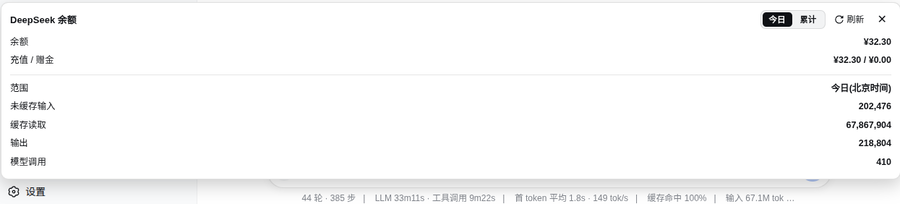
一键安装(从插件市场)
dsh plugin --profile web add dsh-balance-plugin
重启 dsh web 后刷新页面,侧边栏底部出现余额按钮。
架构
浏览器(3080 页面)
  client.js ──fetch──▶ /dsh-balance/data?scope=today|all
                              │
node 端(index.js,运行在 dsh 进程内)
  ├── credentials.resolve("DEEPSEEK_API_KEY")  ← 复用 dsh 的 key
  ├── fetch(https://api.deepseek.com/user/balance)
  └── 解压 ~/.dsh/sessions/*/*/session.jsonl.zstd
      逐行过滤 assistant/message + provider=deepseek-official
index.js:node 端 cordis 插件,注册 HTTP 路由/dsh-balance/dataclient.js:浏览器端插件,注入sidebar.footer.action(侧边栏底部按钮 + 黑色浮层)package.json:dsh.client.platform: "web"+exports["./client"],供dsh-client-modules扫描
安装
- 把
dsh-balance-plugin目录放到 web profile 的 node_modules:
mkdir -p ~/.dsh/profiles/web/node_modules/dsh-balance-plugin
cp index.js client.js package.json ~/.dsh/profiles/web/node_modules/dsh-balance-plugin/
- 编辑
~/.dsh/profiles/web/cordis.patch.yml,加入:
- insert:
    - id: dsh-balance
      name: 'dsh-balance-plugin'
重启 dsh web(如 tmux 里:
tmux send-keys -t dsh C-c然后dsh web)刷新浏览器 3080 页面,侧边栏底部出现余额按钮
依赖
- node 端:仅 Node 内置模块(
node:fs、node:child_process、node:path等),需要系统有zstdCLI 用于解压 session 日志 - 浏览器端:依赖 dsh 自带的
@deepseek-ai/dsh-client-ui-primitives(图标组件),dsh 0.1.0-rc.6 自带,无需额外安装
数据来源
原始会话日志位置:~/.dsh/sessions/<scope>/<session-id>/session.jsonl.zstd
每条 assistant/message 行含:
{
  "type": "assistant/message",
  "time": 1786635270943,
  "data": {
    "message": { "source": { "kind": "model", "provider": "deepseek-official", "model": "deepseek-v4-pro" } },
    "usage": { "inputTokens": 8702, "outputTokens": 298, "cacheReadTokens": 0 }
  }
}
打包
npm pack # 生成 dsh-balance-plugin-0.1.0.tgz
License
MIT
原始 README: https://github.com/stevenx65/dsh-balance-plugin/blob/main/README.zh.md ↗
同类插件
查看全部 →
dsh-usage-plugin
DeepSeek Harness 用量与消耗插件(dsh-usage)—— 每次调用的 token 用量/缓存命中统计、峰谷计费、余额查询、CSV/JSON/PNG 导出,可经桌面端一键安装或命令行 dsh plugin add 安装。

dsh-whale-report
🐋 鲸鱼记事本 — 你的 Agent 年度报告:从会话事件日志生成日报/周报/月报/年报,任意区间、只读不改写

dsh-balance-meter
输入框 dock 显示 DeepSeek 账户余额与会话花费,自动拉取官方定价,支持高峰/低谷计价。

dsh-usage-stats
DeepSeek Harness 使用统计插件|Token 总量与构成、7/30 天趋势、年度活跃热力图、模型占比、工作区/任务筛选、CSV/JSON 导出

dsh-balance
DeepSeek 余额实时显示插件: 在 dsh Web UI 输入框 下方、命中率/输入输出 token 统计条所在的同一行 , 实时显示:

dsh-balance-monitor
DeepSeek 账户余额、剩余比例条与今日花费,显示在 dsh 侧边栏底部 · DeepSeek balance, remaining-ratio bar and today's spend in the dsh si