plugin-registry
by vlln
插件生态基建:浏览器面板管理官方 repository 插件(0 patch)+ make-dsh-plugin 插件开发引导技能。
Ecosystem infrastructure: a thin browser console for managing official repository plugins (zero patches) plus a make-dsh-plugin skill for guided plugin development.
安装
dsh plugin --profile web add github:vlln/plugin-registry#path:/packages/plugin/consoleGitHub 源码安装:首次需按提示配置 allowBuilds 构建授权后重试
安装与环境配置指引、插件开发教程见 DSH 中文社区文档 ↗
安装即在你的机器上以你的权限运行第三方代码——它可读写文件、使用凭据、访问网络,DSH 的工具审批不会为插件代码加沙箱。「检测到 manifest」仅代表发现 dsh.bundle / dsh.plugin 清单,不构成兼容性或安全审查;安装前请审阅源码,不熟悉的插件先在不含密钥的环境试用。
README
这是什么
官方 bundle 插件(dsh.bundle + dsh.client 声明):Node half 注册
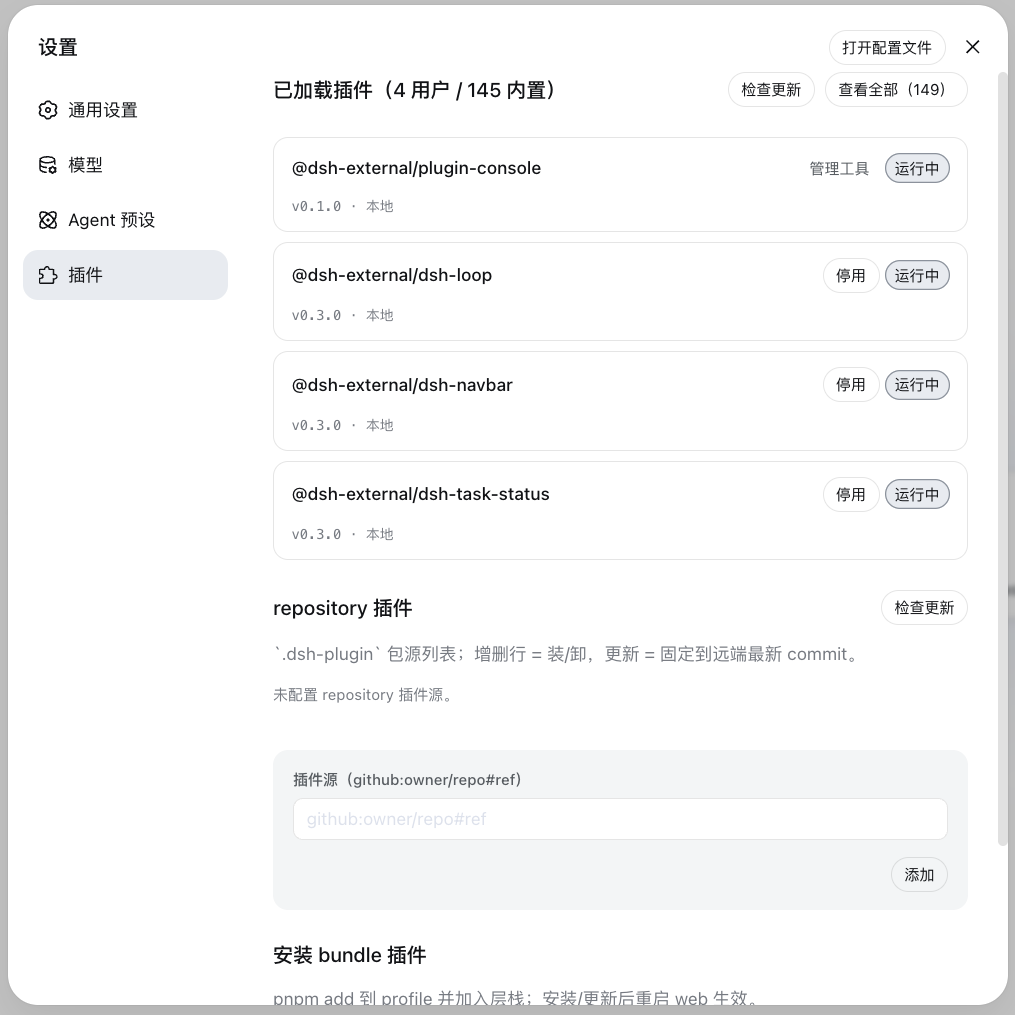
/api/plugin-console 路由,client half 在设置页注册「插件管理」面板
(tab 命名避免与官方「插件」tab 重名)。面板两个管理区:
| 管理区 | 职责 | 操作 | 写入位置 |
|---|---|---|---|
| 安装插件 | 统一安装入口:bundle 与非 bundle 自动分流 | 输入 npm 包名 / GitHub 项目(https://github.com/o/r、github.com/o/r、github:o/r,URL 自动规范化)→ 安装 |
bundle → profile package.json 依赖 + dsh.profile.bundles 层栈(重启生效);非 bundle → profile cordis.patch.yml insert 行(配置 HMR 实时生效,零重启) |
| 已加载插件 | 查看所有已加载插件(bundle + 内置)状态 | 检查更新 / 更新(用户 bundle)/ 停用、启用(用户 bundle)/ 卸载(用户 bundle) | profile cordis.patch.yml 的 disabled 标记(持久化)+ 层栈 |
0811 背景:官方移除 repository-plugins 机制(vendor/loader/src/repository.ts 删除),外部插件
统一经 web profile 安装。0811 保留配置级 HMR(web-app 禁用模块级 hmr 时 profile-boot 主动挂载
watch-only 实例)——profile cordis.patch.yml 编辑实时生效,insert 行写入无需重启即挂载(已实测)。
安装
安装命令与方式(git 源真一行 / npm 源 / 本地目录)见仓库根 README「安装」章节。构建产物已入库,git 源一行命令直接装(实测约 15 秒);npm 源已发布(@vlln/plugin-console):
dsh plugin --profile web add "github:vlln/plugin-registry#main&path:/packages/plugin/console"   # git 源(真一行)
# 或 npm 源:dsh plugin --profile web add @vlln/plugin-console@0.1.0
挂载后刷新 Web 页面,设置页出现「插件管理」面板(settings.section 插槽)。
使用
- 安装插件区:输入 npm 包名或 GitHub 项目(
https://github.com/o/r/github.com/o/r/github:o/r,URL 自动规范化为github:o/r)→ 自动 pnpm add,按包是否声明dsh.bundle分流:bundle → 层栈(重启生效);非 bundle → insert 行(配置 HMR 实时挂载,零重启) - 已加载插件区:统一行渲染(版本状态:已最新 / 本地(非 registry) / 可更新;来源 Pill:内置 / 管理工具 / insert),启停即时生效并持久化到 profile patch,用户 bundle 支持更新与卸载
AI 插件管理工具(agent 面)
面板之外,Node half 注册 4 个 agent 工具(defineTool,与面板写同一安装态):
| 工具 | 参数 | 行为 |
|---|---|---|
plugin_search |
query?, source?, refresh? |
搜源集合(缓存枚举);默认 hub catalog(配置的 index.json);source 给定新索引 JSON 文件/URL → 懒加载探测并记住 |
plugin_install |
source |
npm 包名 / GitHub 项目(https://github.com/o/r、github.com/o/r、github:o/r,URL 自动规范化):声明 dsh.bundle → pnpm add + 层栈(重启生效);纯 cordis 包 → pnpm add + insert 行(实时挂载);安装失败显式报错,不假成功 |
plugin_uninstall |
id |
删 insert 行(实时)或 bundle 依赖(重启生效);清单保留可再装 |
plugin_status |
id? |
无参 list 已装;有参单查(含 TOFU resolved ref) |
发现层存储(协议见 plugin-discovery-design):
$DSH_HOME/plugin-sources/
├── sources.yml      # 索引源集合(hub catalog;用户可编辑 + trust 层级)
├── lock.yml         # TOFU:canonical → resolved ref + 内容哈希
└── cache/<源id>/    # 每源枚举快照(TTL 6h)
index 源支持本地文件(file://…/catalog.json)——私有 hub 仓库匿名 raw 不可达时读本地 clone。
web 面板刷新即见 agent 写入结果(同文件,不实时推送)。
生效方式
- insert 插件(非 bundle):写行/删行后 配置 HMR 实时生效(无需重启——0811 profile-boot 挂载 watch-only HMR)
- bundle 插件:安装/更新/卸载需重启 web(层栈在 boot 合成);已挂载 bundle 的运行时启停即时生效并持久化
- Node half 改动需重启 web(ESM 缓存);client 面板改动重装 + 刷新页面即可
开发插件(引导)
创建官方 bundle 插件 / 纯 cordis 插件的契约见 make-dsh-plugin skill。仓库内参考实现:本包(bundle + 自渲染 client 的完整例子)。
原始 README: https://github.com/vlln/plugin-registry/blob/main/packages/plugin/console/README.zh.md ↗
同类插件
查看全部 →
k8e
k8e.sh — 开源 Agentic AI 沙箱矩阵

hol-guard
开源AI代理防病毒:运行时拦截风险工具、秘密访问、提示注入、恶意软件包、MCP服务器、插件和技能。

anolisa
ANOLISA(Agentic Nexus Operating Layer & Interface System Architecture):具备运行时、安全性、可观测性和 Tokenless 响应压缩能力的 Agentic OS,可降低 Token 使用量与成本。

mobius
首个自我演进的开源 Agent OS:连接你的团队、AI agent、设备与算力

deepseek-harness-desktop
DeepSeek Harness Tauri 桌面版 | Only 5mb installer, zero environment setup. Windows / macOS / Linux.

open-managed-agents
开源Claude管理代理API实现和自托管Claude标签式代理运行时。即插即用;在Cloudflare Workers/Durable Objects或Node.js上运行。Apache 2.0。