dsh-file-explorer-preview-code
by wolfsonliu
DSH Web file-explorer preview plugin: code preview & editor for DSH Web — per-language syntax highlighting, in-place editing with autosave, and dark/light themes. Overrides dsh-file-explorer's plain-text preview. | DSH Web 文件浏览器插件: 代码预览与编辑插件——按语言语法高亮、就地编辑自动保存、深色/浅色主题,覆盖 dsh-file-explorer 的纯文本预览。
安装
dsh plugin --profile web add github:wolfsonliu/dsh-file-explorer-preview-codeGitHub 源码安装:首次需按提示配置 allowBuilds 构建授权后重试
安装与环境配置指引、插件开发教程见 DSH 中文社区文档 ↗
安装即在你的机器上以你的权限运行第三方代码——它可读写文件、使用凭据、访问网络,DSH 的工具审批不会为插件代码加沙箱。「检测到 manifest」仅代表发现 dsh.bundle / dsh.plugin 清单,不构成兼容性或安全审查;安装前请审阅源码,不熟悉的插件先在不含密钥的环境试用。
README
English | 中文
DSH Web 的 CodeMirror 6 代码预览与编辑器,基于 codemirror(basicSetup)+ @codemirror/language-data(按语言高亮)+ @codemirror/theme-one-dark(深色主题)构建。它以优先级 10 覆盖 dsh-file-explorer 内置的纯文本预览(优先级 0),为代码文件提供按语言区分的高亮,以及支持自动保存的就地编辑。
截图
| 深色主题 | 浅色主题 |
|---|---|
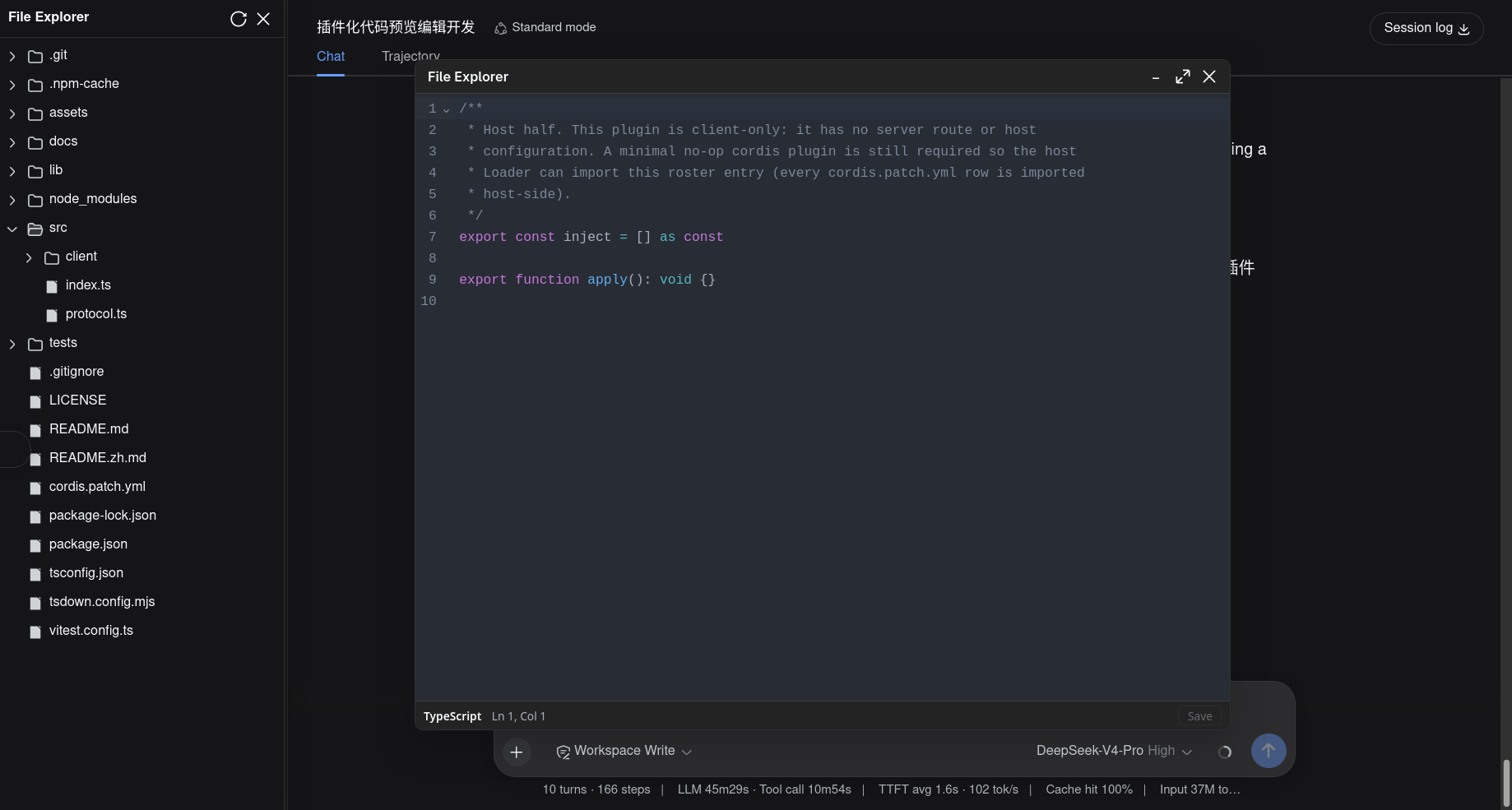 |
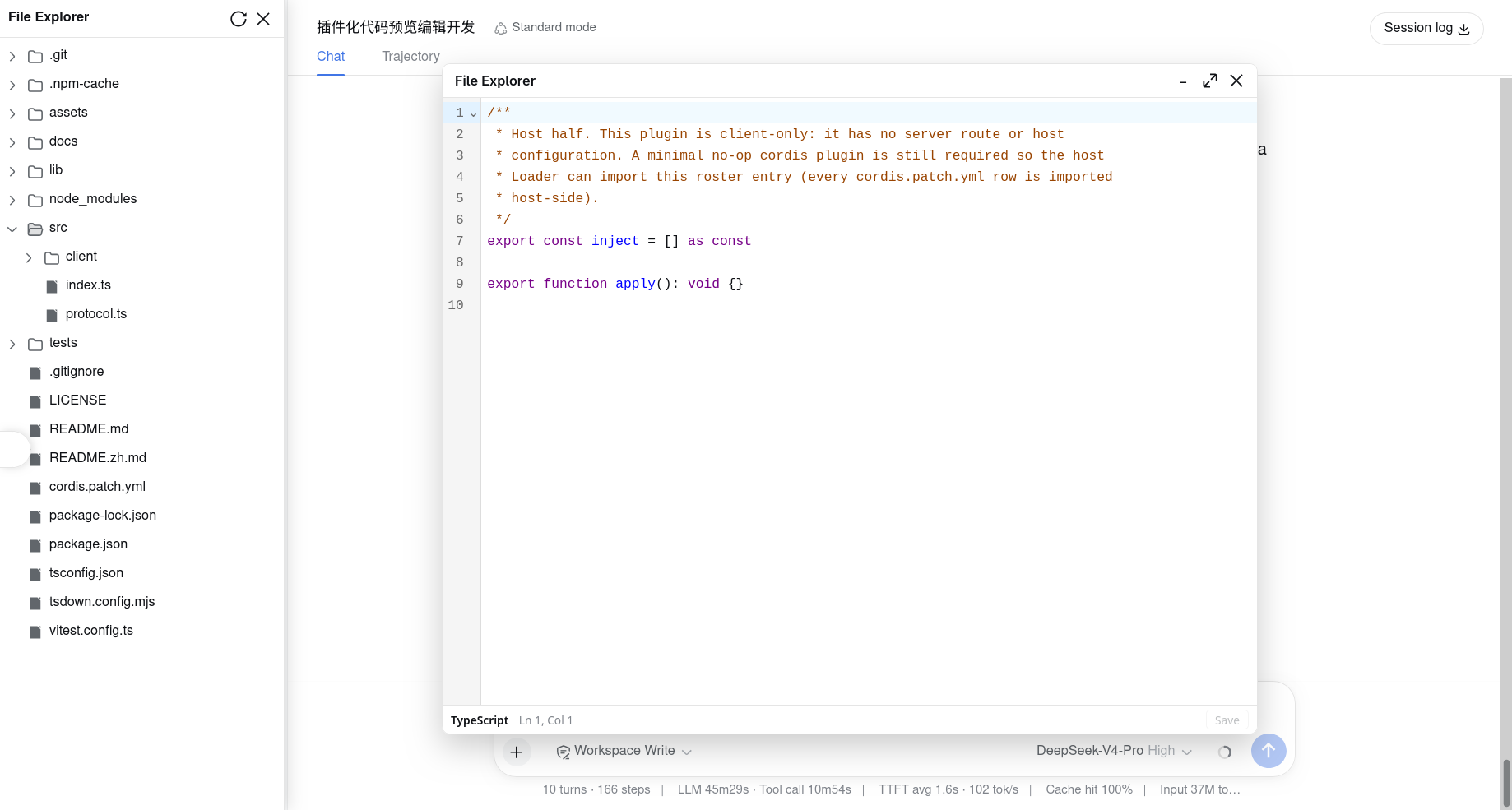 |
功能
- 语法高亮:通过
@codemirror/language-data按文件名解析语言(约 90 种),.ts/.tsx/.js/.jsx/.json/.css/.html/.py/.yaml/.yml/.toml/.sh/.go/.rs/.java/.c/.cpp/.h/.xml/.sql/.ini等都能得到正确的着色。 - 就地编辑:预览框是真正的 CodeMirror 编辑器(行号、撤销/重做、软换行),而非只读的
<pre>。 - 自动保存:停止输入 500ms 后自动保存,
Ctrl/Cmd+S立即保存。 - 保存状态栏:底部细栏显示语言、
Ln/Col光标位置与保存状态(未保存 / 保存中… / 已保存 / 保存失败),并提供手动保存按钮。 - 主题感知:高亮实时跟随 DSH 的深色/浅色切换(
data-ds-dark-theme)。 - 可扩展设计:通过
fileExplorer服务注册,不改动核心文件浏览器。
依赖
本插件依赖 @dsh-external/dsh-file-explorer——它注入 fileExplorer cordis 服务,由该服务提供 registerPreview 与 writeFile(保存路径)。请先安装并启用 dsh-file-explorer,再安装本插件:
git clone https://github.com/wolfsonliu/dsh-file-explorer.git
cd dsh-file-explorer
npm install && npm run build
dsh plugin --profile web add .
@dsh-external/dsh-file-explorer从 git 仓库安装(github:wolfsonliu/dsh-file-explorer),以便tsc解析其./client类型定义。若需针对未发布的本地 checkout 联调,可把该依赖改为指向你自己的路径。
安装
从 git 仓库安装:
git clone https://github.com/wolfsonliu/dsh-file-explorer-preview-code.git
cd dsh-file-explorer-preview-code
npm install && npm run build
dsh plugin --profile web add .
dsh web
工作原理
客户端入口注入 fileExplorer 与 locale,为每个代码扩展名注册同一个 CodePreview 组件(优先级 10):
export const inject = ['fileExplorer', 'locale']

export function apply(ctx) {
  ctx.effect(() => {
    const readRaw = typeof ctx.fileExplorer.readRawFile === 'function'
      ? ctx.fileExplorer.readRawFile.bind(ctx.fileExplorer)
      : undefined
    const component = makeCodePreview(ctx.fileExplorer.writeFile, readRaw, ctx.locale.bind(CODE_NS))
    const disposers = CODE_EXTS.map(ext => ctx.fileExplorer.registerPreview(ext, component, 10))
    return () => { for (const d of disposers) d() }
  })
}
注册的扩展名(CODE_EXTS):ts tsx js jsx json css html py yaml yml toml env sh go rs java c cpp h xml sql graphql cfg ini。
编辑器组件处理四种预览类型:
| 类型 | 行为 |
|---|---|
text |
直接使用 preview.content(≤ 2 MiB 的文件) |
text-large |
调用 readRawFile(filePath),将 ArrayBuffer 按 UTF-8 解码后打开编辑器(超过 2 MiB 的文本文件) |
binary |
与 text-large 相同 —— readRawFile + 解码 |
too-large |
与 text-large 相同 —— readRawFile + 解码(图片超出上限;不会发给本插件注册的代码扩展名) |
当 readRawFile 不可用时(较旧的 dsh-file-explorer 核心),text-large 与 binary 文件会显示升级提示。编辑内容始终通过 fileExplorer.writeFile(filePath, content) 写回。
配置
组合包只插入一行 roster 配置(无宿主端配置项):
- insert:
    - id: file-explorer-preview-code
      name: '@dsh-external/dsh-file-explorer-preview-code'
语言覆盖
@codemirror/language-data 可为 24 个扩展名中的 21 个匹配到语言。env 与 graphql 没有对应语言支持,会以纯文本(无高亮)的可编辑缓冲打开;cfg 会命中 language-data 的旧式 TTCN_CFG(属于匹配偏差,并非语义上的 ini)。这些扩展名仍会在编辑器中打开。
已知限制
- 体积:所有
@codemirror/*语言包被内联进单个lib/client.js(约 2.7 MB 原始体积,按需懒加载)。 - 不支持 Markdown:
.md/.mdx仍由 dsh-file-explorer 内置的 markdown 预览处理。 - 直写:编辑直接写回工作区文件,无保存前 diff、无多标签页。
- 大文件:超过 dsh-file-explorer
maxTextBytes(2 MiB)的文件会以preview.kind === 'text-large'到达,通过readRawFile获取并载入编辑器。极大的文件(数百 MiB)可能因 CodeMirror 单缓冲模型导致浏览器性能问题。readRawFile属于稳定服务契约(于 v0.1.0 引入)。
开发预览插件
本仓库即「开发 preview 插件」的参考实现。契约、最小骨架、打包要点与 i18n 见 docs/developing-preview-plugins.zh.md(English)。
相关项目
- dsh-file-explorer —— 本插件所扩展的核心文件浏览器。
- dsh-file-explorer-preview-code —— 本仓库。
- dsh-file-explorer-preview-molstar —— 基于同一
fileExplorer契约的 Mol* 结构预览(.cif/.pdb)。
开发
npm install
npm run check     # tsc 类型检查
npm test          # vitest 单元测试
npm run build     # tsc + tsdown(宿主 ESM 占位 + 客户端 CJS bundle)
npm run build之后请强制刷新浏览器(Ctrl/Cmd+Shift+R):dsh web可能仍缓存着旧的插件 bundle,普通刷新可能不会加载你最新的构建。
许可
原始 README: https://github.com/wolfsonliu/dsh-file-explorer-preview-code/blob/main/README.zh.md ↗
同类插件
查看全部 →
maid-atelier
DSH Web 鲸鱼娘皮肤系列(深海女仆工坊 maid-atelier)。
dsh-deep-whale
DSH Web 鲸鱼娘皮肤系列(深海女仆工坊 maid-atelier)。

dsh-wallpaper-engine
DSH 网页界面壁纸:把本机 Wallpaper Engine 的 Video/Web 壁纸实时播放到聊天界面后方,Scene 壁纸提取主纹理作为静态帧,支持内容分级/类型过滤、自定义壁纸上传与 iOS 液态玻璃设置窗口。

deepseek-harness-desktop
开源Windows桌面客户端和GUI——DeepSeek Harness——零配置安装器,包含Codex、插件、技能、SSH、移动远程访问和11种皮肤。

dsh-liang-skin
DeepSeek Harness 滑动变阻器皮肤

deepseek-harness
为 DSH Web 设置本地图片与 MP4 视频背景:侧栏「背景」面板、可保存主题(含内置「画窗」)、声音开关、恢复上次背景,以及 /bg、/bg-theme、/bg-clear 命令。