channels
by wsz987
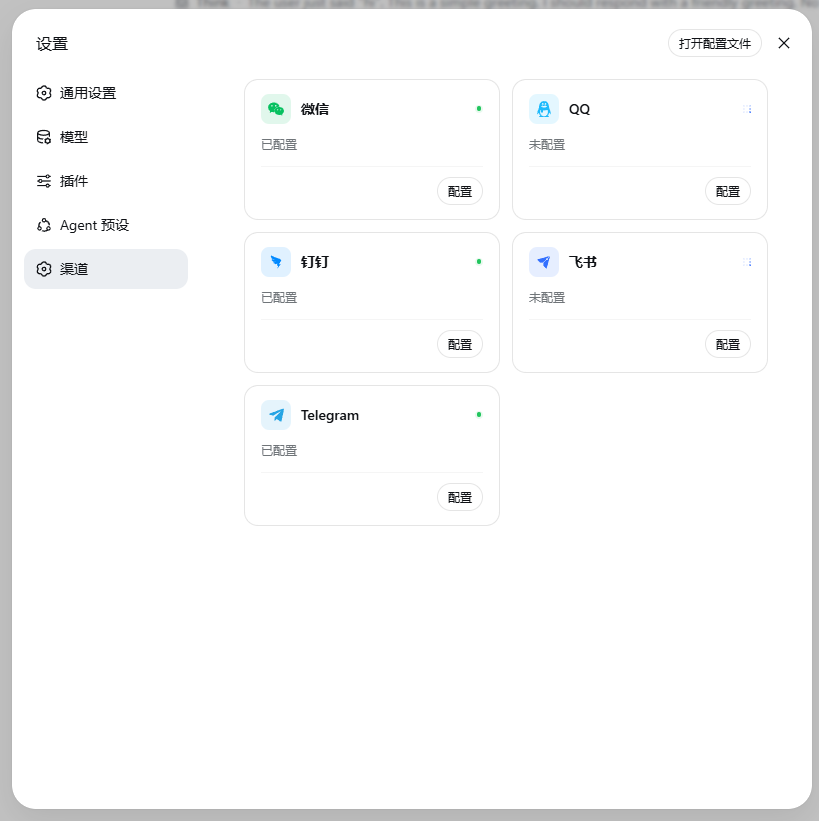
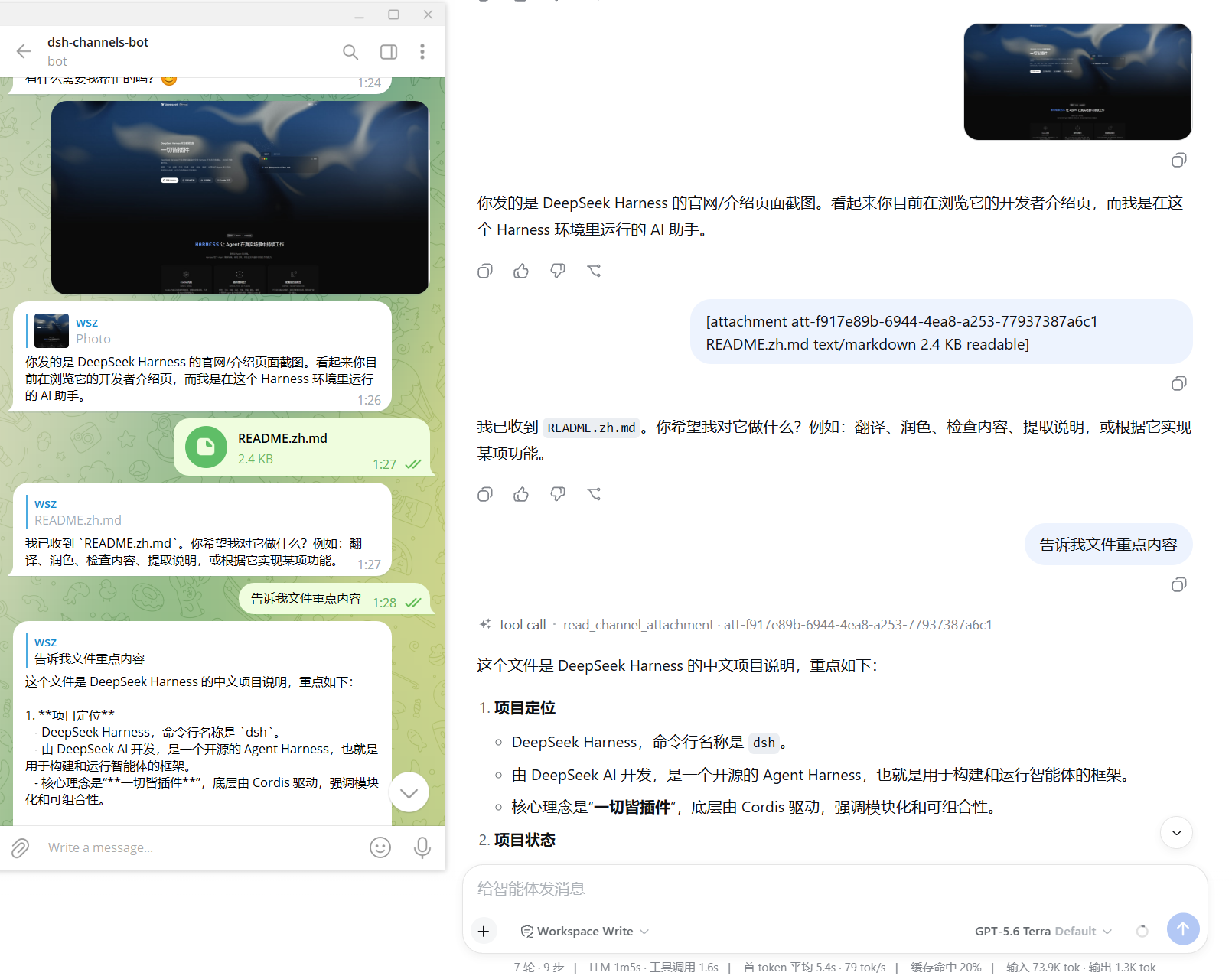
将微信、QQ、钉钉、飞书和 Telegram 接入 DeepSeek Harness,提供统一配置、私聊与群聊访问范围管理,以及渠道内 Agent 对话和会话指令。
Connects WeChat, QQ, DingTalk, Lark, and Telegram to DeepSeek Harness with unified configuration, private-chat and group access controls, and channel-side Agent chat and session commands.
安装
dsh plugin --profile web add github:wsz987/dsh-channels#path:/packages/channelsGitHub 源码安装:首次需按提示配置 allowBuilds 构建授权后重试
安装与环境配置指引、插件开发教程见 DSH 中文社区文档 ↗
安装即在你的机器上以你的权限运行第三方代码——它可读写文件、使用凭据、访问网络,DSH 的工具审批不会为插件代码加沙箱。「检测到 manifest」仅代表发现 dsh.bundle / dsh.plugin 清单,不构成兼容性或安全审查;安装前请审阅源码,不熟悉的插件先在不含密钥的环境试用。
预览截图
README
目录
DeepSeek Harness DSH Bundle — built-in messaging channels:
- Weixin / 微信
- QQ Bot
- DingTalk / 钉钉
- Lark / Feishu / 飞书
- Telegram / 电报(Bot API)
Install
npx @deepseek-ai/dsh plugin --profile web add -w @wsz987/dsh-channels@latest
The profile directory is itself a pnpm workspace, so
-w(--workspace-root) is required to add the bundle to the workspace root (otherwise pnpm fails withERR_PNPM_ADDING_TO_ROOT).@latestselects the stable release. Runnpm view @wsz987/dsh-channels dist-tagsto inspect the currentbetaandlatesttargets.
The bundle patch (cordis.patch.yml) references only entrypoints exported by
@wsz987/dsh-channels itself. Those entrypoints delegate to the ChannelService,
generic-file extension, Harness bridge, control plane, Web settings panel and
the five channel adapters through the bundle's own dependency tree. Every
channel can be disabled through its plugin config.
Quick start
# 1. add the bundle to a profile
npx @deepseek-ai/dsh plugin --profile web add -w @wsz987/dsh-channels@latest

# 2. confirm the merged config inserted the channel plugins
npx @deepseek-ai/dsh --profile web --dump-config

# 3. start the profile — all five channels load
npx @deepseek-ai/dsh web
Update and uninstall
# Install or switch package.json to the latest stable release
npx @deepseek-ai/dsh plugin --profile web add -w @wsz987/dsh-channels@latest

# Update within the package.json semver range
npx @deepseek-ai/dsh plugin --profile web update -w @wsz987/dsh-channels

# Remove the bundle; also remove any channels-* overrides from your profile patch
npx @deepseek-ai/dsh plugin --profile web remove -w @wsz987/dsh-channels
Disable a channel you don't use by setting its plugin enabled flag to false
in your profile patch, e.g. plugins.channels-weixin.enabled = false.
See apps/example/minimal-profile/ in the repository for a reference profile.
Verify your install
Use a clean profile to confirm the bundle loads end to end (never reuse a dirty profile for release validation):
# 1. add the bundle to a clean profile (auto-initializes it on first use)
npx @deepseek-ai/dsh plugin --profile release-validation add -w @wsz987/dsh-channels@latest

# 2. dump the merged config — verify the channel plugins were inserted
npx @deepseek-ai/dsh --profile release-validation --dump-config

# 3. start the profile — channels-service / -harness / -control and the five
#    adapters (plus channels-web) should all load without error
npx @deepseek-ai/dsh --profile release-validation
Dependencies
The bundle owns every Harness loader entry and its Web client face. Its npm
dependencies provide the implementations behind those entries, so you only
ever install @wsz987/dsh-channels:
| Package | Role |
|---|---|
@wsz987/channel-core |
Cross-channel contract + ChannelService (ctx.channels) |
@wsz987/channel-harness |
Harness bridge (SessionBinding, AgentManager, reply pipeline) |
@wsz987/channel-control |
Config / credentials / auth-session control plane |
@wsz987/channel-files |
Optional generic-file extension (store / extract / read_channel_attachment) |
@wsz987/channel-web |
Web dashboard (Settings > Channels) for GUI setup |
@wsz987/channel-weixin/qq/dingtalk/lark/telegram |
The five channel adapters |
The Web dashboard (@wsz987/channel-web) declares one dynamic client
dependency (@deepseek-ai/dsh-client-locale, provider of the locale
service); React, @deepseek-ai/cordis and the static UI libraries
(-ui-primitives, -ui-slots) are shell-owned identities the Harness web app
compiles in — nothing extra to install for that panel beyond a Harness
version that ships them.
Selecting adapters
The individual adapter packages do not currently carry their own dsh.bundle
profile patches, so installing one with plugin add is not a complete Harness
setup. Install @wsz987/dsh-channels, then disable or override unwanted
channels-* rows in the profile patch. See apps/example/minimal-profile/ for
the complete row shapes.
Architecture
Messaging Platform
      │
      ▼
Upstream Driver
      │
      ▼
Channel Adapter (channel-weixin/qq/dingtalk/lark/telegram)
      │
      ▼
ChannelService (Cordis Service, ctx.channels)
      │
      ▼
Harness Bridge (channel-harness)
      │
      ▼
DeepSeek Harness Agent / Session
- Adapters never touch
ctx.agents. - The Harness bridge is the only place allowed to import Harness public APIs.
- Replies flow from
session/eventback through the bridge to the adapters.
Development
pnpm --filter @wsz987/dsh-channels build
pnpm --filter @wsz987/dsh-channels typecheck
pnpm --filter @wsz987/dsh-channels test
Related
License
原始 README: https://github.com/wsz987/dsh-channels/blob/main/packages/channels/README.md ↗
同类插件
查看全部 →
dsh
将 DeepSeek Harness 的生命周期状态、错误与审批请求,桥接到本地运行的 OpenPets 桌面伙伴。

dsh-qqbot
让 QQ Bot 接入 DeepSeek Harness(dsh)的官方插件

dsh-open-in-vscode
从 Web GUI 一键在 VS Code 中打开工作区目录。
dsh-notification
回合完成桌面通知,按结果分控 + 关键词过滤。

dsh-notifier
DSH 统一通知推送与远程控制:一个 `notify()` API 打通 25+ 渠道(Telegram / 钉钉 / 飞书 / 企业微信 / QQ 机器人 / WxPusher / PushPlus / Server 酱 / Bark / Discord / Slack / ntfy / webhook 等),timeSensitive / active / passive 分级路由并重试;五通道反向审批(Telegram 按钮 / 飞书卡片 / QQ / WxPusher / 微信 iLink);QQ/钉钉/飞书官方扫码登录;本地 Web 管理台;多 agent 路由;系统桌面通知——以及**手机指挥中心**:在手机上发 `!status` / `!stop` / `!retry` 遥控 agent,通知带可操作按钮(查看结果 / 重试 / 日志,点击回调 agent)。密钥脱敏、工具限流、零运行时依赖。

chatccc
飞书(Lark)或微信(WeChat)聊天控制 DeepSeek Harness / Claude Code / Cursor / Codex / CCC Agent