dsh-plugin-deepseek-usage
by xavier711
A DeepSeek usage panel plugin for the DeepSeek Harness Web GUI. It adds a 「Usage / 用量」 entry at the bottom of the left sidebar.
安装
dsh plugin --profile web add github:xavier711/dsh-plugin-deepseek-usageGitHub 源码安装:首次需按提示配置 allowBuilds 构建授权后重试
安装与环境配置指引、插件开发教程见 DSH 中文社区文档 ↗
安装即在你的机器上以你的权限运行第三方代码——它可读写文件、使用凭据、访问网络,DSH 的工具审批不会为插件代码加沙箱。「检测到 manifest」仅代表发现 dsh.bundle / dsh.plugin 清单,不构成兼容性或安全审查;安装前请审阅源码,不熟悉的插件先在不含密钥的环境试用。
README
目录
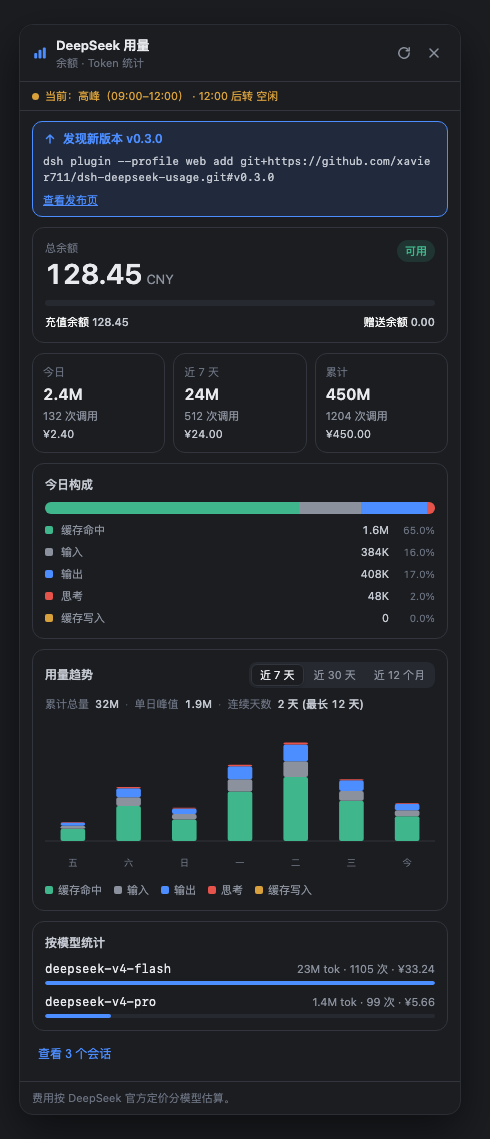
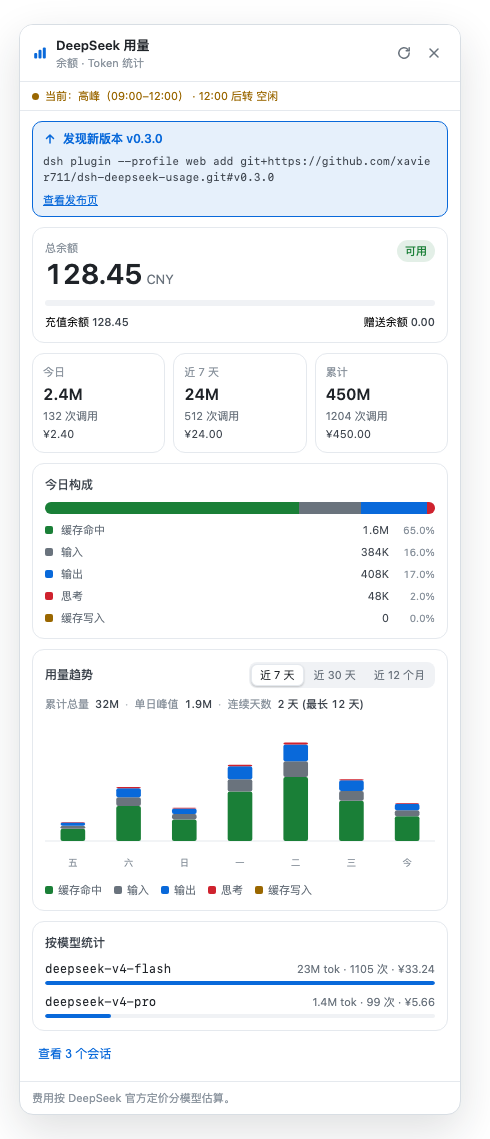
DeepSeek 用量面板插件 —— 装在 DeepSeek Harness 的 Web 界面里,在左侧边栏底部显示你的用量:
- 账户余额:实时查询官方接口
GET /user/balance(余额、充值/赠送拆分) - 本地用量:回放你本机会话日志里的官方 token 计数 —— 今日 / 近 7 天 / 累计、7 天柱状图、今日构成、按会话明细、按模型统计
- 费用估算:按模型套用 DeepSeek 官方定价(含 2026-08-17 起 V4 系列峰谷定价,北京时间自动区分高峰/空闲)。侧边栏入口和面板头部会实时显示当前时段标识(高峰/空闲,含当前时段区间与下一次切换时间)
说明:DeepSeek 官方 API 没有账号级用量查询接口(实测所有候选路径均 404),所以用量数据来自 harness 本地会话日志 —— 日志里记录的就是官方每次请求返回的真实 usage。
界面预览
点击侧边栏底部的「用量」入口打开面板。下图数据均为虚构示例,不含任何真实余额、Key、token 或会话内容。
| 深色主题 | 浅色主题 |
|---|---|
 |
 |
安装(3 种方式,选一种)
需要先装好 Node.js(nodejs.org 下载安装即可)。
方式 A:GitHub 直接安装(推荐,一条命令)
在终端粘贴运行:
dsh plugin --profile web add git+https://github.com/xavier711/dsh-deepseek-usage.git#v0.3.0
没有全局安装过 dsh? 用这条(npx 会自动下载):
npx --yes @deepseek-ai/dsh plugin --profile web add git+https://github.com/xavier711/dsh-deepseek-usage.git#v0.3.0
提示:安装过程中如果提示 pnpm 不存在,先运行
npm install -g pnpm再重试。
方式 B:下载文件夹 + 一键脚本
- 下载或 clone 本仓库:
git clone https://github.com/xavier711/dsh-deepseek-usage.git
cd dsh-deepseek-usage
- 运行安装脚本(脚本会自动处理
dsh不存在的情况,改用 npx):
./install.sh
方式 C:npm 安装
dsh plugin --profile web add @xavier711/dsh-deepseek-usage
安装后(无论哪种方式)
- 重启 web 服务:在运行
dsh web的终端按Ctrl+C,然后重新运行dsh web(没有全局 dsh 就运行npx --yes @deepseek-ai/dsh web) - 刷新浏览器页面:左侧边栏底部、设置按钮上方会出现一个「用量」入口
因为插件声明了
dsh.bundle,安装命令会自动激活插件行,不需要手动改任何配置文件。
可选:配置 API Key(看余额用)
编辑 ~/.dsh/.credentials.yaml,加入一行(把 sk-xxxx 换成你自己的 Key):
DEEPSEEK_API_KEY: sk-xxxx
或者设置环境变量 DEEPSEEK_API_KEY。不配置也能看本地用量统计,只是余额卡片会提示。
卸载
dsh plugin --profile web remove @xavier711/dsh-deepseek-usage
然后重启 dsh web 并刷新页面。
隐私说明
插件不内置任何 API Key(代码里没有任何密钥)。Key 只在运行时从你自己机器的 ~/.dsh/.credentials.yaml 或环境变量读取,且只在服务器端使用——浏览器端永远接触不到 Key。放心分享。
项目结构
lib/index.js       宿主端:/dsh-usage/balance + /dsh-usage/local + /dsh-usage/period 路由
lib/client.js      浏览器端:侧边栏「用量」入口 + 面板(纯手写 bundle,无构建步骤)
cordis.patch.yml   插件自身的 patch 层(dsh.bundle 声明,安装即自动激活)
install.sh         一键安装脚本
配置项(可选,一般不用动)
在 ~/.dsh/profiles/web/cordis.patch.yml 里按行 id 覆盖:
- id: deepseek-usage
  config:
    balanceTtlMs: 60000      # 余额缓存毫秒数
    maxSessions: 100         # 统计最近多少个会话
    sessionConcurrency: 4    # 并行读取会话数
    balanceTimeoutMs: 10000  # 余额请求超时
    localTtlMs: 30000        # 本地统计缓存毫秒数(信号驱动刷新下保持廉价)
    newPricingAt: 1786924800000   # 峰谷定价生效时间(2026-08-17 00:00 北京时间)
    peakHours: [[9,12],[14,18]]   # 北京时间高峰时段
    # pricing: 按模型单价(元/百万 tokens),详见源码仓库
更新
npm 安装的用户:执行 dsh plugin --profile web update @xavier711/dsh-deepseek-usage(或按新版本号重新 add,如 ... add @xavier711/dsh-deepseek-usage@X.Y.Z)。
Git 安装的用户:你安装的是固定 tag 的快照,不会自动更新——但你也不用自己去查:插件每次打开用量面板时(带小时级缓存)会查询 GitHub 最新发布,如果有新版本,面板顶部会显示**「发现新版本」**提示条和完整的更新命令。照命令执行、重启 dsh web、刷新页面即可:
dsh plugin --profile web remove @xavier711/dsh-deepseek-usage
dsh plugin --profile web add git+https://github.com/xavier711/dsh-deepseek-usage.git#v0.3.0
常见问题
安装时提示 dsh: warning: ... declares no dsh.bundle — installed as a plain dependency
装到了仓库的旧快照(pnpm 按提交缓存 git 依赖,在插件声明 dsh.bundle 之前安装过就会保留旧版本)。重新从固定 tag 安装即可:
dsh plugin --profile web remove @xavier711/dsh-deepseek-usage
dsh plugin --profile web add git+https://github.com/xavier711/dsh-deepseek-usage.git#v0.3.0
然后重启 dsh web 并刷新页面。
安装后没有看到「用量」入口
确认安装后重启了 web 服务(在 dsh web 的终端按 Ctrl+C 再重新运行),并强制刷新浏览器(Cmd/Ctrl+Shift+R)。
HTTP 路由
GET /dsh-usage/balance—{ ok, isAvailable, currency, totalBalance, grantedBalance, toppedUpBalance, ... }GET /dsh-usage/local—{ ok, sessionCount, errorSessions, pricing, buckets: { today, week, total }, days: [...7], models: [...], sessions: [...] }GET /dsh-usage/period—{ ok, now, period: 'peak'|'offPeak'|'flat', range: [start, end] 分钟数, nextAt, peakHours, timezoneOffsetMinutes }— 当前北京时间高峰/空闲分类,供侧边栏徽标与面板头部使用
原始 README: https://github.com/xavier711/dsh-plugin-deepseek-usage/blob/main/README.zh.md ↗
同类插件
查看全部 →
dsh-web-ui-all
DSH Web UI 插件与皮肤合集:任务看板、git 图、右侧面板、远程移动端 UI、桌宠、实时 token 统计与皮肤中心。
dsh-web-ui
DSH Web UI 插件与皮肤合集:任务看板、git 图、右侧面板、远程移动端 UI、桌宠、实时 token 统计与皮肤中心。

dsh-TUI
Claude Code 风格全屏终端 UI:像素鲸鱼顶栏、实时工作状态行、思考流式展开。

DSH-better-sidebar
侧边栏完整工作台:内置文件渲染编辑、终端、Git 与子代理,支持三方插件注册新 Tab。
working-activity
让 agent 的"工作状态行"活过来——实时工具动态与进度、俏皮文案、模型自述、上下文预警。同一套想法,适配两个平台: pi CLI 与 DeepSeek Harness(DSH) 。

deepseek-idesign
可视化设计工作室,支持网站、App 原型、海报、信息卡、报告和杂志的模板创建、元素编辑、选区级 AI 草稿衔接与导出。