openflowframes
by zerohackz
OpenFlowFrames — Windows 视频插帧工具
OpenFlowFrames - Video Frame Interpolation for Windows
安装
dsh plugin --profile web add github:zerohackz/openflowframesGitHub 源码安装:首次需按提示配置 allowBuilds 构建授权后重试
安装与环境配置指引、插件开发教程见 DSH 中文社区文档 ↗
安装即在你的机器上以你的权限运行第三方代码——它可读写文件、使用凭据、访问网络,DSH 的工具审批不会为插件代码加沙箱。「检测到 manifest」仅代表发现 dsh.bundle / dsh.plugin 清单,不构成兼容性或安全审查;安装前请审阅源码,不熟悉的插件先在不含密钥的环境试用。
README
目录
This project is a fork of the original Flowframes by n00mkrad. Huge thanks to him for creating and maintaining the powerful core of this application!
This fork is a lean, fully free and open reimagining: a modern Python GUI around the latest RIFE models — no Patreon tiers, no paid builds, no legacy codebase.
Screenshot
Main interface: pick a video or a folder of frames, choose a model and factor, interpolate.
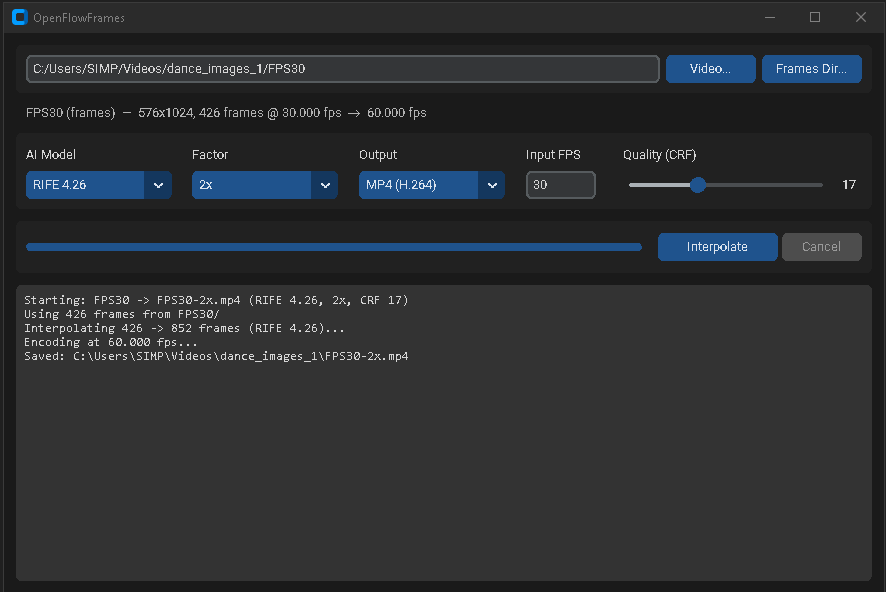
✨ Features
- Latest RIFE Models: RIFE 4.9 through 4.26 bundled in the repo — no external model server, fully self-contained.
- Any GPU: Runs on AMD, Intel, and NVIDIA via
rife-ncnn-vulkan— no CUDA or PyTorch required. - Modern GUI: A clean CustomTkinter dark-mode interface — no install needed beyond Python.
- Video or Frame-Folder Input: Interpolate a video file, or a directory of PNG/JPG/WebP frames with a custom input framerate.
- MP4 or PNG Output: Encode to H.264 MP4 (audio preserved) or export the interpolated frames as a PNG sequence.
- Robust Frame Handling: Mixed resolutions and alpha/16-bit PNGs (common in AI-generated frames) are normalized automatically.
- Portable Windows Executable: Build a self-contained portable app with one script — no Python needed on the target machine.
- No Monetization: Fully free; no Patreon/PayPal integrations.
💻 How to Use (Easy Way)
Python GUI (recommended):
- Clone this repository:
git clone https://github.com/ZeroHackz/OpenFlowFrames.git - Double-click
launcher-gui.bat— it sets up a virtual environment on first run and launches the GUI.
Portable build:
Run build-portable.bat. The result in dist/ is fully self-contained:
dist/
  OpenFlowFramesPortable.exe
  packages/av/           (ffmpeg)
  packages/rife-ncnn/    (interpolator + bundled RIFE models)
Copy the dist folder anywhere and double-click the exe.
How It Works
ffprobereads the input framerate and frame count (or you provide the FPS for a frame folder).ffmpegextracts frames (skipped for frame-folder input).rife-ncnn-vulkaninterpolates toframes × factor.ffmpegencodes H.264 at the multiplied framerate, copying the original audio — or the frames are exported as PNGs.
⌨️ Headless CLI
The same engine runs without the GUI — from scripts, CI, or agents:
python cli.py --probe --input C:\clips\dance.mp4
python cli.py --input C:\clips\dance.mp4 --factor 2 --model "RIFE 4.9" --output out.mp4
python cli.py --input C:\clips\frames --fps 24 --factor 4 --out-mode png --output out_frames
🤖 DeepSeek Harness Plugin
This repository is also a DeepSeek Harness (dsh) plugin bundle — install it into a dsh profile and an agent can interpolate video directly through two tools:
flowframes_probe— inspect a video or frame directory (resolution, fps, frame count, audio).flowframes_interpolate— run RIFE interpolation headless (MP4 with audio, or PNG frames). Works on CPU or any GPU — AMD, Intel, or NVIDIA, no CUDA needed.
dsh plugin add github:ZeroHackz/OpenFlowFrames
Requirements on the machine running dsh: Python 3.10+ (or set OPENFLOWFRAMES_PYTHON). The bundled packages/rife-ncnn model files ship with the repo, so no model downloads are needed.
Example prompts for the agent
Interpolate E:\clips\dance.mp4 to 60fps with RIFE 4.9 and save it as dance-60fps.mp4This folder of AI-generated frames is at 24fps — make a smooth 4x version, then export it as an MP4Probe every video in E:\clips and list their fps and frame countsConvert this 24fps clip to 120fps slow-motion footage and matte out the foreground afterwards(pairs with the GUI-SAM2Matting plugin)
Credits
- Flowframes by n00mkrad — the original application this fork is based on
- RIFE by hzwer
- rife-ncnn-vulkan by nihui
- FFmpeg
原始 README: https://github.com/ZeroHackz/OpenFlowFrames/blob/main/README.md ↗
同类插件
查看全部 →
modlens
为纯文本模型架起视觉桥梁:粘贴图片,输出结构化 JSON 证据(OCR、版面、语义)。

dsh-vision-toolkit
让纯文本模型更好地做视觉任务:带意图的图片问答、长截图 OCR、UI 还原等。

dsh-vision-router
为纯文本 Agent 提供视觉能力:内置免 Key 视觉链 + 像素级视觉工具(看图问答、定位、裁剪、像素对比、取色、OCR、矢量化、抠图、截图);粘贴图片即可用。

dsh-vision-complete
给 DeepSeek 补上「眼睛和耳朵」的多模态视觉插件:看图 / OCR / 物体检测 / 视频理解 / 语音转写 / 截图直读,一键安装(DSH 插件)。

dsh-media-skills
面向纯文本模型的免费视觉桥与生图:粘贴读图、GLM-4V-Flash 与 Gemini 引擎故障转移、modlens 同款结构化证据输出,并自动播种免费视觉模型路由。

dsh-vision-opencode
给纯文本主模型加可配置识图模型:vision_read_image 工具、输入框识图模型选择器,以及纯文本路由的图片自动转文字。