dsh-plugin-runbook
by zhan-tz
DSH 插件:Jupyter 式活体运行本——回合可回放的数据流 DAG,含 git 提交出处节点、子 agent 交接边、持久账本、悬停重跑与 LLM 解释
安装
dsh plugin --profile web add github:zhan-tz/dsh-plugin-runbookGitHub 源码安装:首次需按提示配置 allowBuilds 构建授权后重试
安装与环境配置指引、插件开发教程见 DSH 中文社区文档 ↗
安装即在你的机器上以你的权限运行第三方代码——它可读写文件、使用凭据、访问网络,DSH 的工具审批不会为插件代码加沙箱。「检测到 manifest」仅代表发现 dsh.bundle / dsh.plugin 清单,不构成兼容性或安全审查;安装前请审阅源码,不熟悉的插件先在不含密钥的环境试用。
README
English · 中文
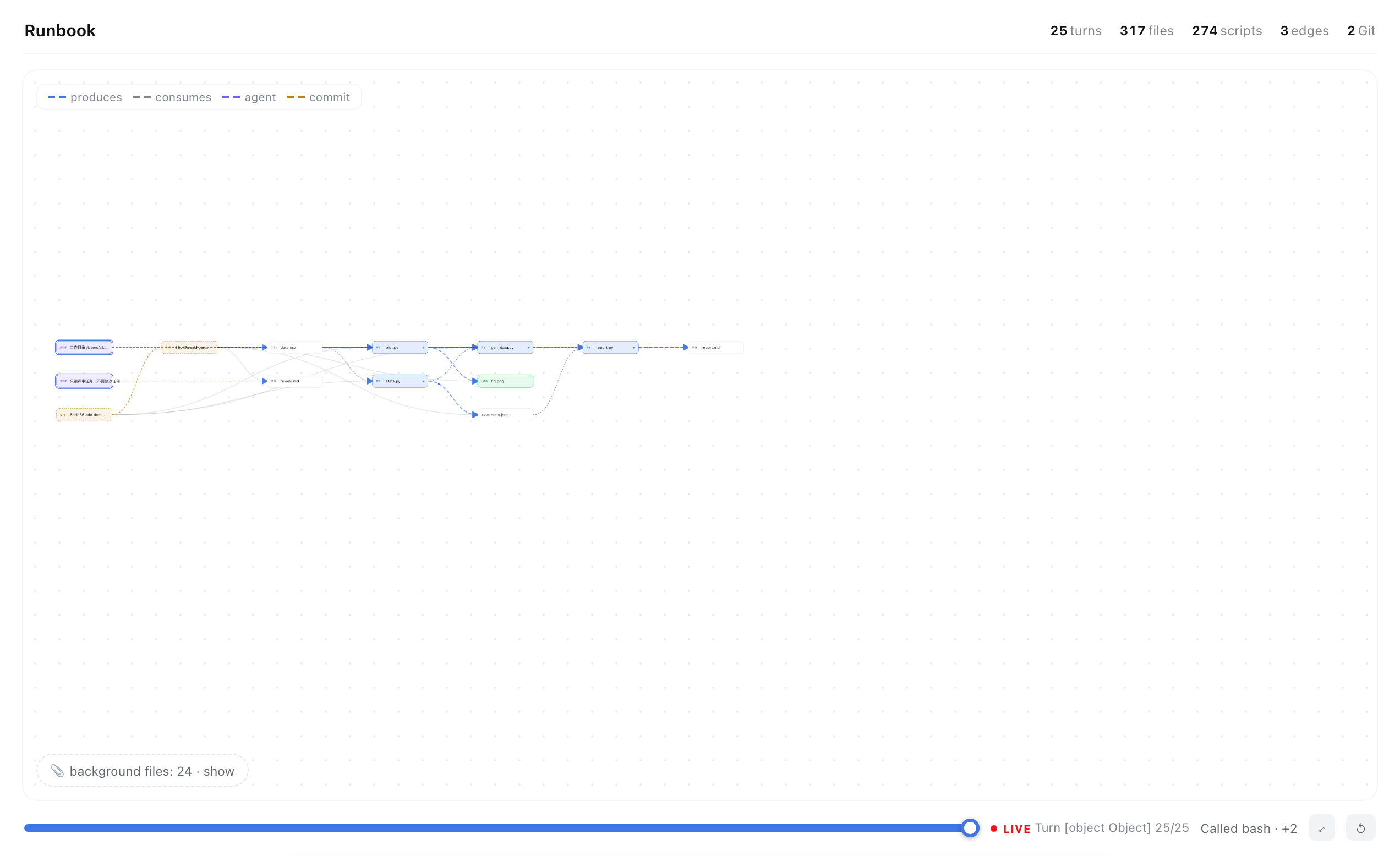
Turn any DeepSeek Harness (DSH) session into a live, scrubbable data-flow runbook — see everything your agent produced, how it connects, and rerun any step in one click.
Why
You let an agent grind for hours. It touched 300 files, ran 50 commands, spawned subagents, committed to git — and at the end you're left asking: what did it actually make, and how do the pieces fit?
The chat transcript can't answer that. A graph can.
Runbook builds a Jupyter-notebook-style DAG of the whole session: scripts, datasets, figures, docs — every node a real file, every edge real data flow. Scrub the turn slider and watch the pipeline grow like a tree. Hover a node for one-click preview / rerun / LLM-explain. Git history becomes provenance nodes; subagent work gets stitched in; a persistent ledger survives compaction and restarts.
Feature highlights
| 🔀 Turn scrubber | Drag from turn 1 to now — the graph grows structurally (zoom/pan stay live, no canned animation) |
| 🖥 Mini terminal | Click ▶ on any script: a small corner terminal streams stdout/stderr + exit code — page never hijacked |
| ✨ LLM explain | One sentence on what any file is and where it came from; racing primary × fallback models, 2–6 s typical |
| 📜 Git provenance | Commits are first-class nodes chained in time; files hang off their commit — un-pushed history gets structure too |
| 🤖 Subagent stitching | Child-session runs/edits/reads mined from their own logs; agent→script→artifact edges, purple-coded |
| 💾 Disk scan + static IO | Never-ran, never-committed research code still enters the graph: read_csv/to_csv/savefig + CLI-flag adjacency + mtime inference |
| 📖 PIPELINE.md backbone | Got a curated mermaid pipeline doc? It becomes the view. Missing files render as dashed ghosts — your gap list, visualized. No doc? A zero-API backbone is inferred from static IO |
| 🧹 Shelf | Orphan files collapse into a per-directory tray by default — the pipeline stays the hero |
| 🌐 Global retarget | Type any project path in the header; git/scan/backbone all retarget, persisted across sessions |
All local by default. The only optional network call is ✨ explain, through your configured provider.
Install
dsh plugin --profile web add zhan-tz/dsh-plugin-runbook
Open any conversation → Runbook tab. For the backbone view, drop a PIPELINE.md (mermaid flowchart LR + status emoji) in your project root — or just let it infer one.
How it works
session timeline ──┐
git ledger ────────┼──► buildFileGraph ──► layered layout ──► SVG (scrub/zoom/hover)
subagent logs ─────┤         ▲
persistent ledger ─┤         └─ host routes (zstd, regex, static IO, cycle guards)
disk scan ─────────┘
Host (lib/index.js) exposes local routes: /agent-fileview /agent-explain /agent-run /agent-git /agent-subruns /agent-ledger /agent-scan /agent-pipeline. Client (lib/client.js) rebuilds the graph and renders it. See ROADMAP.md for the layered architecture and what's next.
Honest limits
- ✨ fallback model can take ~30 s on very long prompts (a live seconds counter shows it's working)
- The ledger preserves edges from install time; earlier history relies on git commit nodes
- Repos > 60 commits are mined by the most recent 60
Community
Part of the DSH plugin ecosystem. Feedback, issues and PRs welcome — especially pipeline-doc variants from other fields (the mermaid parser is deliberately lenient).
Keywords: dsh plugin, DeepSeek Harness, agent artifacts, provenance, data lineage, pipeline DAG, workflow visualization, reproducibility, Jupyter-style, research notebook, agent observability, multi-agent.
中文介绍
DSH 插件:把任何 agent 会话变成可回放、可复跑的数据流运行本。
agent 干了几小时活,碰了 300 个文件、跑了 50 条命令、起了子 agent、提交了 git——聊天记录回答不了"它到底做出了什么、怎么串起来的"。图能。
- 回合滑杆:从第一回合拖到现在,流水线像树一样长出来(缩放平移全程可用)
- 小终端:任意脚本上点 ▶,右下角小终端流出 stdout/stderr + 退出码,不劫持页面
- 悬停动作:👁 预览 / ▶ 重跑 / ✨ 一句话解释(主备模型竞速,通常 2–6 秒)
- git 出处节点:提交成链、文件挂靠——没推送的历史也有结构
- 子 agent 缝合:子会话日志挖掘,agent→脚本→产物紫色边
- 磁盘扫描 + 静态 IO:没跑过没提交的研究代码照样进图(
read_csv/旗标邻接/mtime 三层推断) - PIPELINE.md 主链:有 mermaid 流程文档就以它为骨架,缺失文件渲染为幽灵节点;没有文档就零 API 自动推断
- 孤儿收纳:默认收起按目录分组,主流水线永远是主角
安装:
dsh plugin --profile web add zhan-tz/dsh-plugin-runbook
License
MIT
原始 README: https://github.com/zhan-tz/dsh-plugin-runbook/blob/main/README.md ↗
同类插件
查看全部 →
agent-vision-toolkit
为纯文本模型"看图“设计更好的视觉工具箱和技能,支持多图理解,图片问答,前端UI还原、GUI 自动化等,并可选无缝接入多个主流agent,直接识别粘贴图片| A vision toolkit and skill designed for text-only llms — image Q&A, long-screenshot OCR, frontend UI restoration, and GUI automation, with optional seamless integration for Codex, Claude Code, Pi, Oh My Pi, and OpenCode

api-relay-audit
从 DeepSeek Harness 对 AI API 中转站和 LLM 代理运行本地安全审计,生成 Markdown 报告,覆盖提示词注入、模型替换信号、工具调用改写、错误泄漏、流完整性和按 profile 启用的 Web3 风险。

OpenStory
✨ OpenStory 现已支持 DeepSeek Harness 插件! 现在可以通过 dsh-openstory 将 OpenStory 多智能体推演接入 DeepSeek Harness,让 agent 直接启动模拟、查看角色、下达指令并逐回合推进故事。查看 DSH 插件配置与使用指南。

phi
pi的编码代理 ∞ 提供者、子代理、hashline编辑和权限门

anysearch-dsh
DeepSeek Harness(DSH)的 AnySearch 网络搜索提供方与高级搜索工具。

codex-switch
Codex Switch 是一个 macOS 工具,一键配置 Codex 的自定义 API,同时保留官方 OpenAI 登录。保存后 Codex 的模型选择器里只会出现你选的那个 provider 的模型。也支持 Claude Code 的官方 / 自定义 API 切换。Codex Switch is a lightweight helper for configuring multiple coding-agent API routes. For Codex, it keeps Official OpenAI and a custom API provider configured in parallel, registers the custom model in Codex's mod