dsh-frontend-tools
by lukaiwuyi
DSH插件+客户端SDK:实时连接您的Web、Electron或Tauri应用与DeepSeek Harness代理——用DSH KEY注册前端工具,一桥多应用。
DSH plugin + client SDK: bridge your web, Electron, or Tauri app to DeepSeek Harness agents in real time — register frontend tools with a DSH KEY, one bridge for many apps.
安装
dsh plugin --profile web add github:lukaiwuyi/dsh-frontend-toolsGitHub 源码安装:首次需按提示配置 allowBuilds 构建授权后重试
安装与环境配置指引、插件开发教程见 DSH 中文社区文档 ↗
安装即在你的机器上以你的权限运行第三方代码——它可读写文件、使用凭据、访问网络,DSH 的工具审批不会为插件代码加沙箱。「检测到 manifest」仅代表发现 dsh.bundle / dsh.plugin 清单,不构成兼容性或安全审查;安装前请审阅源码,不熟悉的插件先在不含密钥的环境试用。
README
English | 中文


通过回环 WebSocket 将 Web/Electron/Tauri/Node 应用实时桥接到 DeepSeek Harness (DSH) Agent —— 将你的前端工具暴露给 AI Agent。
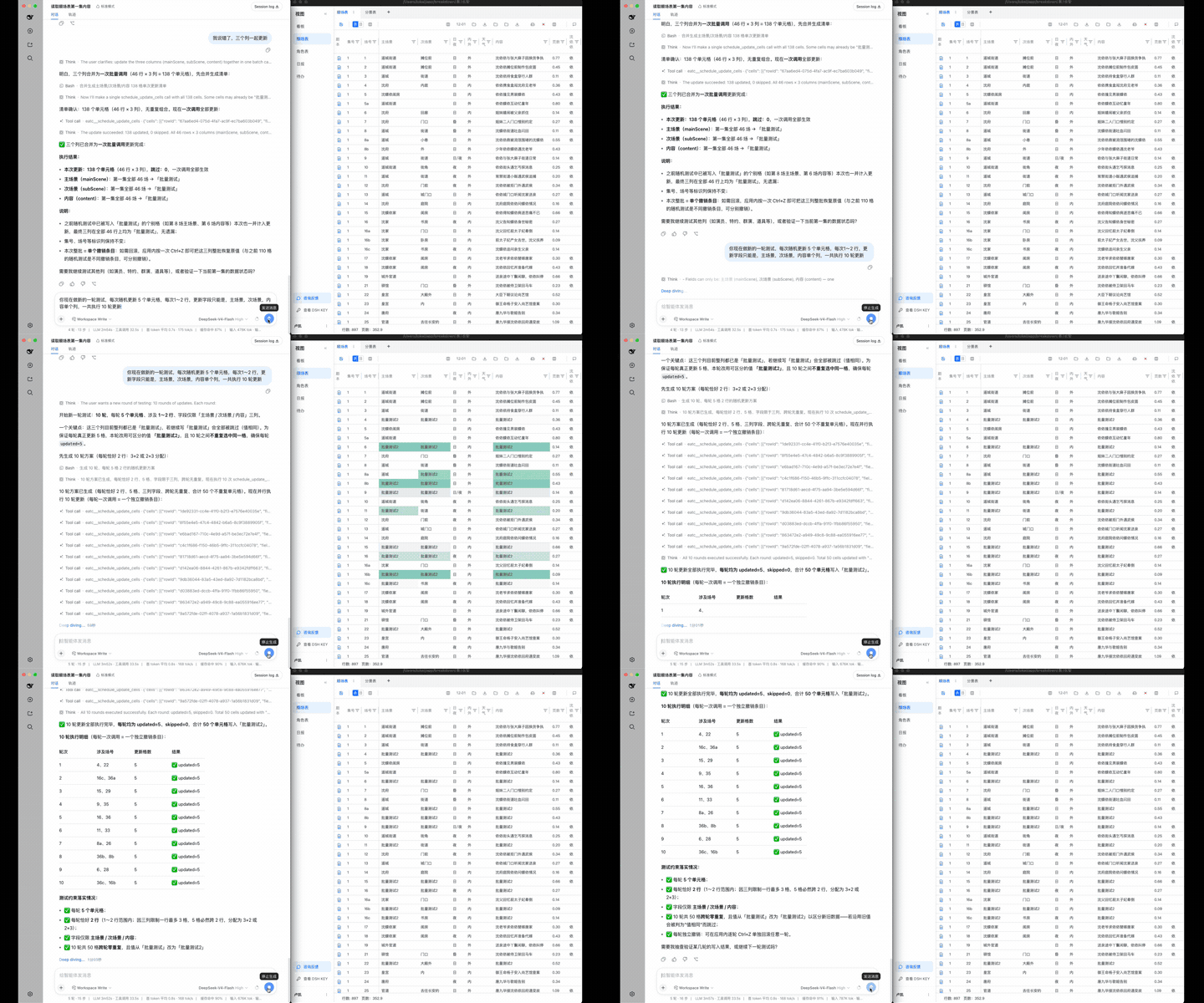
设计初衷
大多数 Agent 工具围绕文件系统设计,而现实中数以万计的应用/系统以前端技术构建 —— Agent 无法通过读写文件触达它们。
dsh-frontend-tools 反转了这一模型:不赋予 Agent 直接访问底层数据的能力,而是让接入的应用成为人工操作的分身 —— Agent 通过应用自身的交互入口完成任务,就像坐在屏幕前的一位真人用户。
- 权限对齐 —— Agent 的能力边界与真人用户完全一致,不多一分,真源数据不会被旁路访问。
- 数据流不变 —— 所有操作仍经过应用原有的校验、联动与副作用链路。
- 交互语义保留 —— undo 栈、乐观更新等既有交互机制对 Agent 同样生效。
灵感来自 CopilotKit 的前端工具。本项目的目标:基于 DSH 底座,让任意前端应用/系统能够快速而优雅地接入 Agent。
这是什么?
dsh-frontend-tools 是一个双包项目,让任意 JavaScript 应用(浏览器页面、Electron 渲染进程、Tauri 应用、Node 进程)将自己的函数注册为 DSH Agent 可用的工具,并实时接收来自 Agent 的工具调用。
- dsh-frontend-tools-bridge — DSH 插件:在 DSH 内启动回环 WebSocket 服务。将应用注册的工具镜像到
ctx.tools,并将模型调用转发回去。通过 KEY 命名空间隔离支持多应用同时连接。 - dsh-frontend-tools-client — 应用端 SDK:连接桥接、注册工具、处理入站调用。除平台
WebSocket外零运行时依赖。
┌─────────────────────┐    WebSocket (127.0.0.1)    ┌──────────────────────┐
│   Your Application  │  ─────────────────────────▶  │   DSH + Bridge       │
│                     │  ◀─────────────────────────  │   (dsh-frontend-     │
│  - generate KEY     │   register tools / calls    │    tools-bridge)     │
│  - register tools   │                              │   - multi-app by KEY │
│  - execute calls    │                              │   - admin tools      │
└─────────────────────┘                              └──────────────────────┘
快速开始
1. 在 DSH 中安装桥接插件
在 DSH 的 cordis.yml 中添加:
plugins:
  - import: dsh-frontend-tools-bridge
    config:
      port: 31870          # optional, default 31870
      maxTools: 200        # optional, total tool budget across all apps
然后安装:
pnpm add dsh-frontend-tools-bridge
2. 在应用中安装客户端 SDK
npm install dsh-frontend-tools-client
# or pnpm / yarn
3. 连接应用
import { createFrontendToolsClient, generateClientKey } from 'dsh-frontend-tools-client'

// Generate a KEY once, persist it (localStorage or similar)
const key = localStorage.getItem('dsh-key') ?? generateClientKey()
localStorage.setItem('dsh-key', key)

const client = createFrontendToolsClient({ url: 'ws://127.0.0.1:31870', key })
await client.connect()

// Register a tool
await client.registerTools([{
  name: 'get_current_page',
  description: 'Get information about the current page the user is viewing.',
  parametersSchema: { type: 'object', properties: {} },
  readOnly: true, // read-only tools run without interruption
  async execute() {
    return { url: location.href, title: document.title }
  },
}])

// Tools WITHOUT `readOnly: true` are WRITE operations: every call clears
// DSH's human approval before it is forwarded to your app (fail-safe
// default — undeclared means write).
4. 在 DSH 中登记 KEY
- 应用展示 DSH KEY 给用户(使用
buildClientKeyClipboardText()生成可直接粘贴的文本) - 用户粘贴到 DSH 对话中
- 模型调用
frontend_tools_register_client将 KEY 登记到命名空间 - 完成 — 应用的工具已出现在 Agent 工具列表中
完整 SDK 文档见 dsh-frontend-tools-client,桥接配置、管理工具与协议细节见 dsh-frontend-tools-bridge。
开发
pnpm install
pnpm run build       # build both packages
pnpm run typecheck   # type-check all sources
pnpm run test        # run 175 unit tests
License
MIT
原始 README: https://github.com/lukaiwuyi/dsh-frontend-tools/blob/main/README.zh.md ↗
同类插件
查看全部 →
deepseek-harness
从仓库或系统描述生成经过校验的自包含交互式架构图、流程图、时序图、数据流图和生命周期图。

dsh-plugin
通过 DSH MCP 客户端挂载 Ouroboros 的纯配置包,在 DSH 中提供 36 个涵盖需求访谈、Seed、执行、评估与演化流程的工具。

dsh-tongflow
基于 TongFlow 的“片场”插件,用于图片、配音、音乐与视频制作:agent 为每个资产生成 TongFlow 工作流文件(.tongflow.json)并通过 TongFlow 插件执行,内嵌工作流画布,按镜头/角色/take 组织项目,附漫剧模板;以 @tongflow 开头的会话进入 Studio 界面。

helloagents
AI 编码 CLI 的工作流层:技能、项目知识、交付检查、更安全的配置写入与可恢复执行

dsh-ai-novel-writer
安装专用 AI 小说创作预设与工作台:提供带修订号的本地项目资产、紧凑侧边工作台,以及需要原生审批的逐文件变更。

rea
用 agent 逆向任何东西:从应用行为到原生二进制